

Apply JavaScript Standard Style, a shared JavaScript code style and linter configuration.
Bun
JavaScript and TypeScript code can be bundled, installed, and run with Bun, a runtime and toolkit.
About Bun
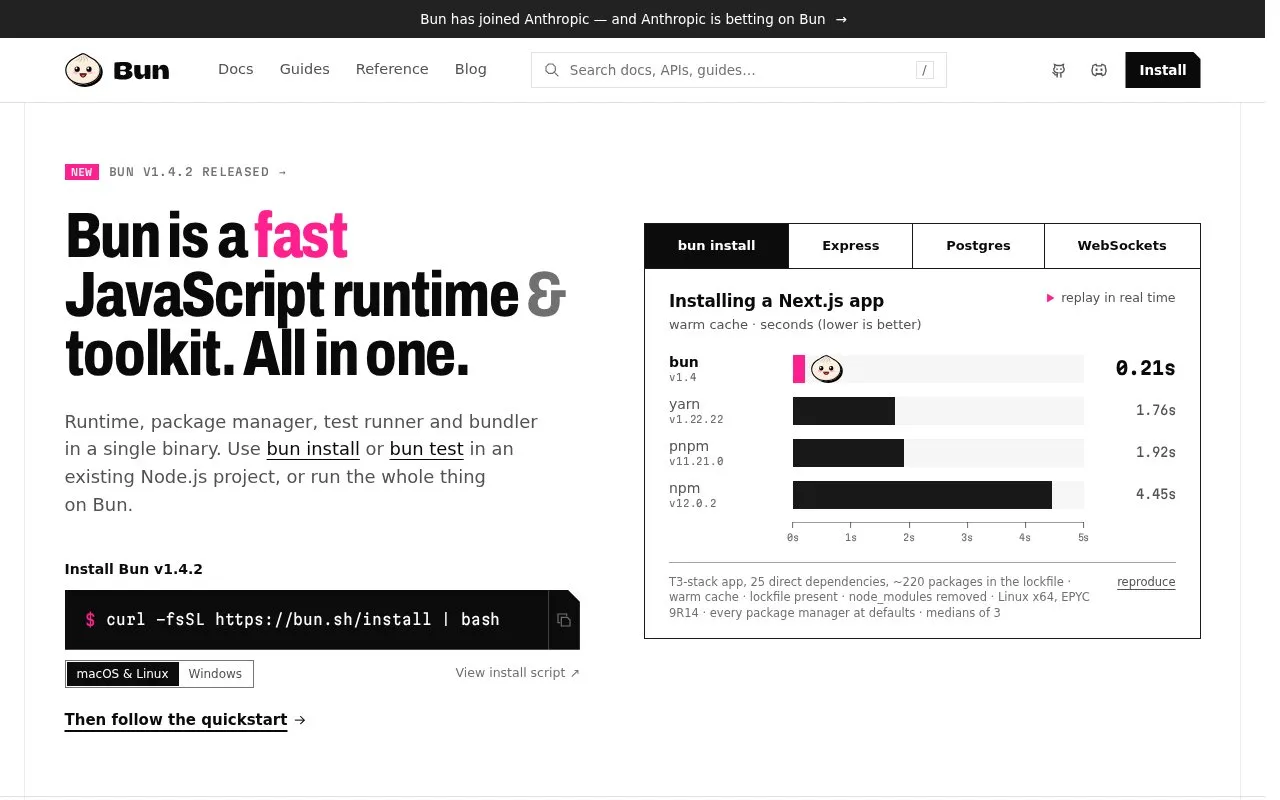
Bun is a JavaScript and TypeScript runtime and toolkit distributed as a single binary. The project describes four tools in one: a runtime built on JavaScriptCore that it says runs Node.js APIs, node_modules and existing frameworks as-is; an npm-compatible package manager with workspaces, catalogs, overrides, patches and a lockfile; a Jest-compatible test runner with expect(), mocks, snapshots, DOM testing and coverage; and a bundler for TypeScript, JSX, CSS and HTML with a dev server and hot reloading. bun install and bun test can be added to an existing Node.js project without switching runtimes. The runtime also provides Bun.serve() for HTTP, routing and WebSockets, built-in SQL, Redis and S3 clients, and a build command that compiles an app and the runtime into a single executable cross-compiled for Linux, macOS and Windows.
The homepage publishes its own benchmark comparisons against Node.js and Deno covering install times, HTTPS request throughput, Postgres queries and WebSocket messaging. Those figures are the project's measurements from one Linux x64 configuration (medians of three runs), so they reflect that setup rather than general guarantees. Pricing is not stated on the homepage.
Key features
- Runs JavaScript and TypeScript on JavaScriptCore, with Node.js APIs and node_modules
- npm-compatible package manager with workspaces, catalogs, overrides, patches and lockfile
- Jest-compatible test runner with expect(), mocks, snapshots, DOM testing and coverage
- Bundler for TypeScript, JSX, CSS and HTML, with dev server and hot reloading
- Bun.serve() handles HTTP, routing and WebSockets; SQL, Redis and S3 clients built in
- Compiles app plus runtime into one executable, cross-compiled for Linux, macOS, Windows
Best for: JavaScript and TypeScript developers who want one binary for installing packages, running code, testing and bundling, including those adding bun install or bun test to an existing Node.js project.
Good for
- Runtime, package manager, test runner and bundler ship together in a single binary.
- bun install and bun test can be used in existing Node.js projects without switching runtimes.
- Project-published benchmarks on Linux x64 report lower install times and peak memory than npm, yarn and pnpm in the tested scenario.
Watch out for
- Homepage benchmarks cover selected scenarios on a single Linux x64 machine as medians of three runs, so results may not carry over to other setups.
- The documented macOS and Linux install method pipes a downloaded script from the web into bash.
Bun at a glance
- Website
- bun.com
- Category
- Development › Programming Languages
- Type
- Online tool
- Pricing
- Not confirmed. Check the site
- Platforms
- Linux, macOS, Web, Windows
- Open source
- Not stated
- Language
- English
- Last checked
- Oct 6, 2026 · Online when checked
- Listed
- Oct 5, 2026
Bun alternatives
Tools and sites you could use instead, ranked by how closely they match.

Deobfuscate, unminify, and unpack bundled JavaScript with WebCrack, a tool for inspecting scripts.

The stdlib project provides a numerical library for JavaScript and TypeScript applications.
Open source
24 alternatives
Use Bun as a JavaScript runtime, bundler, test runner, and package manager.
The visualml.io site introduces a machine learning toolkit built with JavaScript.
Retext processes natural language through a plugin based toolkit in the unified JavaScript ecosystem.
Open source
24 alternativesPopular in Programming Languages
Well-known listings from the same topic.
Language Benchmarksprogramming-language-benchmarks.vercel.appJavaDecompilerjavadecompilers.comOpenNLPopennlp.apache.orgactnektosact.comRustPythonrustpython.github.ioOctaveoctave.org


Bun FAQ
How is Bun installed?
The homepage gives a curl script for macOS and Linux (curl -fsSL https://bun.sh/install | bash) and a PowerShell command for Windows, with an install script link and a quickstart to follow.
Can Bun be used in an existing Node.js project?
Yes. The project states that bun install and bun test drop into existing Node.js projects with no runtime switch required, and that the runtime runs Node.js APIs, node_modules and existing frameworks as-is.
Which platforms does Bun support?
macOS, Linux and Windows. The build command can also cross-compile a single-file executable for Linux, macOS and Windows from any machine.
Is something wrong or out of date?
Tell us and an editor will check it.
Own this website?
Claim this listing
Claim the listing and suggest updates yourself. An editor checks every claim first.