

fooyin plays music and lets users customize its interface, according to its homepage.
cliamp
cliamp plays local music, podcasts, Spotify, and Qobuz from a terminal interface.
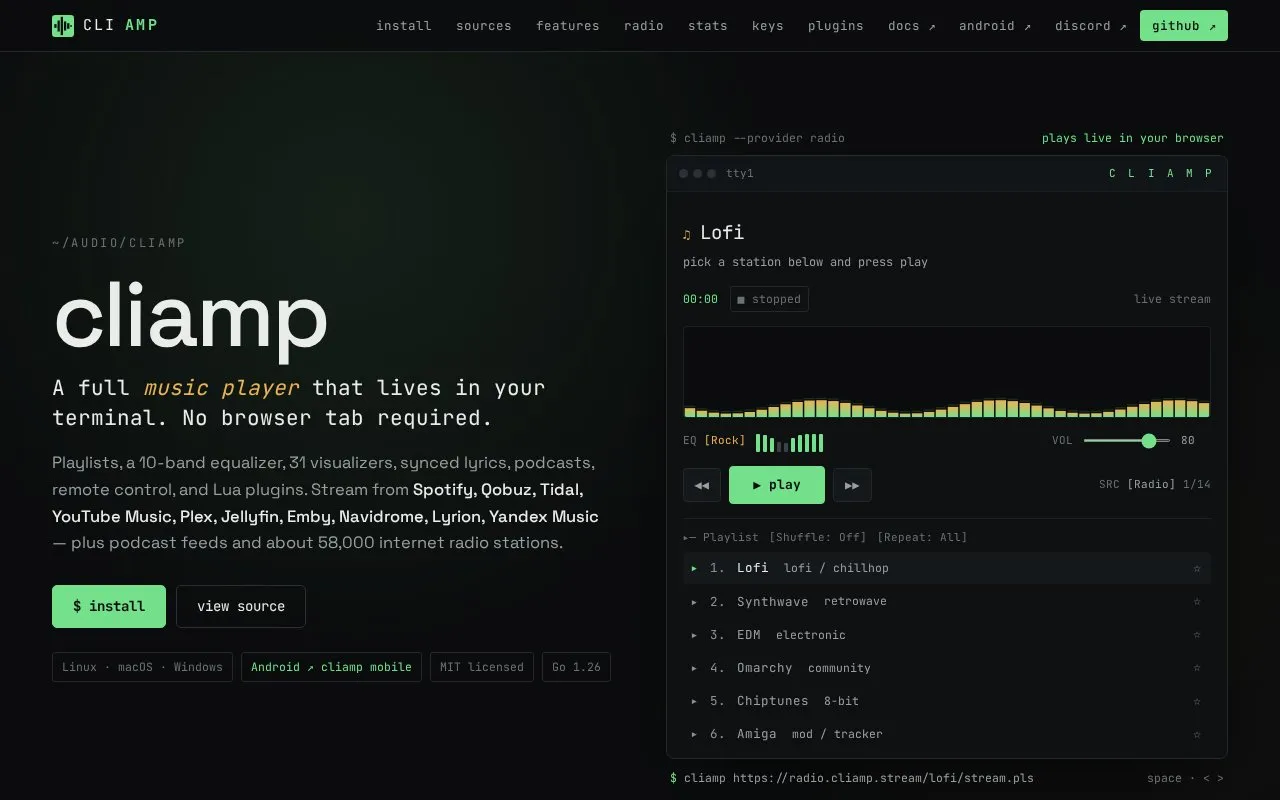
About cliamp
cliamp is a music player that runs in a terminal window. It plays local music files, podcasts, and internet radio, and it can stream from streaming services and self-hosted media servers, including Spotify, Qobuz, Tidal, YouTube Music, Plex, Jellyfin, Emby, Navidrome, Lyrion, and Yandex Music. The homepage also lists SoundCloud, Mixcloud, NetEase, and about 58,000 radio stations. A setup command walks users through configuring streaming services and media servers.
Playback features include a 10-band equalizer, 31 visualizer modes, synced lyrics, remote control, and Lua plugins. Some features rely on optional tools: ffmpeg is needed for certain audio formats, and yt-dlp is needed for some online sources.
Key features
- Playback from local files, podcasts, internet radio, and streaming or media-server sources
- Parametric 10-band equalizer with 14 presets and a custom curve that persists
- 31 terminal visualizer modes driven by live FFT data
- Synced lyrics displayed during playback
- Radio favorites saved locally by stream URL and kept after restart
- With Jellyfin as default provider, restores last track, position, and source list on reopen
Best for: Linux and terminal users who want one player for local files, podcasts, radio, and several streaming or self-hosted music services.
Good for
- Brings local files, podcasts, radio, streaming services, and self-hosted libraries into one playlist and interface.
- Large Spotify playlists begin playing while later pages load in the background.
- Radio favorites and Jellyfin sessions persist across restarts.
Watch out for
- Some audio formats need ffmpeg, and YouTube, SoundCloud, Mixcloud, Bandcamp, Bilibili, and NetEase sources need yt-dlp.
- On Windows, favorites assume only one cliamp instance writes to a config directory.
- Relative download paths are rejected, and missing directories are created without checking whether external drives are mounted.
cliamp at a glance
- Website
- cliamp.stream
- Category
- Software & Utilities › Linux Apps
- Type
- Website
- Pricing
- Not confirmed. Check the site
- Platforms
- Android, Linux, macOS, Web, Windows
- Open source
- Not stated
- Language
- English
- Last checked
- Oct 6, 2026 · Online when checked
- Listed
- Oct 5, 2026
cliamp alternatives
Tools and sites you could use instead, ranked by how closely they match.

MusicPod plays music, radio, television, and podcasts on Ubuntu and macOS, according to its project description.
Open source
24 alternatives
ytermusic plays YouTube Music from a terminal interface, with a text-based user interface described by its project.
Open source
24 alternatives
kew plays music from a shell interface and is described on its project page.
Open source
24 alternativeshtop displays and manages running processes in an interactive terminal interface.

nnn manages files from a terminal interface, according to its project description.
Open source
21 alternativesPopular in Linux Apps
Well-known listings from the same topic.
AltBoxaltbox.devThe Levelatorarchive.org/details/conversationsnetwork_org-l…Alacrittyalacritty.orgShellScriptshellscript.shghostwriterghostwriter.kde.orgLibrebootlibreboot.org


cliamp FAQ
Do I need to install extra tools?
ffmpeg is optional and is needed for AAC, ALAC, Opus, and WMA. yt-dlp is optional and is needed for YouTube, SoundCloud, Mixcloud, Bandcamp, Bilibili, and NetEase.
Where are downloaded files saved?
By default, yt-dlp downloads and temporary audio files from Ctrl+S in the TUI are saved to ~/Music/cliamp. The location can be changed with the directory setting under [downloads] in config.toml, using an absolute path.
Can I request the original file quality from Navidrome?
Yes. Set format = "raw" under [navidrome] in the configuration to always request the original file. Otherwise, Navidrome uses the player's transcoding settings, or streams the original if none are configured.
Is something wrong or out of date?
Tell us and an editor will check it.
Own this website?
Claim this listing
Claim the listing and suggest updates yourself. An editor checks every claim first.