
Maya AI supports sales, marketing, customer service, legal, and creative work through an assistant informed by business context.
Pieces
Pieces builds a memory layer from work activity to help recover decisions and bring context into AI tools.
About Pieces
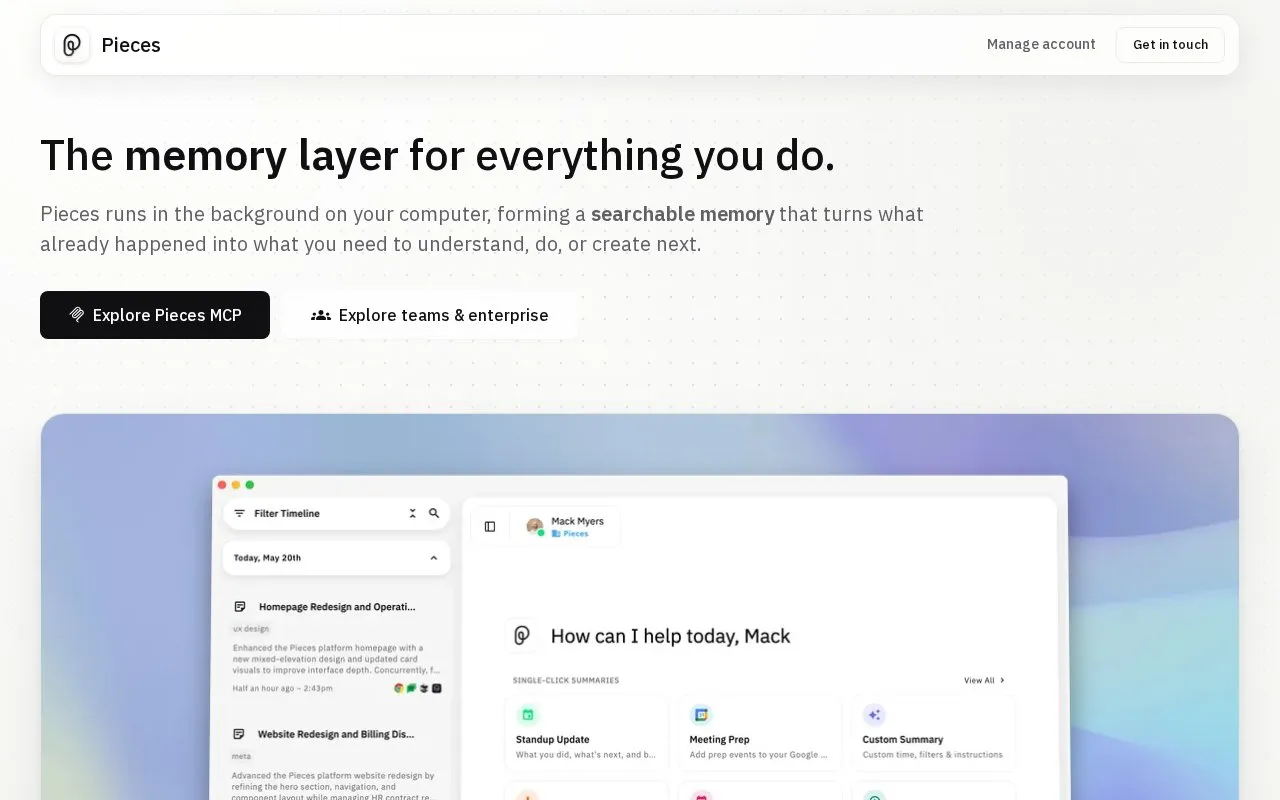
Pieces is a desktop-based memory layer that runs in the background on a user's computer. It records work activity from the apps the user already uses and builds a searchable memory from it. The homepage says it captures a new memory every 2 seconds. Captured items are arranged on a chronological timeline of research, chats, emails, notes, and meetings. Users can ask questions about past activity, with prompts scoped by time, source, or topic. Pieces can also generate standup updates, morning briefs, meeting prep, and day recaps from this context. The Pieces MCP Server can carry this history into Claude, Cursor, Codex, Antigravity, and other MCP-ready assistants.
On privacy, the homepage says memories are saved on-device by default. Users can pause capture, disable it for specific apps and websites, and delete data by time, app, website, or capture method. Capture of clipboard content is part of the default set, while audio from meetings and conversations is opt-in only. The homepage describes additional controls, such as bring-your-own API keys and organization-wide capture policies, for enterprise teams. Pricing is not stated on the homepage.
Key features
- Background capture that builds a searchable memory of work activity
- Chronological timeline of research, chats, emails, notes, and meetings
- Questions about past activity, scoped by time, source, or topic
- Generated standup updates, morning briefs, meeting prep, and day recaps
- Pieces MCP Server carries work history into MCP-ready AI assistants
- Pause capture, exclude specific apps and websites, or delete data by time
Best for: People who move between many apps and AI tools and need to recover decisions, sources, and context from earlier work.
Good for
- Memories are saved on-device by default, according to the homepage
- Users can pause capture, exclude specific apps and websites, and delete data
- Lists integrations with many common email, chat, meeting, research, and coding tools
Watch out for
- Pricing is not stated on the homepage
- Audio capture from meetings and conversations is opt-in only
- Some controls, such as organization-wide capture policies, are described for enterprise teams
Pieces at a glance
- Website
- pieces.app
- Category
- AI & Machine Learning › AI Agents & Automation
- Type
- Website
- Pricing
- Not confirmed. Check the site
- Platforms
- Web
- Open source
- Not stated
- Language
- English
- Last checked
- Oct 6, 2026 · Online when checked
- Listed
- Oct 5, 2026
Pieces alternatives
Tools and sites you could use instead, ranked by how closely they match.

Dosu captures knowledge from teams and agents to provide shared context for future work.

Dailybot collects team updates and AI reports, keeping work and agent activity visible without adding more meetings.

PixieBrix monitors browser activity by customer service agents and lets operations teams intervene or enforce workflow policies.

AgentSeer visualizes AI agent decision processes as diagrams based on supplied agent information.

ModularMind builds Maia, an AI executive platform that understands business operations and can coordinate work.
Popular in AI Agents & Automation
Well-known listings from the same topic.
Simsim.aiMakeformsmakeforms.ioAgent Skillsagentskills.ioGenFuse AIgenfuseai.comBeambeam.aiLlamaIndexllamaindex.ai


Pieces FAQ
Where are Pieces memories stored?
The homepage says all memories live directly on the user's machine and are saved on-device by default.
Can capture be turned off for specific apps or websites?
Yes. The homepage says users can pause Pieces at any time or disable capture from specific apps and websites.
Is meeting audio captured automatically?
No. The homepage lists audio from meetings and conversations as opt-in only.
Is something wrong or out of date?
Tell us and an editor will check it.
Own this website?
Claim this listing
Claim the listing and suggest updates yourself. An editor checks every claim first.