

Generate and edit Minecraft world maps by shaping terrain and painting materials, trees, snow, and ice.
Arnis
Generate Minecraft worlds from real-world locations with Arnis, an open-source mapping tool.
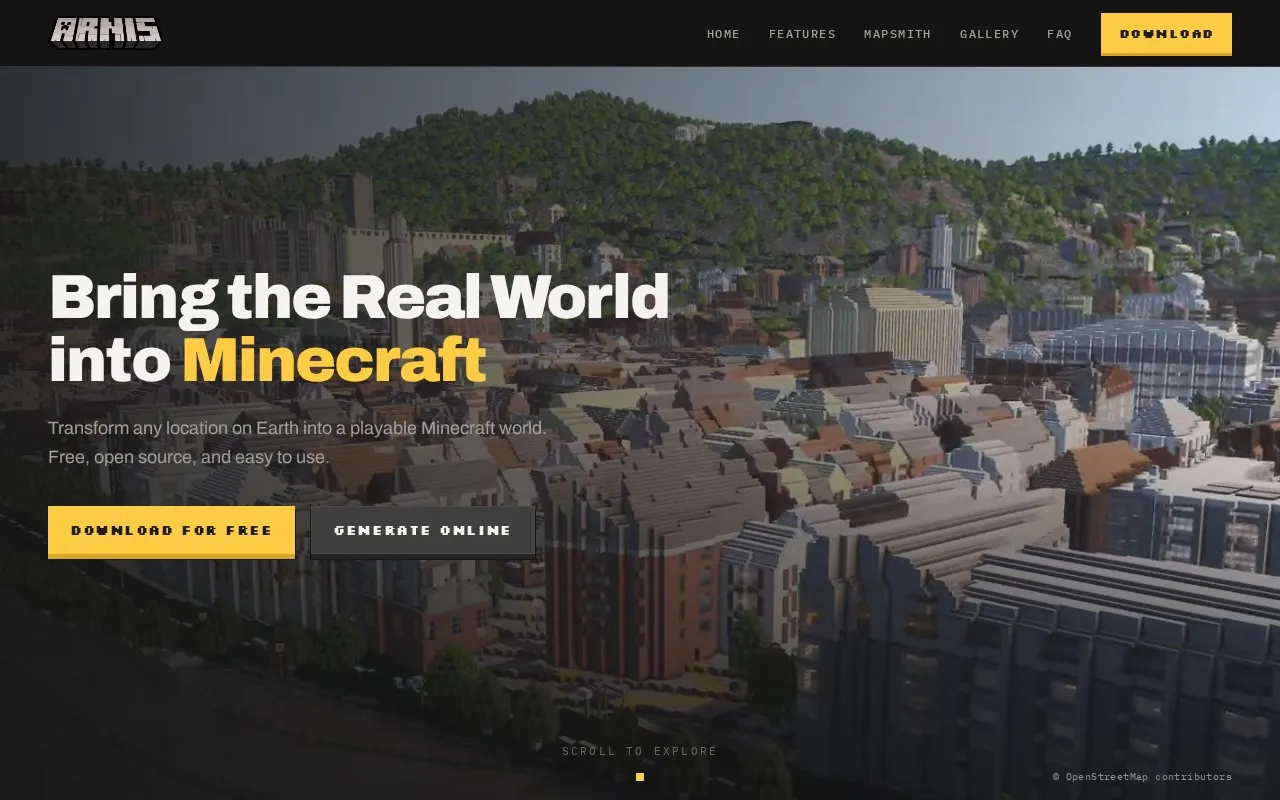
About Arnis
Arnis is a free, open-source desktop application that converts geographic data into playable Minecraft worlds. Users select an area on an interactive map, choose a new or existing world, and start generation. The tool recreates streets, buildings, landmarks, and terrain from the selected location. It supports Minecraft Java Edition (1.17 and later) and Bedrock Edition, and runs on Windows, macOS, and Linux.
The quality of the output depends on the underlying data. Arnis uses OpenStreetMap, a community-edited map, so coverage and detail vary by region, and well-mapped cities produce the most detailed worlds. Large areas need more memory and can take several minutes, and the source states there is no hard size limit. Mobile users can use the separate MapSmith online service or generate a Bedrock .mcworld file on a computer and transfer it to a phone or tablet. The source also mentions a paid online generation service for mobile devices, but does not state pricing.
Key features
- Converts OpenStreetMap roads, buildings, land use, and terrain into Minecraft worlds
- Interactive map with rectangle tool for selecting a generation area
- Outputs Java Edition saves or Bedrock .mcworld files
- Optional custom output location and interior generation settings
- MapSmith online generation in a browser with no installation required
- Bedrock .mcworld export for opening worlds on iOS or Android devices
Best for: Minecraft players who want to recreate real places such as their hometown or a city on a desktop computer or through a mobile workflow.
Good for
- Free and open source under the Apache 2.0 License, with source code publicly available on GitHub
- Does not modify the Minecraft installation; it only creates new world files
- Desktop application runs on Windows, macOS, and Linux
Watch out for
- Coverage and detail vary by region because the data is community-contributed OpenStreetMap data
- Large areas require more memory and may take several minutes to generate
- Some antivirus software may flag unsigned executables as suspicious
Arnis at a glance
- Website
- arnismc.com
- Category
- Gaming › Game Guides, Wikis & Tools
- Type
- Website
- Pricing
- Not confirmed. Check the site
- Platforms
- Linux, macOS, Web, Windows
- Open source
- Yes · Source code
- Language
- English
- Last checked
- Oct 6, 2026 · Online when checked
- Listed
- Oct 5, 2026
Arnis alternatives
Tools and sites you could use instead, ranked by how closely they match.

TerraFirma provides mapping for Terraria, with support noted for version 1.4.5.7.
Open source
24 alternatives
MCA Selector lets users select Minecraft Java world chunks and regions for export or deletion.
Open source
24 alternatives
Bedrock Editor provides in-game multi-block editing tools for modifying Minecraft worlds.
Open source
24 alternatives
Blue Map creates 3D maps of Minecraft worlds and displays them for web-based exploration.
Open source
24 alternatives
Convert Minecraft world data between Java, Bedrock, Xbox 360, and PlayStation 3 editions with this web app.
Open source
24 alternativesPopular in Game Guides, Wikis & Tools
Well-known listings from the same topic.
GTA Bossgtaboss.ggGTAGaragegtagarage.comPocket Bardpocketbard.appSerebii.netserebii.netBlock Displayblock-display.com2-Minute Tabletop2minutetabletop.com


Arnis FAQ
Where are the generated worlds saved?
For Java Edition, worlds are saved to the Minecraft saves folder, for example %APPDATA%\.minecraft\saves on Windows. For Bedrock Edition, a .mcworld file is saved to the Desktop. In both cases, a custom output location can be chosen in the settings, and generated worlds appear as "Arnis World" in the world list.
Which Minecraft versions and platforms are supported?
Java Edition 1.17 and later and any up-to-date Bedrock Edition version are supported. The desktop application runs on Windows, macOS, and Linux. For mobile devices, a Bedrock .mcworld file can be generated and transferred to a phone or tablet, or the online generation service can be used from any device.
What data source does Arnis use?
Arnis uses OpenStreetMap for building footprints, roads, land use, and other map features, fetched through the Overpass API. Elevation and terrain data come from open topographic datasets from AWS Terrain Tiles. Because the data is community-contributed, coverage and detail vary by region.
Is something wrong or out of date?
Tell us and an editor will check it.
Own this website?
Claim this listing
Claim the listing and suggest updates yourself. An editor checks every claim first.