

CyberChef is a web app for encryption, encoding, compression, and data analysis.
Open source
24 alternativesCyberChef provides browser-based tools for encryption, encoding, compression, and data analysis.
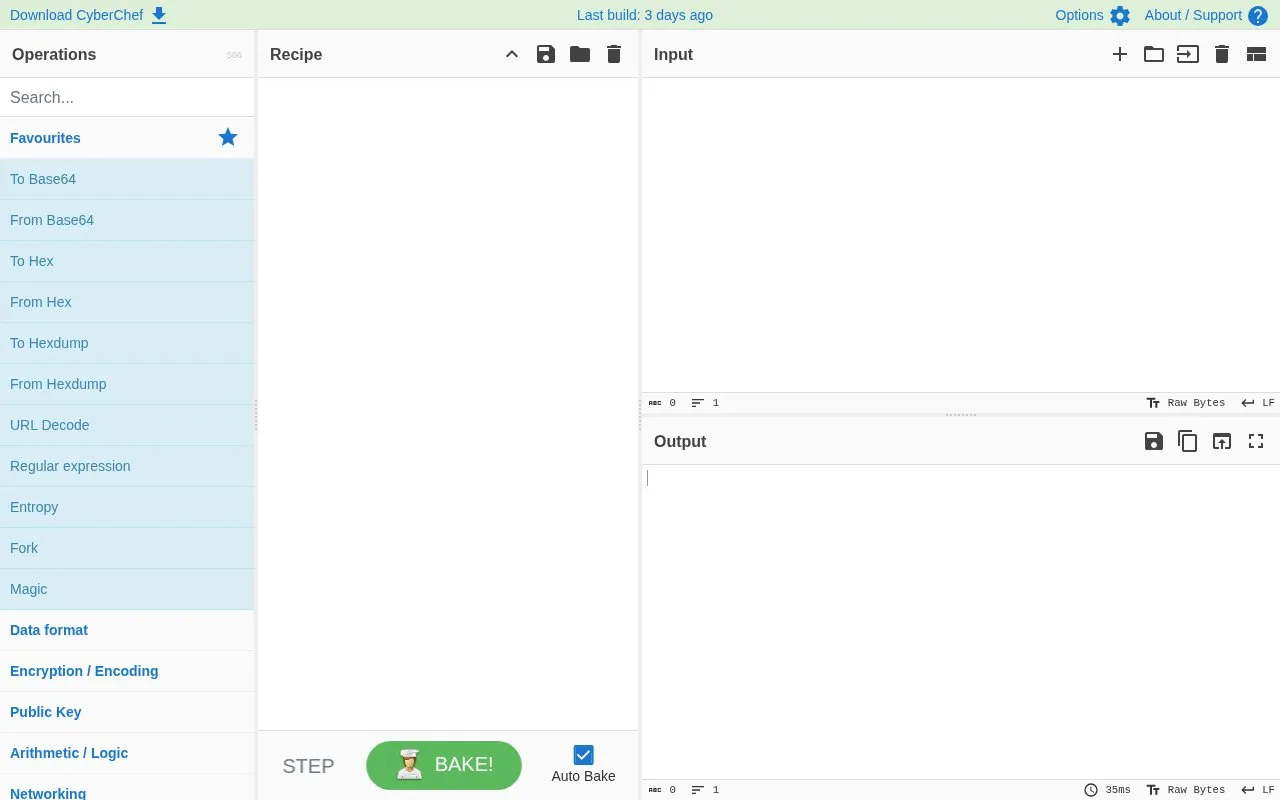
CyberChef is a browser-based tool for working with data through a set of operations, including encoding, decoding, encryption, compression, and data analysis. Users select operations from a categorised, searchable list and arrange them in a recipe. The input is then processed by the recipe, and the output is shown in a separate pane.
The tool can run recipes automatically when the input or recipe changes, using its auto-bake setting. Recipes can be saved to local storage or shared through a deep link. Auto-bake applies only to the active tab when there are multiple inputs; other inputs must be baked manually.
Tools and sites you could use instead, ranked by how closely they match.
CyberChef is a web app for encryption, encoding, compression, and data analysis.
The site groups browser-based utilities for hashing, encoding, encryption, formatting, compression, and file processing.
cryptii provides browser-based modular conversion, encoding, and encryption, with translations processed in the browser.
Universal Encoding Tool provides methods for encoding, decoding, encryption, decryption, conversion, and hashing.
DenCode provides online encoding and decoding tools, including HTML escaping, URL encoding, Base64, MD5, SHA-1, and CRC32.
 8 sites
I'd choose regex101 for most regex testing, RegExr for learning JavaScript patterns, and CyberChef when matching is one…
Well-known listings from the same topic.
Tell us and an editor will check it.
Claim the listing and suggest updates yourself. An editor checks every claim first.


