

Easings
The Easing Functions Cheat Sheet helps users choose animation easing curves by showing how parameters change over time.
About Easings
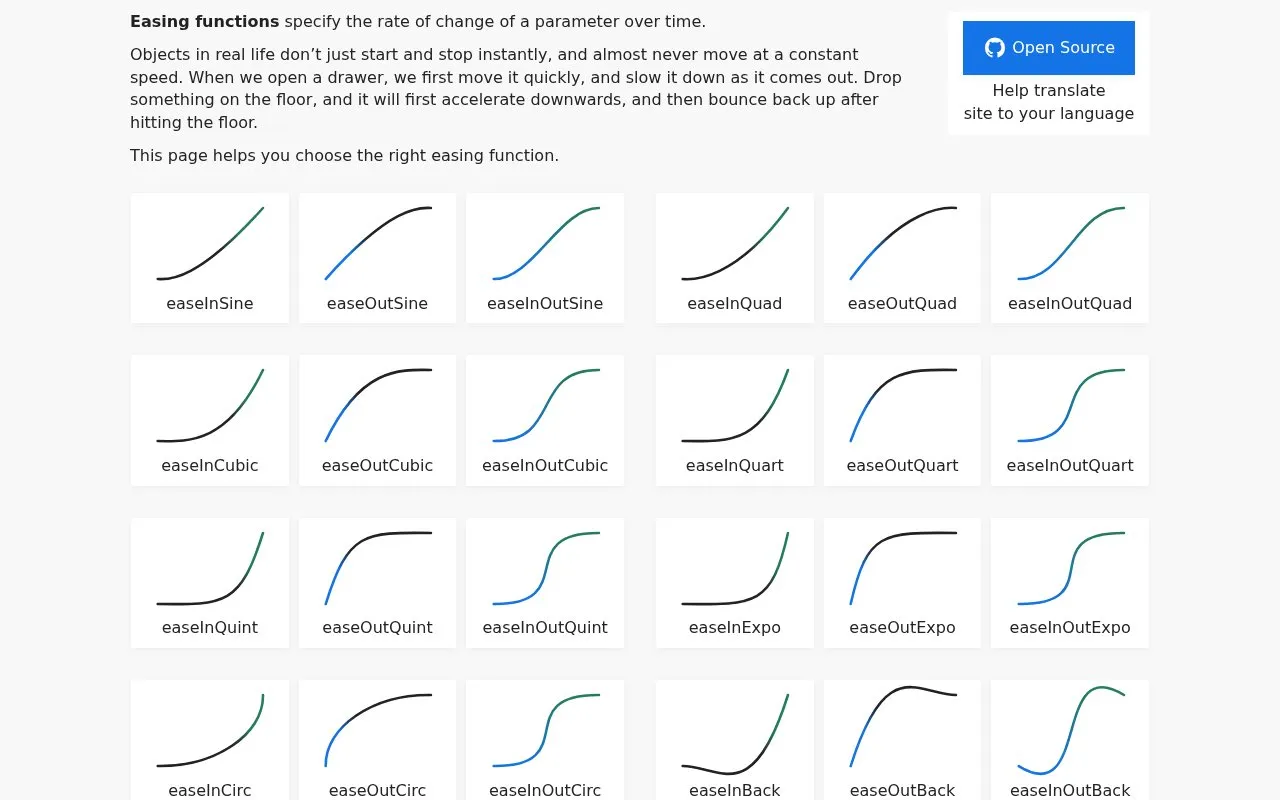
Easings is an Easing Functions Cheat Sheet that shows how easing curves change a parameter over time. It lists In, Out, and InOut variants for Sine, Quad, Cubic, Quart, Quint, Expo, Circ, Back, Elastic, and Bounce.
The site provides CSS transition and animation code, @keyframes implementations, TypeScript functions where x is progress from 0 to 1, and notes on postcss-easings and postcss-easing-gradients. A PostCSS plugin alone cannot set the easing function; @keyframes is required.
Key features
- Lists Sine, Quad, Cubic, Quart, Quint, Expo, Circ, Back, Elastic, Bounce variants
- Shows CSS transition and animation easing code
- Provides @keyframes implementation for CSS easings
- Displays TypeScript function with progress value x from 0 to 1
- Describes PostCSS conversion with postcss-easings plugin
- Describes gradients using postcss-easing-gradients
Best for: Developers and designers selecting easing curves for web animations.
Good for
- Covers In, Out, and InOut variants across multiple easing types
- Includes code for CSS, @keyframes, PostCSS notes, gradients, and TypeScript
- Available in many languages with light, dark, and auto themes
Watch out for
- Easing function cannot be set with a PostCSS plugin alone; @keyframes is needed
Easings at a glance
- Website
- easings.net
- Category
- Development › Developer Tools
- Type
- Website
- Pricing
- Not confirmed. Check the site
- Platforms
- Web
- Open source
- Not stated
- Language
- English
- Last checked
- Oct 6, 2026 · Online when checked
- Listed
- Oct 5, 2026
Guides for Developer Tools


Easings alternatives
Tools and sites you could use instead, ranked by how closely they match.

Devhints collects developer cheat sheets covering tools and languages such as Bash, Go, React, Sass, and Vim.

Change just one letter and get github repo context to use as context for your LLM.
This guide explains how to choose a license when publishing free software projects.

Web animations can be built with GSAP, a JavaScript library for creating motion effects.
CSS3 Transform Visualizer lets users explore and preview two-dimensional and three-dimensional transform functions.
Beszel monitors servers and containers, showing historical resource data and configurable alerts.
Popular in Developer Tools
Well-known listings from the same topic.
AppDevToolsappdevtools.comCommand Not Foundcommand-not-found.comTestFlighttestflight.apple.com/join/A8GwCnq8Sourcegraphabout.sourcegraph.comProject Wallaceprojectwallace.comCarbon Calculatorwebsitecarbon.com


Easings FAQ
What is an easing function?
It specifies the rate of change of a parameter over time.
How can an easing function be used in CSS?
Through the transition and animation properties, or implemented with @keyframes.
What does x represent in the TypeScript code?
Absolute progress of the animation from 0 at the beginning to 1 at the end.
Is something wrong or out of date?
Tell us and an editor will check it.
Own this website?
Claim this listing
Claim the listing and suggest updates yourself. An editor checks every claim first.