

Shmoop provides study guides and homework help for students, teachers, parents and schools.
Helium
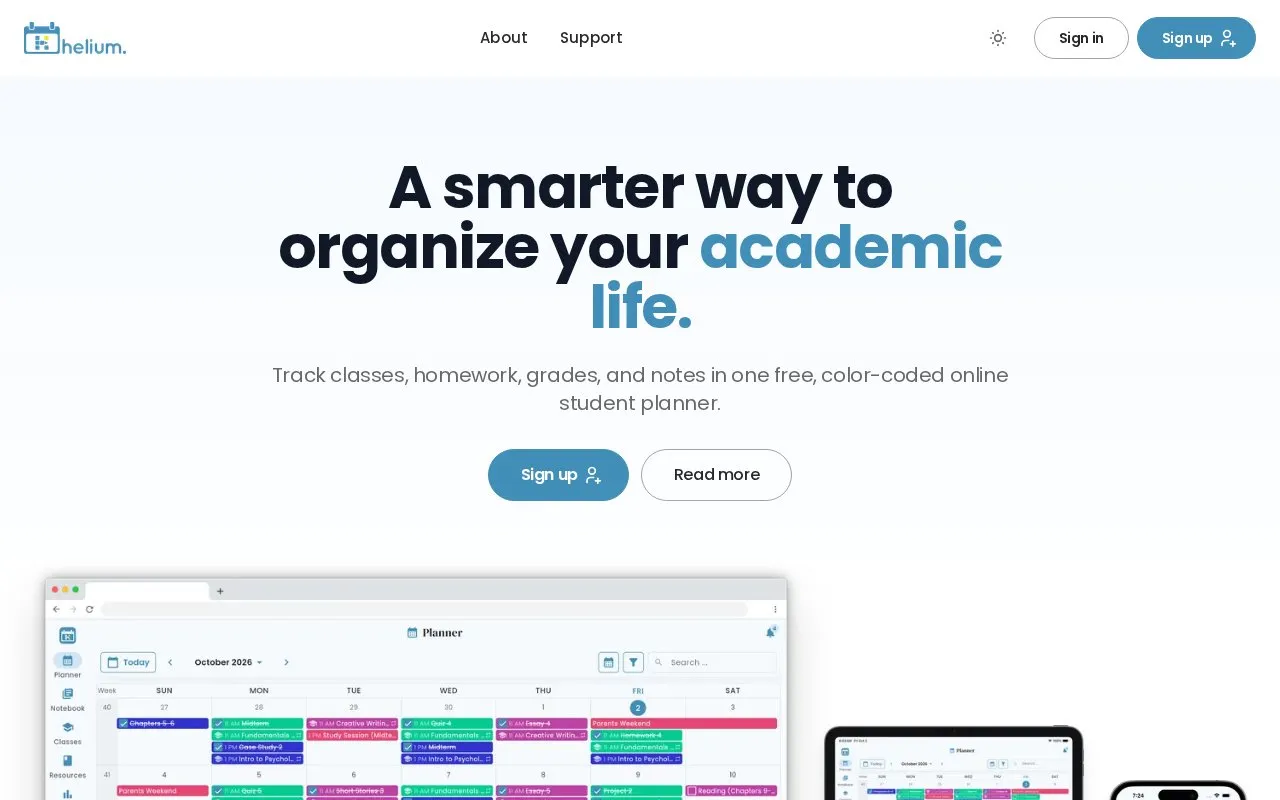
Helium organizes classes, homework, grades and notes in a color-coded student planner available on web and mobile.
About Helium
Helium is a color-coded student planner for organizing classes, homework, grades and notes. It is available on the web and as native iOS and Android apps, and an account created with Google, Apple, Microsoft or an email address keeps the same schedule in sync across devices. Within the planner, users enter classes, schedules, assignments, due dates and rubrics, then mark work done and record grades as the term progresses.
The planner offers Month, Week, 3-Day, Day and Agenda views, time-blocked class meetings, drag-and-drop rescheduling and a Todos view. A grade tracker recalculates results by class, category and term, and a grade calculator projects hypothetical scores or shows what is needed on a final for a target grade. The dashboard shows Progress vs. Pace, At-Risk Classes below a user-set threshold and Pending Impact. Calendar sync works in both directions with Google, Apple or other iCal sources, and notifications arrive through native push on iOS, Android and web or by email. Notes can be attached to items or kept standalone, formatted with headings, lists, quotes and links, searched and printed.
Key features
- Color-coded planner with Month, Week, 3-Day, Day and Agenda views
- Live grade tracking by class, category and full term
- Grade calculator with hypothetical scores and target-grade projections
- Progress vs. Pace and At-Risk Class dashboard indicators
- Two-way sync with Google, Apple or other iCal calendars
- Notebook with linked and standalone notes, search and print
Best for: Students who want to combine class schedules, assignments, grades and notes in a single planner that stays synced across web and mobile devices.
Good for
- Combines scheduling, grade tracking, grade projection and note-taking in one planner
- Description states the planner is free
- Syncs the same schedule across web, iOS and Android
Watch out for
- Grade tracking depends on users entering syllabi details and grades themselves
- An account, created through Google, Apple, Microsoft or email, is required
- Calendar sync relies on external Google, Apple or iCal services
Helium at a glance
- Website
- heliumedu.com
- Category
- Research & Data › Research & Study Tools
- Type
- Website
- Pricing
- Not confirmed. Check the site
- Platforms
- Android, iOS, Web
- Open source
- Not stated
- Language
- English
- Last checked
- Oct 5, 2026 · Online when checked
- Listed
- Oct 5, 2026
Helium alternatives
Tools and sites you could use instead, ranked by how closely they match.
Numla organizes math notes in searchable documents with keyboard shortcuts for navigation and editing.
Studocu hosts study notes shared by students and offers tools for creating practice materials.

Use Kalker as a calculator with custom variables, functions, differentiation and integration on desktop, mobile or web.

BBC Bitesize provides homework and revision help through videos, guides, activities and quizzes for school levels.

GradesCalculator calculates cumulative GPA from semester grades and credits, with country selection.
Popular in Research & Study Tools
Well-known listings from the same topic.
NoteKnightnoteknight.comNotebookCastnotebookcast.comGeoGebrageogebra.orgWikitiawikitia.comPapertagpapertag.appMoby Thesaurusmoby-thesaurus.org


Helium FAQ
Which platforms does Helium run on?
Helium is available as native iOS and Android apps and in any web browser, with the schedule kept in sync across devices.
Can Helium work with a calendar I already use?
Yes. You can subscribe to Google, Apple or any other iCal source so it appears in Helium, or share the Helium schedule back the other way.
How do I create a Helium account?
Sign up using Google, Apple, Microsoft, or any email address and password.
Is something wrong or out of date?
Tell us and an editor will check it.
Own this website?
Claim this listing
Claim the listing and suggest updates yourself. An editor checks every claim first.