
Porofessor provides League of Legends live game search and real-time player statistics across regions.
PingTrack
PingTrack displays public Minecraft server statistics and ping over selected time ranges.
About PingTrack
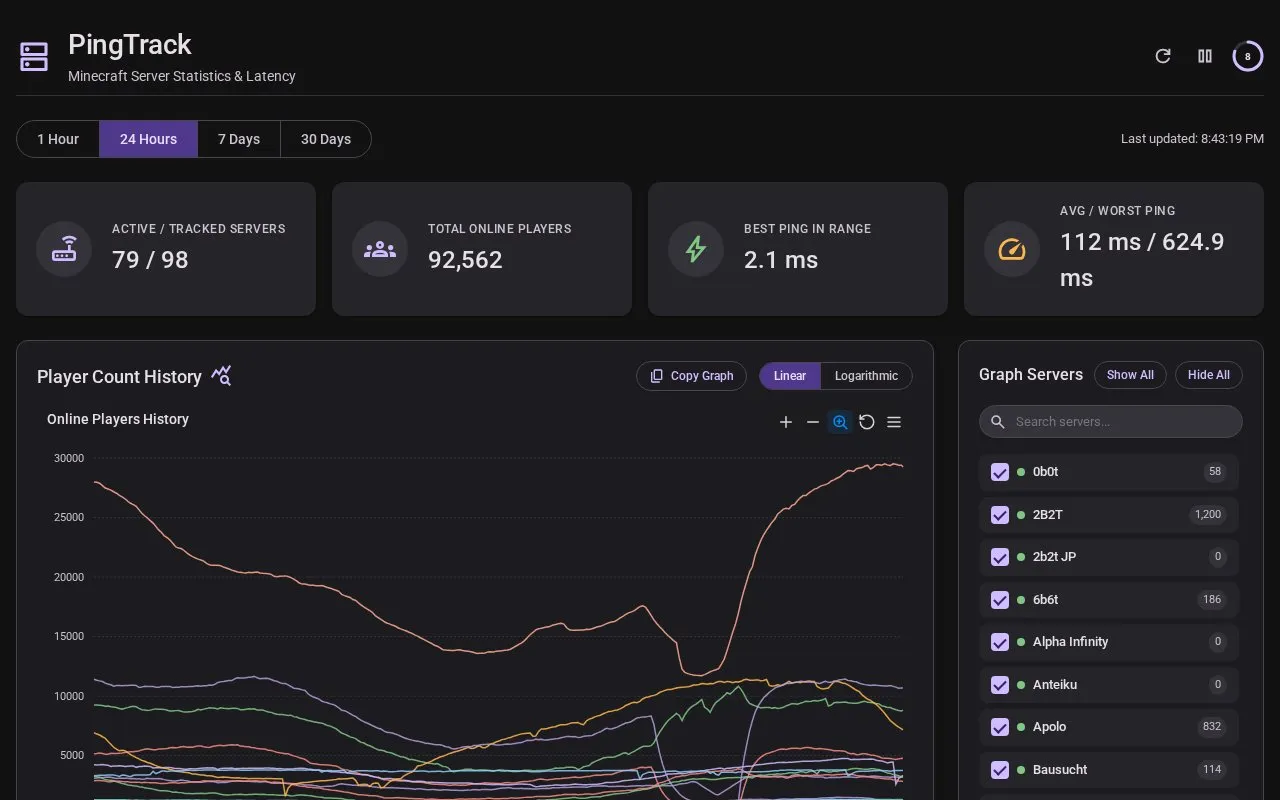
PingTrack is a public web dashboard that displays statistics and ping histories for Minecraft servers. It shows active and tracked servers, total online players, the best ping in a selected range, and average and worst ping values. Users can choose a 1 hour, 24 hour, 7 day, or 30 day time range.
The dashboard includes a player count history graph and a ping latency history for individual servers. A detailed overview table lists each server's online players, range peak, all-time peak, current ping, and range average ping. The source does not state how servers are added to the dashboard, how often data is updated, or whether any server can be tracked on request.
Key features
- Time range selection for 1 hour, 24 hours, 7 days, and 30 days
- Player count history graph with linear or logarithmic scale
- Ping latency history graph for individual servers
- Sortable overview table of server players, peaks, and ping
- Pinned servers list and show or hide controls for graphed servers
- Copy graph button for graphs
Best for: Minecraft players and server operators who want to compare public server player counts and ping over recent time ranges.
Good for
- Shows player counts and ping history for public Minecraft servers in one dashboard
- Offers several time ranges, from one hour up to 30 days
- Lets users compare multiple servers on the same graph
Watch out for
- Only the four listed time ranges are available, with no custom range shown
- The source code is not published, so the project is not open source
PingTrack at a glance
- Website
- pingtrack.lenni0451.net
- Category
- Gaming › Game Guides, Wikis & Tools
- Type
- Website
- Pricing
- Not confirmed. Check the site
- Platforms
- Web
- Open source
- Not stated
- Language
- English
- Last checked
- Oct 6, 2026 · Online when checked
- Listed
- Oct 5, 2026
PingTrack alternatives
Tools and sites you could use instead, ranked by how closely they match.

Untapped.gg offers statistics and tools for selected games, with a page to choose which title to explore.

Share Songs lets users discover, share, and listen to Minecraft note block music from a public community collection.

BlueMap creates 3D maps of Minecraft worlds and displays them in a browser-based viewer.

MineAtlas displays a Minecraft 1.8 seed map and identifies slime spawning areas.

Minecraft Earth Map displays a high-resolution map for exploring Minecraft geography.
Popular in Game Guides, Wikis & Tools
Well-known listings from the same topic.
GTA Bossgtaboss.ggGTAGaragegtagarage.comPocket Bardpocketbard.appSerebii.netserebii.netBlock Displayblock-display.comWorldPainterworldpainter.net


PingTrack FAQ
Which time ranges can I view?
The dashboard lists 1 hour, 24 hours, 7 days, and 30 days as selectable ranges.
Can I compare more than one server on a graph?
The graph section includes a server selector with Show All and Hide All options, so multiple servers can be shown or hidden together.
Is something wrong or out of date?
Tell us and an editor will check it.
Own this website?
Claim this listing
Claim the listing and suggest updates yourself. An editor checks every claim first.