
UI Colors
Generate custom Tailwind CSS color palettes and browse the framework's built-in color values.
About UI Colors
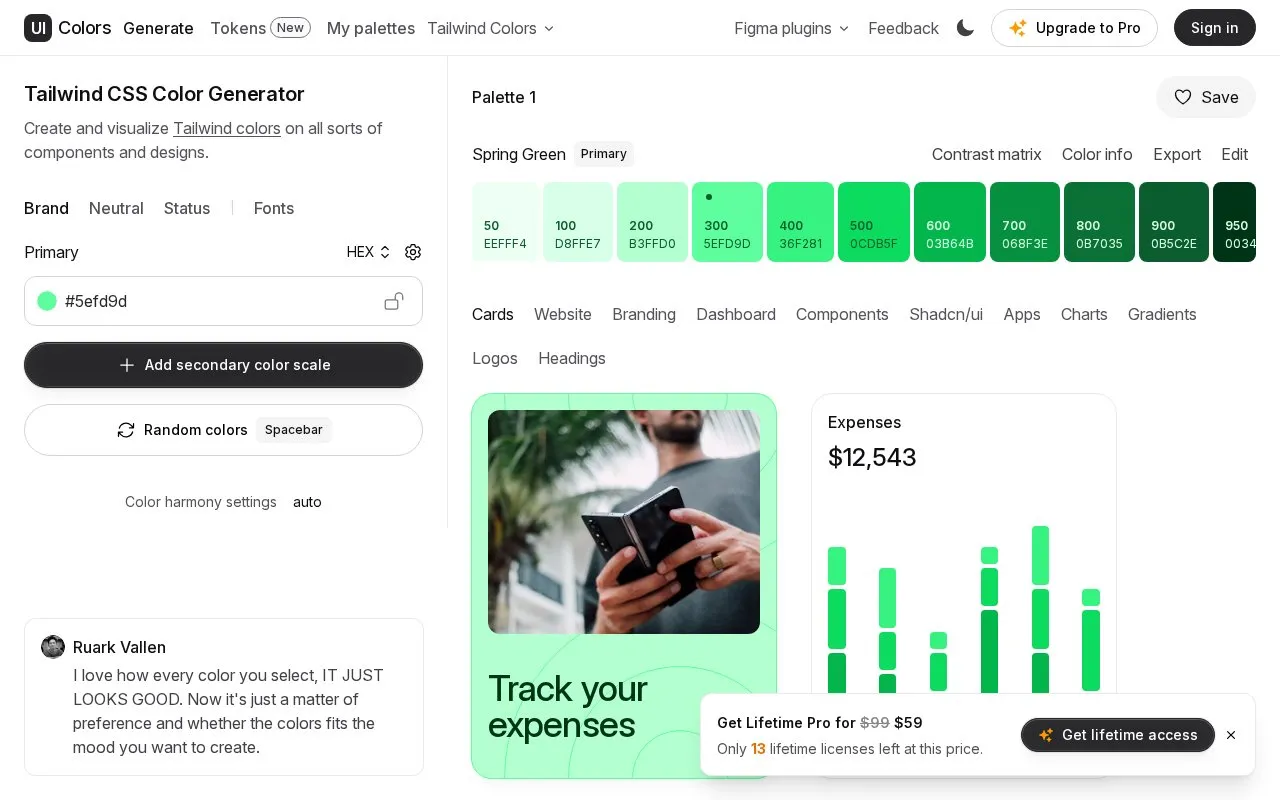
UI Colors is a web tool for generating custom Tailwind CSS color palettes and browsing the framework's built-in color names. Users create palettes and preview them on example components and designs, including cards, websites, dashboards, charts, and logos.
The generator can add success, info, warning, and error color scales, a secondary scale, and a neutral scale for text, borders, and surfaces. Base and heading fonts can be chosen from a curated selection and applied to the design examples. The homepage marks custom font selection and some other options with an "Unlock" label and mentions an upgrade to Pro, but it does not state what each option costs or which plan includes it. The site also lists a UI Colors API, a Figma plugin, a contrast check tool, and a shadcn/ui theme generator as separate products.
Key features
- Preview generated color scales on cards, websites, dashboards, charts, and logos
- Add success, info, warning, and error color scales with live preview
- Add a custom neutral color scale for text, borders, and surfaces
- Choose base and heading fonts from a curated selection
- Generate random colors and random font pairings, with optional base and heading sync
- Adjust color harmony settings for palette generation
- Browse Tailwind CSS built-in color names such as red, amber, emerald, and zinc
Best for: Designers and front-end developers who build interfaces with Tailwind CSS and want to test color palettes in context before using them.
Good for
- Palettes can be checked against example components and layouts rather than only as swatches
- Status, secondary, and neutral color scales can be built in the same generator
- Browsing the built-in Tailwind color list is available in the same tool
Watch out for
- Font choices are limited to a curated selection, and custom font selection is marked as locked behind an unlock option
- The homepage does not state pricing, so the cost of the locked options is unknown
- The tool is not open source
UI Colors at a glance
- Website
- uicolors.app/create
- Category
- Design & Creative › Color Tools
- Type
- Online tool
- Pricing
- Not confirmed. Check the site
- Platforms
- Web
- Open source
- Not stated
- Language
- English
- Last checked
- Oct 6, 2026 · Online when checked
- Listed
- Oct 5, 2026
Guides for Color Tools
UI Colors alternatives
Tools and sites you could use instead, ranked by how closely they match.

Browse Material Design color palettes and other collections, including Tailwind and Fluent colors.

Generate color values for design systems by setting a target contrast ratio.
Open source
24 alternatives
Create, download and share color combinations, or browse palettes submitted by other users.

Browse CSS colors sorted by hue, saturation and lightness, with RGB, HSL and hex values.

Generate color palettes with AI and choose from styles such as smart color schemes.
Generate color palettes with Pigment's color tool and adjust color combinations.
Popular in Color Tools
Well-known listings from the same topic.
accessiblepaletteaccessiblepalette.comhue.toolshue.toolsAdobe Colorcolor.adobe.comCoolorscoolors.coColor Pickerimagecolorpicker.comRealtime Colorsrealtimecolors.com


UI Colors FAQ
Can I see how a palette looks on real interface examples?
Yes. The homepage says colors can be visualized on cards, websites, branding, dashboards, components, shadcn/ui, apps, charts, gradients, logos, and headings.
Can I choose my own fonts?
Fonts can be picked from a curated selection that is applied to all design examples. The homepage labels custom font selection with an "Unlock" option, so it may not be available to every user.
Is something wrong or out of date?
Tell us and an editor will check it.
Own this website?
Claim this listing
Claim the listing and suggest updates yourself. An editor checks every claim first.