

Measure surrounding sound levels in decibels using a computer microphone in this browser tool.
7.1 Surround
HeSuVi virtualizes 7.1 surround sound for stereo headphones using profiles from several surround sound engines.
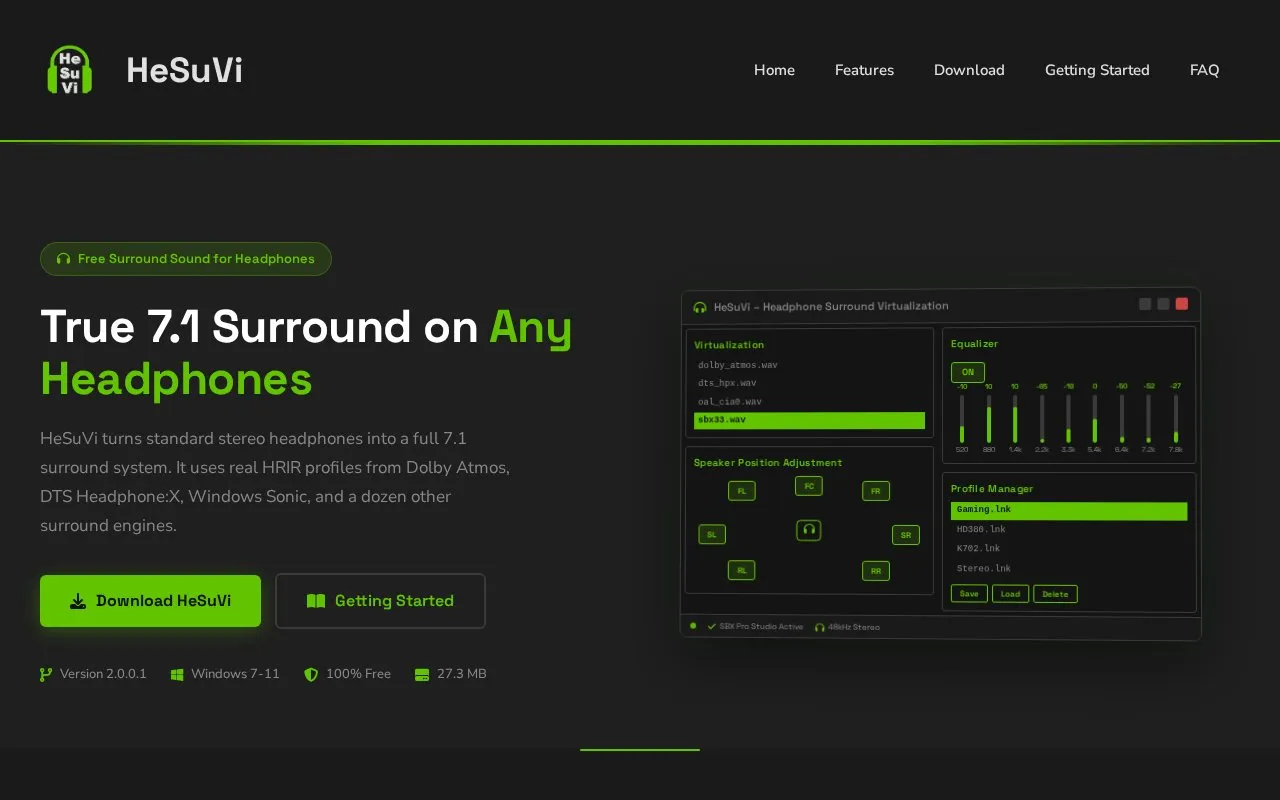
About 7.1 Surround
HeSuVi converts 7.1-channel audio into binaural stereo for standard stereo headphones using HRIR profiles from Dolby Atmos, DTS Headphone:X, Windows Sonic, Creative SBX Pro Studio, Sennheiser GSX and other systems. It provides headphone correction presets, adjustable virtual speaker positions, stereo and 5.1 upmixing, and saved profiles that store HRIR, EQ, speaker positions and crossfeed settings.
It runs on Windows 7 through 11 and requires Equalizer APO for audio processing. The download is listed as 27.3 MB.
Key features
- Converts 7.1-channel audio to binaural stereo for headphones
- HRIR profiles from Dolby Atmos, DTS Headphone:X, Windows Sonic and others
- Over 1,000 headphone correction presets from AutoEq, oratory1990 and Innerfidelity
- Adjustable virtual speaker angle and distance per channel
- Upmixes stereo and 5.1 content to fill eight channels
- Saveable profiles storing HRIR, EQ, speaker and crossfeed settings
Best for: People who play games, watch 7.1 movies, or listen to music on stereo headphones and want positional audio.
Good for
- Free download for Windows PC
- Combines profiles from more than a dozen surround systems in one tool
- Includes over 1,000 headphone-specific correction presets
Watch out for
- Requires Equalizer APO for audio processing
- Available for Windows 7 through 11 only
7.1 Surround at a glance
- Website
- hesuvi.net
- Category
- Software & Utilities › Hardware & Diagnostics
- Type
- Website
- Pricing
- Free
- Platforms
- Web, Windows
- Open source
- Not stated
- Language
- English
- Last checked
- Oct 5, 2026 · Online when checked
- Listed
- Oct 5, 2026
7.1 Surround alternatives
Tools and sites you could use instead, ranked by how closely they match.

SonyHeadphonesClient provides a cross-platform library implementation for Sony Sound Connect headphones.
Open source
24 alternativesPopular in Hardware & Diagnostics
Well-known listings from the same topic.
PC Managerpcmanager.microsoft.comDolby Accessapps.microsoft.com/detail/9n0866fs04w8RAMMaplearn.microsoft.com/en-us/sysinternals/downloa…AppControlappcontrol.comUNIGINE Benchmarksbenchmark.unigine.comMemTestmemtest.org


7.1 Surround FAQ
What does HeSuVi do?
It takes 7.1-channel audio and converts it into binaural stereo for regular headphones by applying HRIR profiles through Equalizer APO.
What is needed to use HeSuVi?
Windows 7 through 11 and Equalizer APO, which handles the low-level audio processing.
Does it work with stereo or 5.1 sources?
Yes, it upmixes stereo or 5.1 content to fill all eight channels before virtualizing.
Is something wrong or out of date?
Tell us and an editor will check it.
Own this website?
Claim this listing
Claim the listing and suggest updates yourself. An editor checks every claim first.