

Clippings
Clippings saves frequently entered text for later pasting, and the site also lists separate browser tools for hiding windows and reading lists.
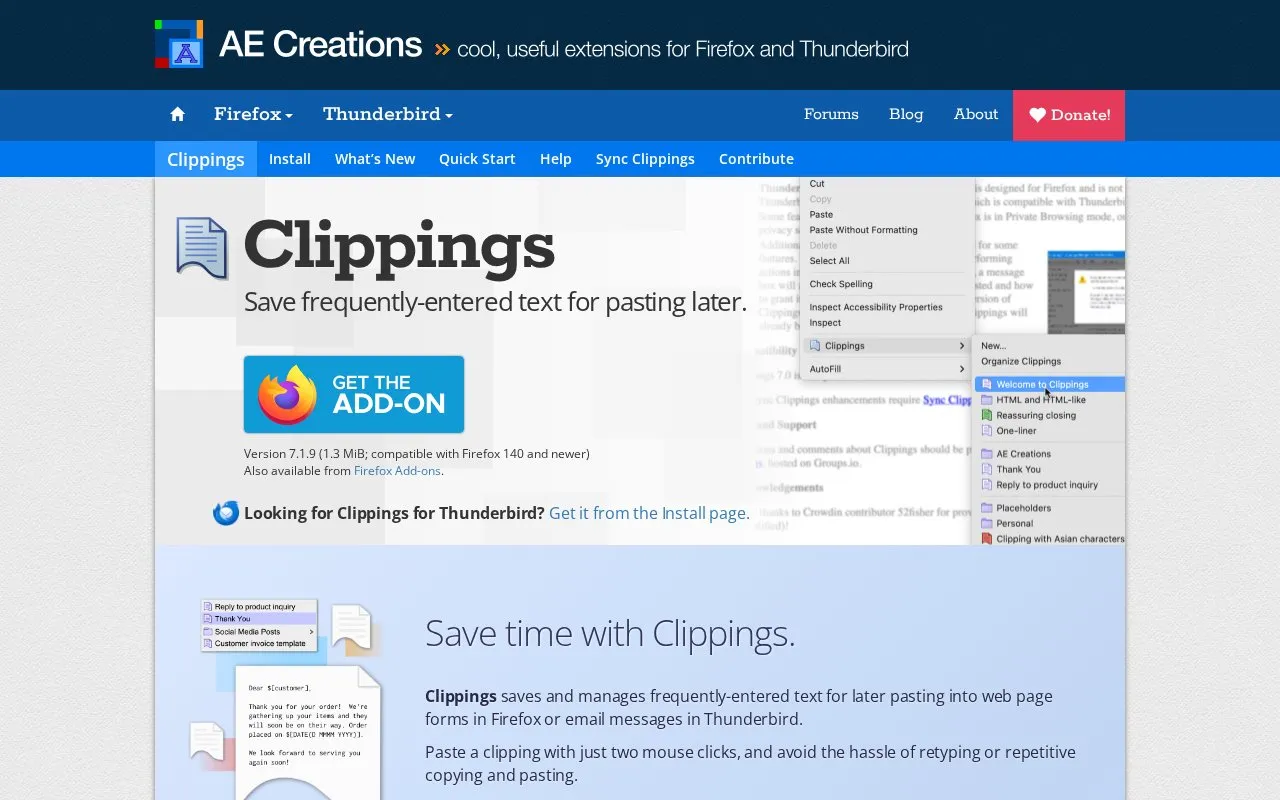
About Clippings
Clippings is an add-on for Firefox and Thunderbird that saves frequently entered text so it can be pasted later into web page forms or email messages. Clippings can be created from selected text in a Firefox page or form, or from selected text in a Thunderbird message, and in Firefox the source page URL can be saved with the clipping. Pasting is done from the Clippings context menu or with an assigned shortcut key after pressing ALT+SHIFT+Y (⇧⌘Y in Firefox on macOS; ⌥⌘V for the Thunderbird paste shortcut on macOS), and clippings can also be found by typing their name in an autocomplete menu. Clippings Manager organizes items into folders with color labels, and clippings can be backed up, imported and exported in several file formats.
Additional options include pasting as formatted text when a clipping contains HTML tags, and placeholders that prompt for input at paste time, with presets for the date, time and clipping name. Synchronizing clippings between Firefox and Thunderbird or other instances of those applications requires installing the separate Sync Clippings Helper application. The listed Firefox version is 7.1.9 (1.3 MiB) and is compatible with Firefox 140 and newer, and the interface is available in English (United States), Chinese (Simplified), French and German. No pricing is stated on the page.
Key features
- Creates clippings from selected text in Firefox pages or Thunderbird messages
- Saves the source page URL with a clipping in Firefox
- Pastes from the Clippings context menu or an assigned shortcut key
- Finds clippings by typing a name in an autocomplete menu
- Clippings Manager organizes items into folders with color labels
- Placeholders prompt for input at paste time, including date, time and clipping name
Best for: People who repeatedly type the same blocks of text into Firefox forms or Thunderbird email messages and want to paste them instead.
Good for
- Covers both Firefox web forms and Thunderbird message editing
- Supports backup plus import and export in several file formats
- Includes shortcuts, folders, color labels and placeholder prompts for reuse
Watch out for
- Syncing clippings requires installing the separate Sync Clippings Helper application
- The listed Firefox version requires Firefox 140 or newer
- Interface translations cover only four languages
Clippings at a glance
- Category
- Software & Utilities › Browser Extensions
- Type
- Website
- Pricing
- Not confirmed. Check the site
- Platforms
- Web, Windows
- Open source
- Not stated
- Language
- English
- Last checked
- Oct 5, 2026 · Online when checked
- Listed
- Oct 5, 2026
Guides for Browser Extensions
Clippings alternatives
Tools and sites you could use instead, ranked by how closely they match.

Instapaper saves web pages for later reading on iOS, Android, computers, and e-readers.
Tab Stash saves open tabs so users can clear them and return to those pages later.

Containers isolate cookies and related files into separate groups, such as a finance container, according to the supplied project page.

CSE lets users change Safari search engine settings, including preferred engines, language options, and hiding AI Overviews.

Session Buddy helps manage browser tabs and bookmarks, with options to save open tabs and restore saved browsing sessions later.

Page Edit lets users make a webpage content-editable and modify it through a toolbar popup before saving or printing changes.
Popular in Browser Extensions
Well-known listings from the same topic.
Popupblocker by Joofthanaddons.mozilla.org/firefox/addon/popupblockerallEnhancementscplx.appViolentmonkeyviolentmonkey.github.ioMomentummomentumdash.comMission Controlmission-control.appIndie Wiki Buddygetindie.wiki


Clippings FAQ
How do I create a clipping?
Select the text you want to save, then right-click and choose Clippings → New from the context menu. A shortcut key or label can be assigned to the clipping.
Can I sync clippings between Firefox and Thunderbird?
Yes, but syncing requires installation of the Sync Clippings Helper application.
Which languages does Clippings support?
English (United States), Chinese (Simplified), French and German.
Is something wrong or out of date?
Tell us and an editor will check it.
Own this website?
Claim this listing
Claim the listing and suggest updates yourself. An editor checks every claim first.