
Tab Stash
Tab Stash saves open tabs so users can clear them and return to those pages later.
About Tab Stash
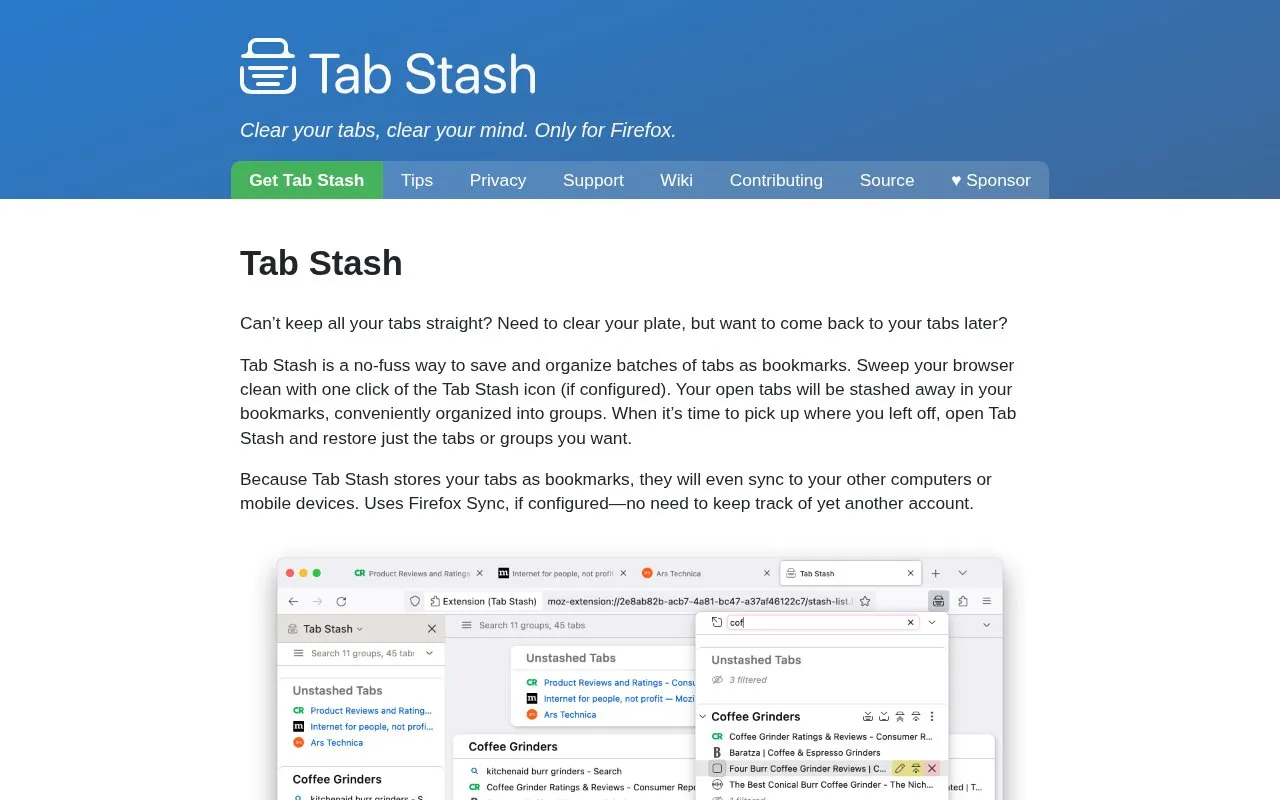
Tab Stash saves open tabs as bookmarks so users can clear them and restore them later. Tabs are kept in groups and sub-groups, and can be restored individually or as a whole group.
It can be viewed in the Firefox sidebar, a popup, or a full-browser tab view. Stored bookmarks can sync to other computers or mobile devices using Firefox Sync, if configured.
Key features
- Stash all open tabs with toolbar button when configured
- Stash individual tabs with address bar button
- Restore individual tabs or whole groups with one click
- Organize stashed tabs into groups and sub-groups
- Search stashed tabs with quick-search bar
- Import and export stash in Markdown, OneTab and other formats
Best for: Firefox users who want to close batches of tabs but return to them later.
Good for
- Stores tabs as bookmarks that can sync via Firefox Sync when configured
- Supports restoring single tabs or entire groups at once
- Offers import and export in formats including Markdown and OneTab
Tab Stash at a glance
- Category
- Software & Utilities › Browser Extensions
- Type
- Website
- Pricing
- Not confirmed. Check the site
- Platforms
- Web
- Open source
- Not stated
- Language
- English
- Last checked
- Oct 5, 2026 · Online when checked
- Listed
- Oct 5, 2026
Guides for Browser Extensions
Tab Stash alternatives
Tools and sites you could use instead, ranked by how closely they match.

Clippings saves frequently entered text for later pasting, and the site also lists separate browser tools for hiding windows and reading lists.

Instapaper saves web pages for later reading on iOS, Android, computers, and e-readers.

Session Buddy helps manage browser tabs and bookmarks, with options to save open tabs and restore saved browsing sessions later.

SnoozeTabs is a Firefox add-on for postponing tabs, letting them be set aside for a while before returning to them.
Open source
24 alternatives
Sessionic saves, manages, and restores browser sessions, windows, and tabs, with options to import and export sessions.
Open source
24 alternatives
Page Edit lets users make a webpage content-editable and modify it through a toolbar popup before saving or printing changes.
Popular in Browser Extensions
Well-known listings from the same topic.
Popupblocker by Joofthanaddons.mozilla.org/firefox/addon/popupblockerallEnhancementscplx.appViolentmonkeyviolentmonkey.github.ioMomentummomentumdash.comMission Controlmission-control.appIndie Wiki Buddygetindie.wiki


Tab Stash FAQ
How does Tab Stash store saved tabs?
It stores them as bookmarks organized into groups, which can sync via Firefox Sync if configured.
How do I bring back stashed tabs?
You can restore individual tabs or whole groups with a single click.
Can I import or export my stash?
Yes, import and export is available in rich text, Markdown, OneTab and more.
Is something wrong or out of date?
Tell us and an editor will check it.
Own this website?
Claim this listing
Claim the listing and suggest updates yourself. An editor checks every claim first.