
CloneZilla
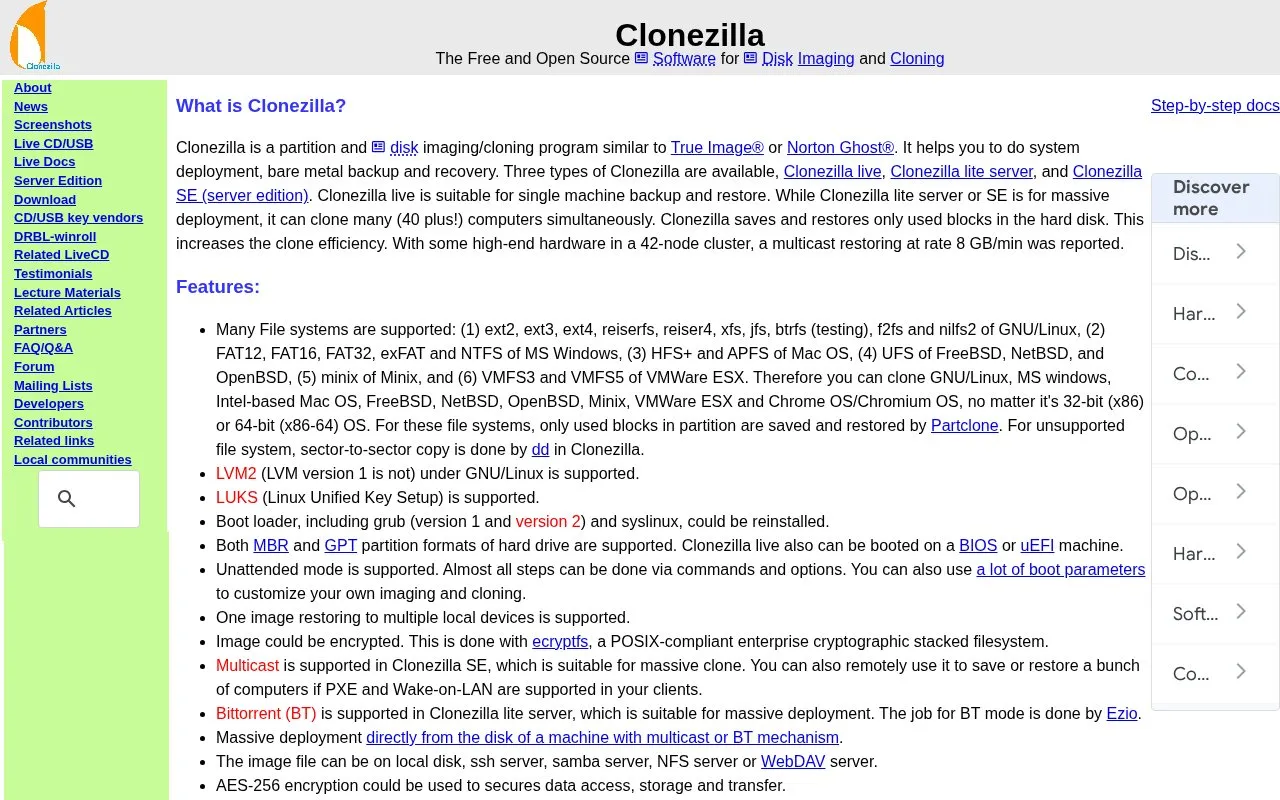
Clonezilla is free and open-source software for disk imaging and cloning, with Live CD/USB and server editions listed on its site.
About CloneZilla
Clonezilla is a free and open-source partition and disk imaging/cloning program used for system deployment, bare metal backup and recovery. It comes in three editions: Clonezilla live for single machine backup and restore from CD/DVD or USB, Clonezilla lite server for mass cloning, and Clonezilla SE, which is included in DRBL and requires a DRBL server. It supports many file systems and, for supported ones, saves and restores only used blocks using Partclone; unsupported file systems are copied sector by sector with dd.
Key features
- Three editions: live for single machines, lite server and SE for mass deployment
- Supports ext, reiserfs, xfs, jfs, btrfs, f2fs, FAT, exFAT, NTFS, HFS+, APFS, UFS and VMFS
- Saves and restores only used blocks via Partclone, improving clone efficiency
- Multicast in SE and BitTorrent in lite server for cloning many computers at once
- Images can be stored on local disk, SSH, Samba, NFS or WebDAV servers
- Unattended mode with commands, options and boot parameters; image encryption options
Best for: System administrators and technicians who need to back up, restore or deploy entire disks and partitions, including large batches of machines.
Good for
- Free and open-source software licensed under the GNU General Public License Version 2
- Supports many file systems, MBR and GPT partitions, and can boot on BIOS or UEFI machines
- Saves only used blocks for supported file systems, which the site says increases clone efficiency
Watch out for
- The destination partition must be equal to or larger than the source partition
- Differential/incremental backup and online imaging are not implemented; the partition being imaged must be unmounted
- Due to image format limitations, images cannot be explored or mounted, so a single file cannot be recovered from an image directly
CloneZilla at a glance
- Website
- clonezilla.org
- Category
- Software & Utilities › Backup & Recovery
- Type
- Website
- Pricing
- Not confirmed. Check the site
- Platforms
- Linux, macOS, Web, Windows
- Open source
- Not stated
- Language
- English
- Last checked
- Oct 6, 2026 · Online when checked
- Listed
- Oct 5, 2026
Guides for Backup & Recovery
CloneZilla alternatives
Tools and sites you could use instead, ranked by how closely they match.

Rescuezilla provides a graphical live-CD tool for disk imaging, cloning, and restoring an entire computer.

AOMEI Backupper provides backup, restore, file sync, and disk cloning tools for personal and business Windows PCs and servers.
Pick
6 alternatives
BackupPC backs up Linux, Windows, and macOS computers to a server disk, according to its project description.

Rescuezilla supports disk cloning and imaging and works with Clonezilla; its repository calls it a graphical interface for Clonezilla.
Open source
8 alternativesPopular in Backup & Recovery
Well-known listings from the same topic.
UrBackupurbackup.orgWindows File Recoveryapps.microsoft.com/detail/9n26s50ln705Duplicatiduplicati.comBorgborgbackup.orgKopiakopia.ioFolderClonefolderclone.com


CloneZilla FAQ
Which Clonezilla edition should I use?
Clonezilla live lets you boot from CD/DVD or USB flash drive and is unicast only. Clonezilla lite server adds unicast, broadcast, multicast and BitTorrent support for massive cloning. Clonezilla SE is included in DRBL, so a DRBL server must be set up first; it supports unicast, broadcast and multicast.
What are the minimum system requirements for Clonezilla live?
An x86 or x86-64 processor, 196 MB of system memory, and a boot device such as a CD/DVD drive, USB port, PXE or hard drive.
Can I recover a single file from a Clonezilla image?
No. Because of the image format limitation, the image cannot be explored or mounted. The site notes that a workaround exists.
Is something wrong or out of date?
Tell us and an editor will check it.
Own this website?
Claim this listing
Claim the listing and suggest updates yourself. An editor checks every claim first.