

Imagine
Imagine provides image and animation viewing software for Windows as a freeware download.
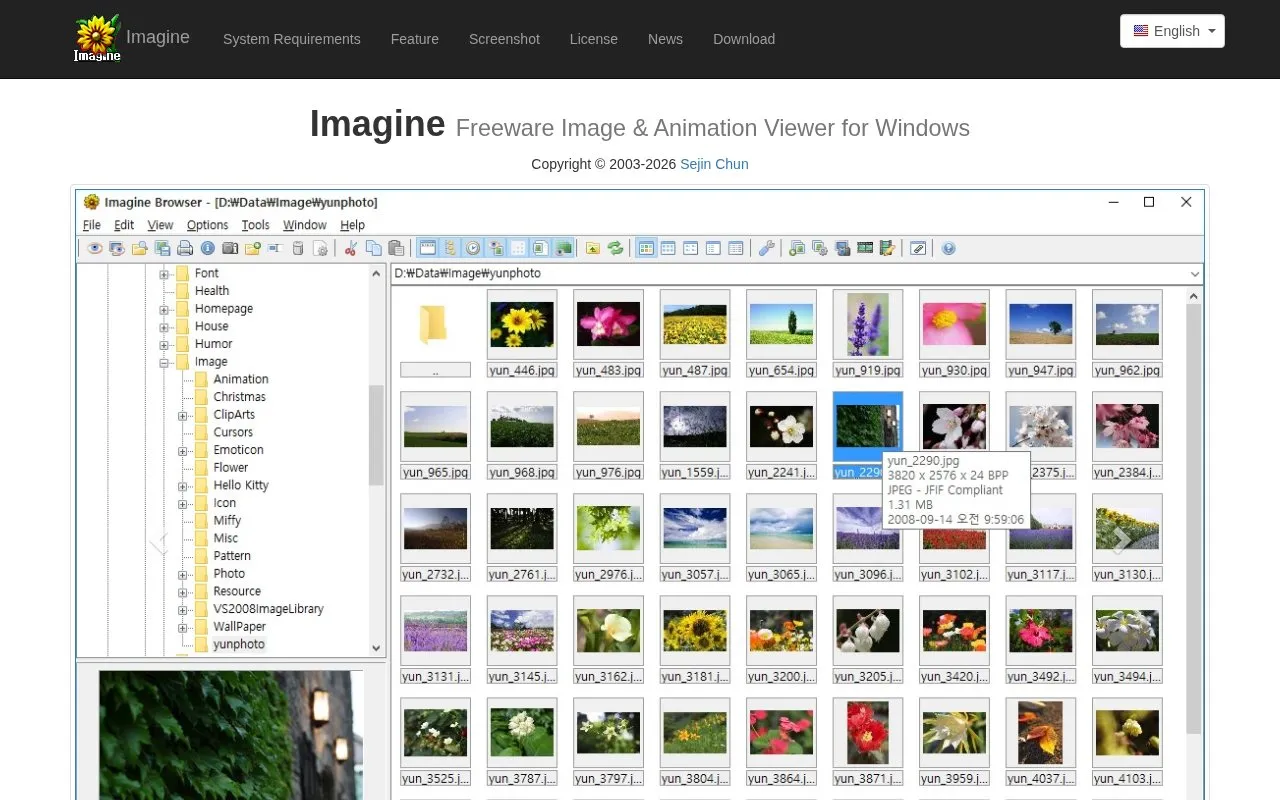
About Imagine
Imagine is a freeware image and animation viewer for Windows, published by Sejin Chun and described as viewing and saving image and animation files at very fast speed. It supports a long list of image and animation formats (including PNG, JPG, GIF, SVG, WebP, PSD, TIFF and many others), digital camera RAW files, HDR formats, and images packed inside archives such as ZIP, RAR, 7Z, CBZ and CBR. Beyond viewing, it offers frame extraction, image information including Exif/XMP/IPTC/DICOM/Comment, thumbnail browsing, basic paint, color corrections, ICC profile color management, batch conversion, batch rename, slide shows, screen capture, tiled view, and tools to create animations, multi-page images and panoramas. A 64-bit version, a Unicode version, multilingual support, command line parameters, shell extension, plugin support and Total Commander plugins are listed. It is free to use with no restrictions; donations of at least $20 USD are described as earning a personal license code and technical support with priority given to suggestions. Some formats require separately downloaded plugins.
Key features
- Views and saves image and animation files at very fast speed
- Supports numerous image, animation, RAW, HDR and archive formats
- Extracts single or all frames from animation files
- Shows Exif, XMP, IPTC, DICOM and comment information
- Batch conversion, batch rename, slide show and screen capture
- Creates animations, multi-page images and panoramas; basic paint and color correction
Best for: Windows users who need a lightweight viewer that opens a wide range of image, RAW and animation formats and handles simple batch or editing tasks.
Good for
- Freeware (donationware) described as free to use with no restrictions
- Very broad format coverage, including digital camera RAW, HDR and images inside archives
- Native builds for x86, x64 and ARM64, with Unicode and multilingual support
Watch out for
- Runs on Microsoft Windows only; no macOS or web version is offered on the page
- Several formats (RAW, 7Z, RAR, ALZ, HV3, WEBP, HDP, EXR, JPEG 2000) need separate plugin downloads
- A personal license code and technical support require a donation of at least $20 USD
Imagine at a glance
- Website
- nyam.pe.kr/dev/imagine
- Category
- Online Tools › Image Tools
- Type
- Website
- Pricing
- Not confirmed. Check the site
- Platforms
- Web, Windows
- Open source
- Not stated
- Language
- English
- Last checked
- Oct 6, 2026 · Online when checked
- Listed
- Oct 5, 2026
Guides for Image Tools

Imagine alternatives
Tools and sites you could use instead, ranked by how closely they match.

PicView views images on Windows and macOS, with EXIF display, batch resizing, compression, and archive viewing.
ImageGlass views more than 90 image formats on Windows, macOS, and Linux.
Favicon Maker creates SVG and PNG favicons from letters or emoji, with options for fonts and sizes.
FrameSVG converts animated GIF files into animated SVGs with vector output.

ImageSmaller compresses PNG, JPG, JPEG, GIF, TIFF, WebP, and SVG images online.
Free
22 alternatives
SVGOMG provides a visual interface for compressing and optimizing SVG images.
Popular in Image Tools
Well-known listings from the same topic.
CamScannerapps.apple.com/us/app/camscanner-pdf-scanner-a…BeeRefbeeref.orgGreenshotgetgreenshot.orgLightshotapp.prntscr.comnomacsnomacs.orgConverseenconverseen.fasterland.net


Imagine FAQ
Is Imagine free to use?
Yes. It is described as freeware (donationware): you are free to use it with no restrictions. Donations are optional, but a minimum of $20 USD is stated for receiving a personal license code; donors can also receive technical support and priority for suggestions.
Which Windows versions and hardware does it require?
The listed requirements are a Pentium-compatible x86 or x64 CPU or ARM64 (AArch64), 32MB RAM or more, 256 colors or higher, and Windows 95/98/ME/NT 4.0/2000/XP/2003/Vista/7/8/10/11. Windows 95/98/ME uses the ANSI version; the Unicode version is recommended.
Are all supported formats included in the main download?
No. Separate plugins are offered for digital camera RAW, 7Z, RAR, ALZ, HV3, WEBP, HDP, EXR and JPEG 2000 formats, available for 32-bit, 64-bit and ARM64 builds. Download packages that include all plugins are also listed.
Is something wrong or out of date?
Tell us and an editor will check it.
Own this website?
Claim this listing
Claim the listing and suggest updates yourself. An editor checks every claim first.