
LLPlayer provides a media player for language learners with dual subtitles and playback tools.
Open source
24 alternativesKanjiTomo identifies Japanese text in images and is optimized for kanji recognition.
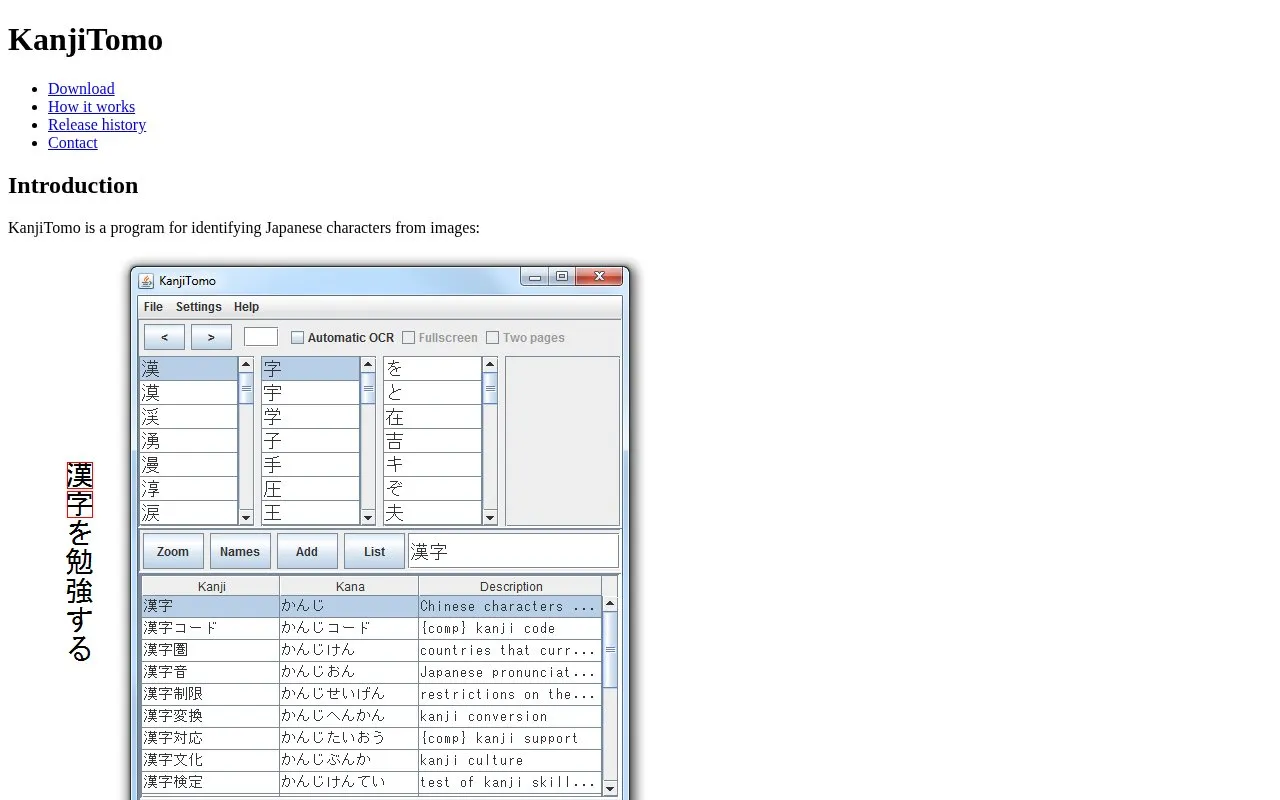
KanjiTomo is a program for identifying Japanese characters in images. The user points the mouse at an image on screen, whether it comes from a file, another program, or a web page, and the program recognizes the kanji there. Dictionary lookup runs at the same time. The program supports both horizontal and vertical text.
It is a desktop program rather than a website-only tool. To run it, the user unzips the package and launches KanjiTomo.jar or launch.bat. Java is required, and Japanese fonts must be installed. The program has been tested on Windows 10. Other operating systems may work but are not supported.
Tools and sites you could use instead, ranked by how closely they match.
LLPlayer provides a media player for language learners with dual subtitles and playback tools.
The Chimahon repository describes a Mihon fork with dictionary lookup, manga and anime support, an EPUB reader, and Anki card mining.
Tagaini Jisho is a free, open-source Japanese dictionary and kanji lookup tool for Windows, macOS, and Linux.
jpdb combines a Japanese dictionary with a learning system for kanji and vocabulary.
The ichi.moe service provides Japanese transliteration and dictionary tools for kanji and word information.
Koohii helps users study Japanese kanji using mnemonics from Heisig's Remembering the Kanji and community-created alternatives.
Well-known listings from the same topic.
Tell us and an editor will check it.
Claim the listing and suggest updates yourself. An editor checks every claim first.


