
Change DNS servers on Windows with DNS Jumper, a free portable utility with IPv6 support.
redirect.name
Set up DNS-based URL redirects with redirect.name using DNS records, without a server or dashboard.
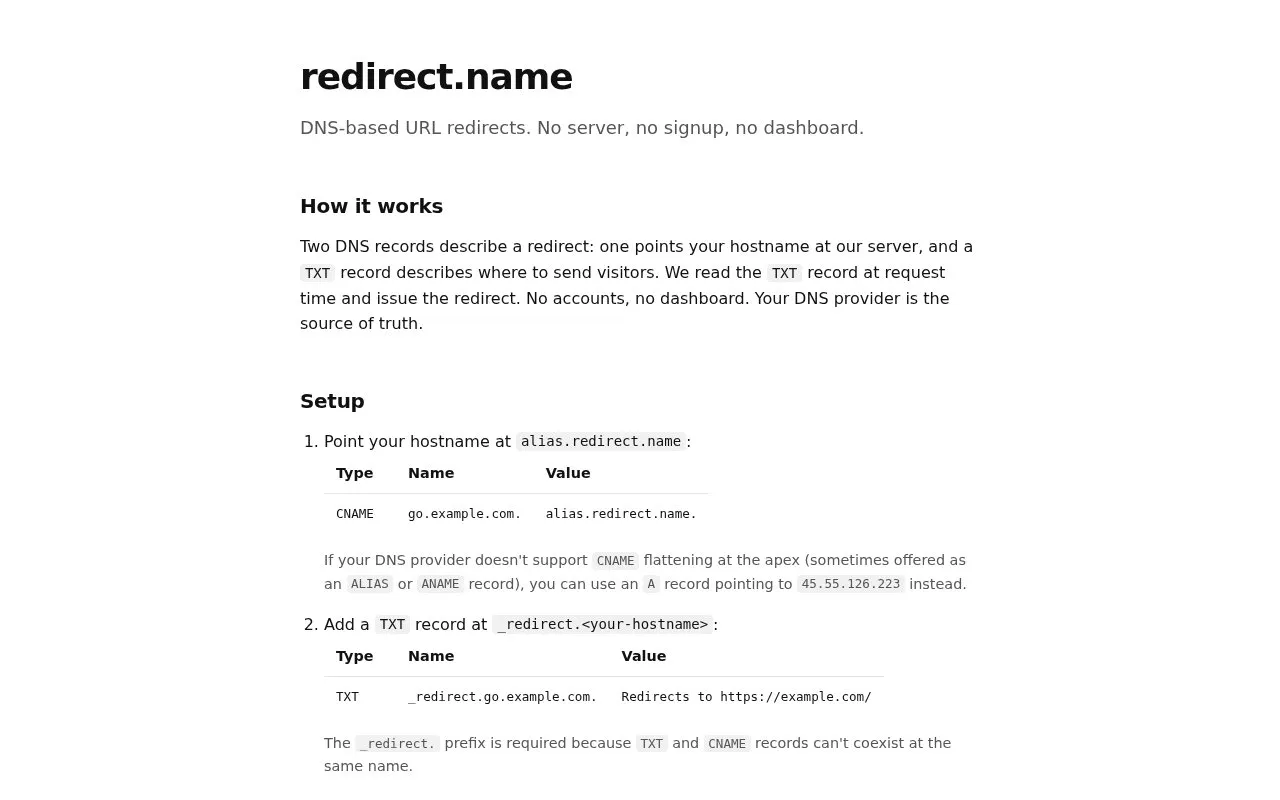
About redirect.name
redirect.name handles URL redirects through DNS records rather than a server or dashboard. A CNAME points the hostname at alias.redirect.name, and where the DNS provider does not support CNAME flattening at the apex (sometimes offered as ALIAS or ANAME), an A record pointing to 45.55.126.223 can be used instead. A TXT record at _redirect. holds the redirect rule, which is read at request time, so the DNS provider acts as the source of truth and no account is needed.
Rules use a plain-English syntax: "Redirects to " produces a 302, "Redirects permanently to " produces a 301, and "Redirects from to " applies when the request path matches, with an optional explicit status of 301, 302, 307 or 308. Wildcards are supported, multiple TXT records can sit at the same name, and path-specific rules are tried before catch-all rules. Destinations can use http, https, ftp, mailto, magnet or an absolute path. HTTPS certificates are issued automatically by Let's Encrypt on the first request to a new hostname, which may take a couple of seconds.
Key features
- Redirect rules stored as DNS TXT records at _redirect.
- CNAME to alias.redirect.name, or A record to 45.55.126.223 at apex
- Plain-English rule syntax such as "Redirects permanently to "
- Status codes 301, 302, 307 and 308, set explicitly in the rule
- Path-specific and wildcard rules, with path rules matched first
- Automatic Let's Encrypt HTTPS certificates on first request
Best for: People who already control a domain's DNS and want to redirect a hostname without running a server or signing up for an account.
Good for
- No server, signup or dashboard; DNS records are the only configuration
- Multiple TXT records at one name allow path routing plus a catch-all fallback
- HTTPS works out of the box with certificates issued automatically by Let's Encrypt
Watch out for
- The _redirect. prefix is required because TXT and CNAME records cannot coexist at the same name
- Apex hostnames depend on the DNS provider supporting CNAME flattening, ALIAS or ANAME, otherwise a fixed A record is needed
- The first request to a new hostname may take a couple of seconds while the certificate is provisioned
redirect.name at a glance
- Website
- redirect.name
- Category
- Development › Domain, IP & DNS Lookup
- Type
- Website
- Pricing
- Not confirmed. Check the site
- Platforms
- Web
- Open source
- Not stated
- Language
- English
- Last checked
- Oct 5, 2026 · Online when checked
- Listed
- Oct 5, 2026
redirect.name alternatives
Tools and sites you could use instead, ranked by how closely they match.

Verisign Whois Search provides information about domain name registrations, including .com and .net records.

metabigor collects open source intelligence about internet assets without requiring API keys for its workflow.
Open source
24 alternatives
Google Transparency Report publishes data about requests and activity affecting Google services.
Pick
24 alternativesWhoxy provides a WHOIS API for looking up domain registration records from a database of historical records.
Paid
24 alternatives
Look up domain, IP, autonomous system, and entity records with RDAP.org RDAP-based lookup tool.
Popular in Domain, IP & DNS Lookup
Well-known listings from the same topic.
Cloudflare DNScloudflare.com/application-services/products/dnsNetlas:netlas.ioIWantMyNameiwantmyname.comIPIP.NETwhois.ipip.netDomainrdomainr.comInstantDomaininstantdomainsearch.com


redirect.name FAQ
What DNS records do I need to set up a redirect?
Point your hostname at alias.redirect.name with a CNAME (or an A record to 45.55.126.223 if apex flattening is unavailable), then add a TXT record at _redirect. whose value describes the redirect.
How long does it take for a redirect to start working?
You need to wait for DNS to propagate, usually a minute or two, then visit your hostname.
What should I check if the redirect does not happen?
Use dig to confirm the CNAME or A record resolves and that the TXT record matches what you set. If both look correct, check that the value starts with the word Redirects capitalized and that the destination is a fully qualified URL or an absolute path.
Is something wrong or out of date?
Tell us and an editor will check it.
Own this website?
Claim this listing
Claim the listing and suggest updates yourself. An editor checks every claim first.