
This page compares desktop environments for Linux and Unix, with macOS and Windows included for reference.
Reference Card
This i3 reference card lists keyboard shortcuts for common window manager actions.
About Reference Card
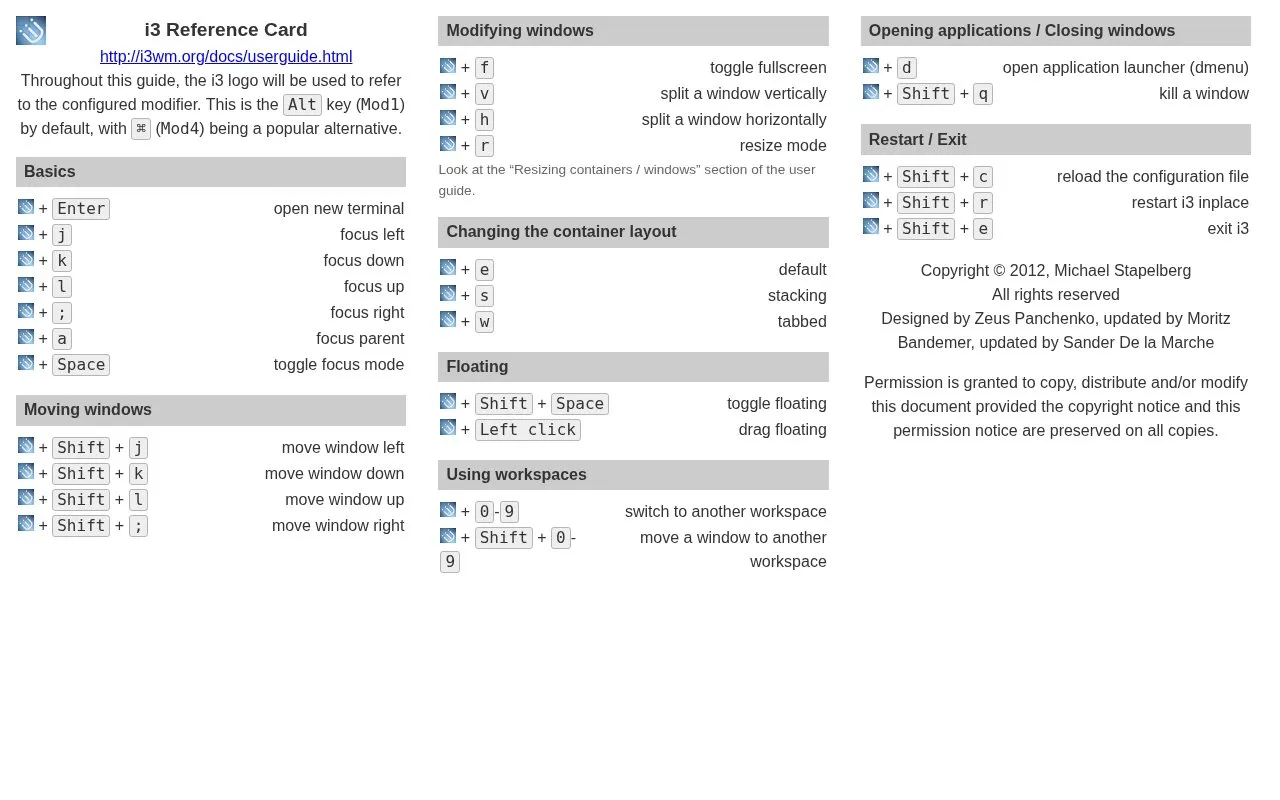
Reference Card is a one-page keyboard shortcut list for the i3 window manager, a tiling window manager. It groups shortcuts by task: moving focus, moving windows, splitting and resizing, changing container layouts, floating windows, switching workspaces, launching applications, and reloading or exiting i3.
The homepage description says i3 has clean, readable and documented code, extended Xinerama support, uses libxcb instead of xlib, and includes several improvements over wmii. The card itself does not cover installation or detailed configuration. For resize behavior, it refers readers to the "Resizing containers / windows" section of the user guide.
Key features
- Directional focus movement between windows using single-key shortcuts
- Moving windows left, down, up, and right with Shift shortcuts
- Vertical and horizontal splitting of windows
- Default, stacking, and tabbed container layout shortcuts
- Toggling floating mode and dragging floating windows with the mouse
- Switching windows and moving them between workspaces 0 to 9
Best for: Users of the i3 window manager who want a quick lookup of its common keyboard shortcuts.
Good for
- Shortcuts are grouped by task, which makes related commands easy to find.
- The homepage describes i3 as using libxcb instead of xlib.
Watch out for
- The card lists keyboard shortcuts only and does not explain setup or full configuration.
- Resize mode details are not on the card and are referred to the user guide.
Reference Card at a glance
- Website
- i3wm.org/docs/refcard.html
- Category
- Software & Utilities › Desktop Customization
- Type
- Website
- Pricing
- Not confirmed. Check the site
- Platforms
- Web, Windows
- Open source
- Not stated
- Language
- English
- Last checked
- Oct 6, 2026 · Online when checked
- Listed
- Oct 5, 2026
Reference Card alternatives
Tools and sites you could use instead, ranked by how closely they match.

This guide tracks Wayland support and lists alternative applications for common desktop tasks, such as launchers and screenshot tools.

MechaKeys simulates mechanical keyboard sounds on a desktop, with free and paid sound packs.
Freemium
24 alternatives
Awesome is a highly configurable and extensible window manager for X, described as fast and framework-based.
Pick
24 alternatives
The ArchWiki explains window managers and links to a comparison of tiling window managers.
Configure Qtile with Python and use its full-featured tiling window manager for arranging windows.
Popular in Desktop Customization
Well-known listings from the same topic.
Chezmoichezmoi.iodotfilesdotfiles.github.iobackieeapps.microsoft.com/store/detail/backiee-wallpa…Dynamic Themeapps.microsoft.com/detail/9nblggh1zbkwHydraPaperhydrapaper.gabmus.orgWallpaperCavewallpapercave.com


Reference Card FAQ
How do I reload the i3 configuration file?
The card lists Shift + c under restart and exit, labeled as reloading the configuration file. The modifier key is not shown in the text.
How do I restart i3 without exiting?
The card lists Shift + r for restarting i3 in place.
Where can I find more detail on resizing windows?
The card points to the "Resizing containers / windows" section of the i3 user guide.
Is something wrong or out of date?
Tell us and an editor will check it.
Own this website?
Claim this listing
Claim the listing and suggest updates yourself. An editor checks every claim first.