
EZ Conversion
Game audio files can be batch converted with EZ Game Audio Format Conversion.
About EZ Conversion
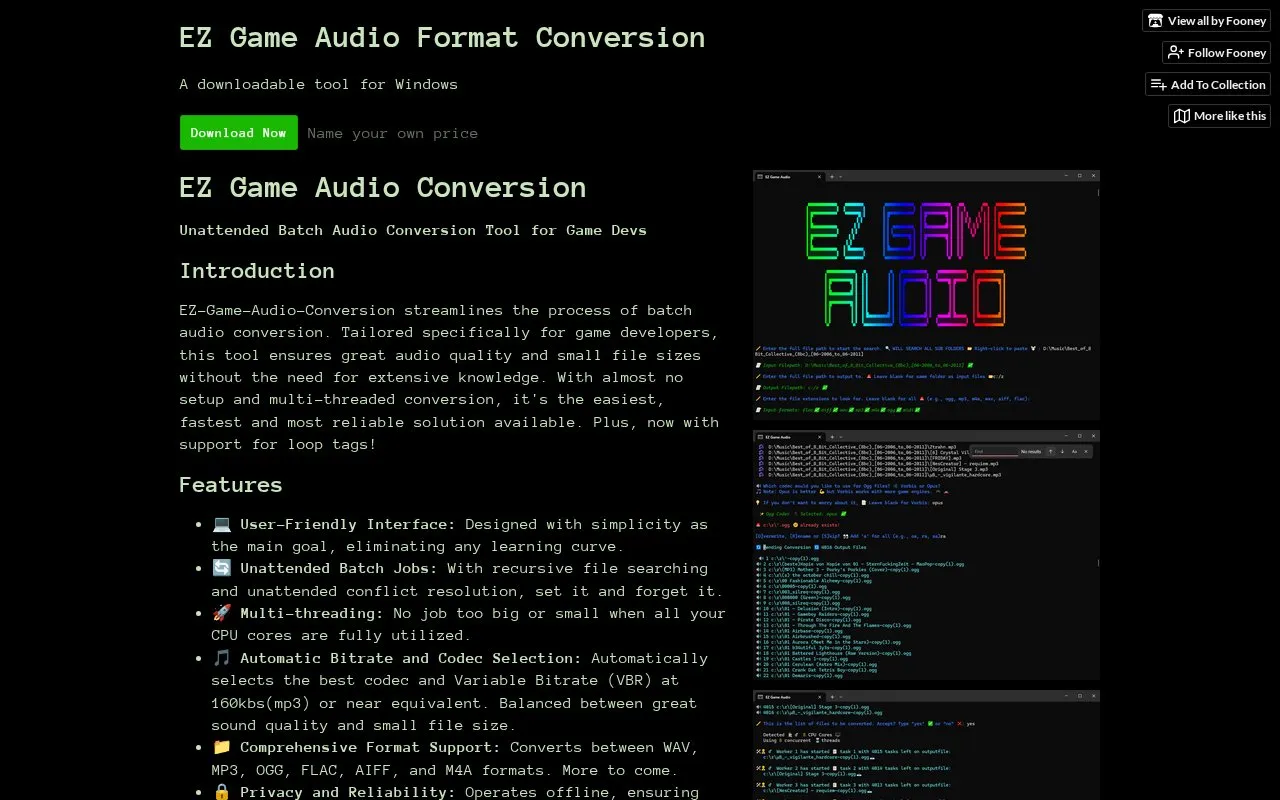
EZ Game Audio Format Conversion is a downloadable Windows tool for unattended batch conversion of audio files used in games. It searches folders recursively, resolves duplicate filenames and conflicting output files without intervention, and converts between WAV, MP3, OGG, FLAC, AIFF and M4A. Processing is multi-threaded, and the tool selects codec and variable bitrate settings automatically (around 160 kbps for MP3).
The tool runs offline and uses FFMPEG for encoding. Basic metadata is transferred between formats that support it, and loop metadata copies to new Ogg or FLAC files, with loop timings adjusted automatically when the sample rate changes; loop tags can be read from M4A but not written to it. A Windows PC is required, and changing bitrate or codec settings means editing converterWorker.js in the source.
Key features
- Batch conversion between WAV, MP3, OGG, FLAC, AIFF and M4A
- Recursive file search with unattended duplicate-name and output-conflict resolution
- Multi-threaded conversion that uses available CPU cores
- Automatic codec and variable bitrate selection, about 160 kbps for MP3
- Loop metadata written to new Ogg and FLAC files, timings adjusted on sample-rate changes
- Runs offline; uses FFMPEG for encoding
Best for: Game developers, including RPG Maker and Unity users, who need to convert batches of audio into game-friendly formats.
Good for
- Unattended batch jobs with recursive search and automatic duplicate and conflict handling
- Copies loop metadata to Ogg and FLAC and adjusts loop timings when sample rate changes
- Operates offline, so files are processed locally rather than uploaded
Watch out for
- Requires a Windows PC; only a Windows build is offered
- Loop tags cannot be written to M4A, only read from it
- Changing bitrate or codec settings requires editing converterWorker.js in the source
EZ Conversion at a glance
- Category
- Music & Audio › Audio Editing & Production
- Type
- Online tool
- Pricing
- Not confirmed. Check the site
- Platforms
- Web, Windows
- Open source
- Not stated
- Language
- English
- Good for
- Developers
- Last checked
- Oct 6, 2026 · Online when checked
- Listed
- Oct 5, 2026
Guides for Audio Editing & Production
EZ Conversion alternatives
Tools and sites you could use instead, ranked by how closely they match.

Audacity is a free, open-source audio editor and recorder for Windows, macOS and Linux. It supports multitrack editing, audio format conversion and effects plugins.
FreeOpen source
13 alternativesPopular in Audio Editing & Production
Well-known listings from the same topic.
Basic Pitchbasicpitch.spotify.comWebChuck IDEccrma.stanford.edu/~tzfeng/webchuck-ideVO Padsvo.odgn.netWebSynthswebsynths.comsamplv1samplv1.sourceforge.ioSoundboardGuyssoundboardguys.com


EZ Conversion FAQ
Which audio formats can it convert between?
WAV, MP3, OGG, FLAC, AIFF and M4A, with more formats stated as planned. Ogg output defaults to the Opus codec, with Vorbis also supported; WAV and AIFF use pcm_s16le, and M4A uses the lossy AAC codec.
How are loop points handled?
Loop metadata is transferred to new Ogg or FLAC files, and loop timings are adjusted automatically when the sample rate changes. Loop tags cannot be written to M4A, only read from it. RPG Maker MV and MZ play Opus but do not support loop tags, and MV will not play Opus in the editor.
What is written if some files fail during a batch job?
A logs.csv file is placed at the specified output path, and errors are logged separately to errors.csv. Some files may report errors but still convert correctly.
Is something wrong or out of date?
Tell us and an editor will check it.
Own this website?
Claim this listing
Claim the listing and suggest updates yourself. An editor checks every claim first.