
Audacity
Audacity is a free, open-source audio editor and recorder for Windows, macOS and Linux. It supports multitrack editing, audio format conversion and effects plugins.
About Audacity
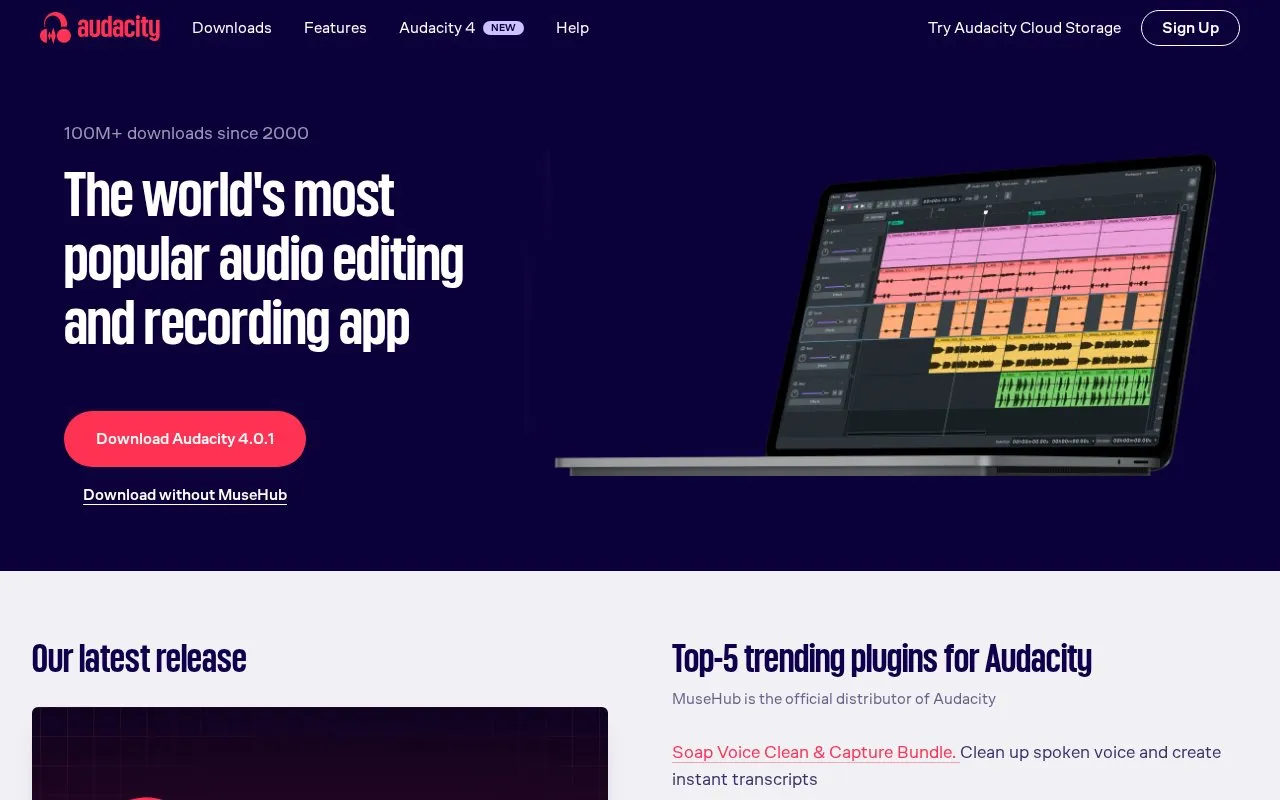
Audacity is a free, open-source audio recorder and editor for Windows, macOS and Linux. You can record audio, bring existing recordings into a project, arrange tracks and export a finished file. That makes it useful for spoken recordings, podcast edits, music projects and format conversion. It supports common formats such as WAV, MP3, FLAC and Ogg, with VST3 and Nyquist plugins available for additional processing. Spectrogram view and Vamp analyzers provide ways to examine frequencies as well as listen to a recording.
The distinction between saving and exporting matters. An Audacity project keeps tracks and edits so you can return to unfinished work, but other players cannot play that project directly. Export Audio creates the file you send to a listener or use in another application. Keep the editable project if you expect more changes. Some additional formats need the optional FFmpeg library, and projects with long recordings or repeated edits can use considerably more disk space than a compressed audio export.
Key features
- Record and arrange audio in multitrack projects
- Import and export common formats including WAV, MP3, FLAC and Ogg
- Add audio processing with VST3 and Nyquist plugins
- Inspect frequencies with spectrogram view and Vamp analyzers
- Save editable projects separately from finished audio exports
Best for: People editing spoken recordings, podcasts or music on a desktop who want free tools and control over the exported audio file.
Good for
- Free, open-source app for Windows, macOS and Linux
- Editable projects preserve tracks for later changes
- Supports common audio formats and third-party processing plugins
Watch out for
- Saved Audacity projects need an export before other audio players can use them
- Some additional import and export formats require the optional FFmpeg library
- Long projects and editing history can require substantial disk space
Audacity at a glance
- Website
- audacityteam.org
- Category
- Music & Audio › Audio Editing & Production
- Type
- App
- Pricing
- Free
- Platforms
- Linux, macOS, Windows
- Details verified
- Oct 20, 2026 · Official source
- Open source
- Yes · Source code
- Language
- English
- Last checked
- Oct 5, 2026 · Online when checked
- Listed
- Oct 5, 2026
Guides for Audio Editing & Production
Audacity alternatives
Tools and sites you could use instead, ranked by how closely they match.

Game audio files can be batch converted with EZ Game Audio Format Conversion.
Tenacity provides cross-platform multitrack audio recording and editing, with audio import, export, and plugin support in an open source project.

The free Decent Sampler plugin plays samples in Decent Sampler format and is available for Mac, Windows, Linux, and iOS.

Based on Pure Data, plugdata provides visual audio patching with desktop, mobile, and plugin formats listed for several platforms.
Free
6 alternatives
Airwindows Consolidated collects audio plugins available in Mac AU and VST formats for Mac, Windows, and Linux.

Igorski offers free audio plugins in VST and Audio Unit formats, plus Kontakt instruments that work with Kontakt or Kontakt Player.
Free
9 alternativesAudacity comparisons

Featured in
 8 sites


Best of
8 Best Free Audio Editors in 2026 for Voice and Music
The best free audio editors handle very different jobs: cleaning a voice recording, arranging a song or trimming a…
Popular in Audio Editing & Production
Well-known listings from the same topic.
Basic Pitchbasicpitch.spotify.comWebChuck IDEccrma.stanford.edu/~tzfeng/webchuck-ideVO Padsvo.odgn.netWebSynthswebsynths.comsamplv1samplv1.sourceforge.ioSoundboardGuyssoundboardguys.com


Audacity FAQ
Why will my saved Audacity project not play in another app?
A project stores editable work for Audacity. Use Export Audio to create a playable file such as WAV or MP3.
Can Audacity import M4A or audio from a video file?
The optional FFmpeg library adds M4A and other formats and lets Audacity import audio from many video files. Install it using the official instructions for your operating system.
Is something wrong or out of date?
Tell us and an editor will check it.
Own this website?
Claim this listing
Claim the listing and suggest updates yourself. An editor checks every claim first.