

FastFlix
Encode videos with FastFlix, a free desktop interface for H.264, HEVC and AV1 hardware or software encoders.
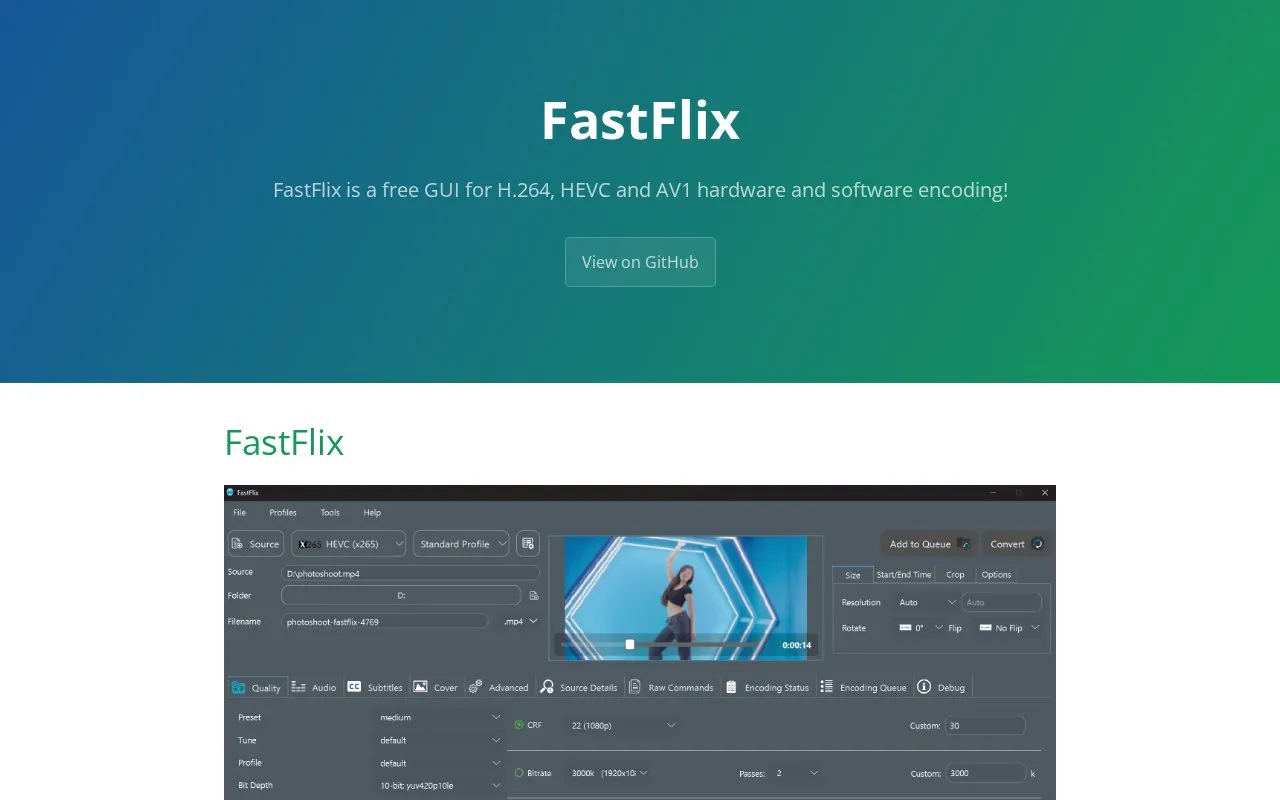
About FastFlix
FastFlix is a free desktop GUI for encoding video with H.264, HEVC and AV1 using software or hardware encoders. It runs on Windows, macOS and Linux and relies on FFmpeg under the hood, offering software encoders such as x264, x265, rav1e, AOM AV1, SVT AV1, VP9 and VVC, plus hardware encoding through NVEnc, QSVEnc, VCEEnc, VAAPI and Apple VideoToolbox. It can copy HDR10 metadata, pass through HLG color transfer information, and copy existing Dolby Vision metadata for HEVC and AV1 with rigaya's hardware encoders.
Setup depends on external components. FFmpeg and ffprobe executables must be on the PATH, with version 4.3 or greater required and 5.0+ recommended; the version in a package manager may not include all encoders. Hardware encoders require matching hardware, and most rigaya encoders for Nvidia, Intel and AMD must be downloaded separately and linked in the Settings panel, though FastFlix can download them automatically on Windows. AV1 hardware encoding is limited to Intel Arc, Nvidia 4000 series and AMD 7000 series cards.
Key features
- GUI for H.264, HEVC, AV1, VP9 and VVC encoding
- Software encoders include x264, x265, rav1e, AOM and SVT AV1
- Hardware encoding via NVEnc, QSVEnc, VCEEnc, VAAPI and VideoToolbox
- Extracts and copies HDR10 metadata with supported encoders
- Passes through HLG color transfer for most output formats
- Copies existing Dolby Vision metadata for HEVC and AV1
Best for: People who want a graphical front end for FFmpeg-based H.264, HEVC or AV1 encoding on desktop, including users handling HDR metadata.
Good for
- Covers a wide range of software and hardware encoders in one interface
- Handles HDR10, HDR10+, HLG and Dolby Vision metadata copying where supported
- Available for Windows, macOS and Linux, with interface translations via DeepL
Watch out for
- Requires FFmpeg 4.3+ and ffprobe executables on the PATH, installed separately
- Hardware encoders need compatible hardware and manual linking of rigaya encoders outside Windows
- AV1 hardware encoding works only on Intel Arc, Nvidia 4000 series and AMD 7000 series
FastFlix at a glance
- Website
- fastflix.org
- Category
- Design & Creative › Video Editing & Animation
- Type
- Online tool
- Pricing
- Not confirmed. Check the site
- Platforms
- Linux, macOS, Web
- Open source
- Not stated
- Language
- English
- Last checked
- Oct 5, 2026 · Online when checked
- Listed
- Oct 5, 2026
Guides for Video Editing & Animation

FastFlix alternatives
Tools and sites you could use instead, ranked by how closely they match.

FastFlix provides a graphical interface for hardware and software encoding with H.264, HEVC, and AV1 codecs.
FreeOpen source
24 alternatives
Encode videos and work with DVD or Blu-ray sources in VidCoder, an open-source video conversion tool.

NEAV1E provides a GUI for AV1 and VP9 encoders, splitting videos into chunks and processing them with multiple workers.
Open source
24 alternatives
StaxRip provides a Windows encoding interface for video and audio tools including FFmpeg, x265, and MKVToolNix.
FreeOpen source
24 alternatives
This HandBrake guide covers presets, encoding settings, Blu-ray and DVD workflows, file size control, and video transcoding.

The JET Encoding Guide collects information about multimedia, video encoding, and VapourSynth in a set of linked reference pages.
Popular in Video Editing & Animation
Well-known listings from the same topic.
Animakeranimaker.com8mb.video8mb.videoASM Lessonsgithub.com/FFmpeg/asm-lessonsCuttrcuttr.inVideo Cuttervideo-cutter-js.comFreeMoCapfreemocap.org


FastFlix FAQ
Does FastFlix include FFmpeg?
No. You must have ffmpeg and ffprobe executables on your PATH and they must be executable. Version 4.3 or greater is required for most usage, and a recent master build is recommended and needed for some features.
What hardware do the hardware encoders require?
An Nvidia GPU for NVEnc, an Intel GPU or CPU for QSVEnc, an AMD GPU for VCEEnc, compatible hardware for VAAPI on Linux, and Apple VideoToolbox on macOS.
Which graphics cards support AV1 hardware encoding?
AV1 hardware encoding is supported only on the latest generation of graphics cards: Intel Arc, Nvidia 4000 series and AMD 7000 series.
Is something wrong or out of date?
Tell us and an editor will check it.
Own this website?
Claim this listing
Claim the listing and suggest updates yourself. An editor checks every claim first.