
Sora's Pixel Converter turns images into retro pixel art with palettes, dialog styles, effects, and PNG or video export.
FontVibe
FontVibe turns text into visual artwork using AI font effects, with more than 120 styles and PNG or JPG downloads.
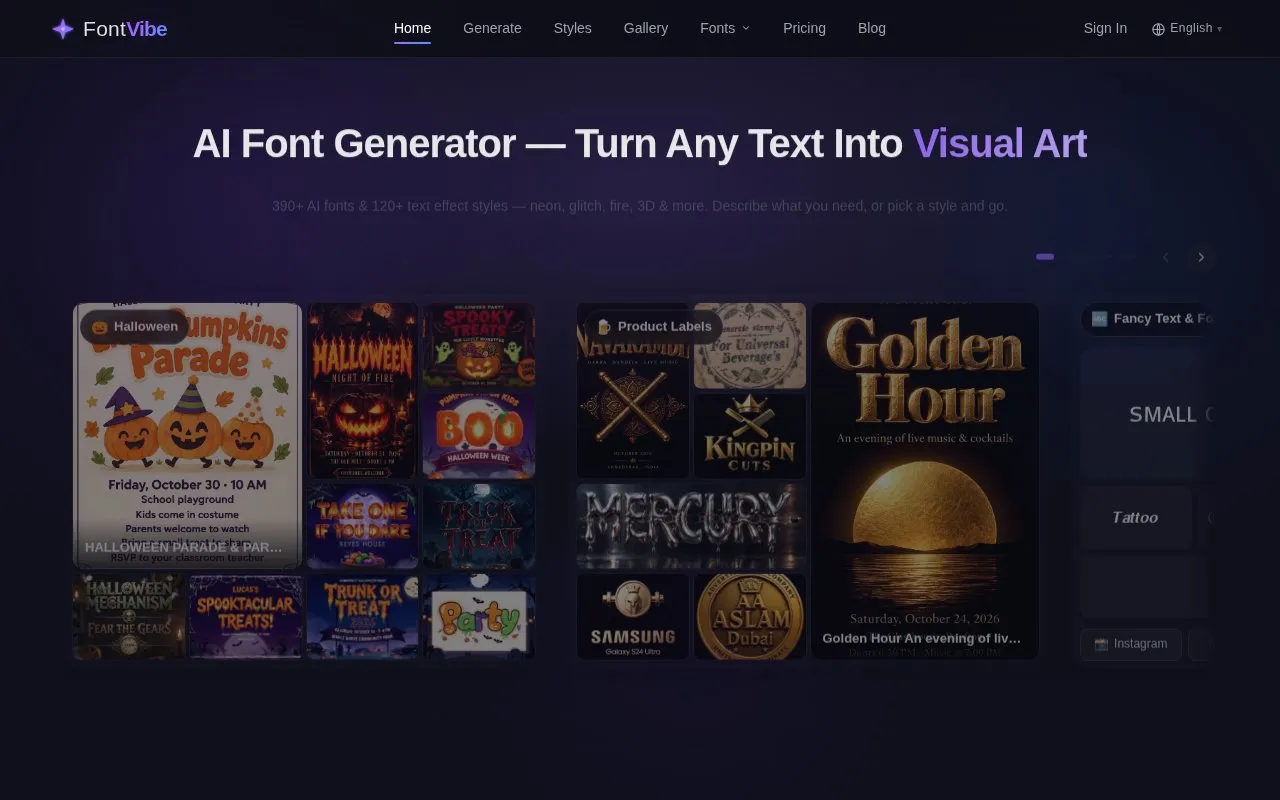
About FontVibe
FontVibe is a web-based AI font generator that turns typed text into stylized text artwork. Users either describe the look they want or choose one of more than 120 text effect styles, such as neon, glitch, fire and 3D. The homepage lists 391 AI fonts, each described as a complete lettering design that includes lighting, texture and background. Finished designs can be downloaded as PNG or JPG files.
The homepage offers 20 free credits and says no account is needed to begin. Use-case pages provide preset dimensions for formats such as channel logos and YouTube thumbnails. The Transparent Effect style outputs a PNG with the background removed, and that output is always PNG. Pricing beyond the free credits is not stated on the homepage.
Key features
- Generates text artwork from a typed description or a selected style
- Offers 391 AI fonts, each with generated lighting, texture and background
- Provides more than 120 text effect styles, including neon, glitch, fire and 3D
- Transparent Effect style outputs a PNG with the background removed
- Downloads finished designs as PNG or JPG files
- Use-case pages set preset sizes such as 1024 × 1024 px and 1824 × 1024 px
Best for: Creators and individuals who want stylized text graphics for logos, thumbnails, or invitations without manual lettering.
Good for
- The homepage states that users can start with 20 free credits.
- No account is required to begin generating, according to the homepage.
- Use-case pages provide preset dimensions for common formats such as channel logos and thumbnails.
Watch out for
- Free use is limited by credits, and the homepage shows 20 free credits remaining.
- Transparent Effect outputs are always PNG files.
- Pricing beyond the free start is not stated on the homepage.
FontVibe at a glance
- Website
- fontvibe.ai
- Category
- Design & Creative › Image Creation & Editing
- Type
- Online tool
- Pricing
- Not confirmed. Check the site
- Platforms
- Web
- Open source
- Not stated
- Language
- English
- Last checked
- Oct 6, 2026 · Online when checked
- Listed
- Oct 5, 2026
FontVibe alternatives
Tools and sites you could use instead, ranked by how closely they match.

Image Mage applies visual styles to source photos, with controls for effects such as pixel art, comic-style output, and color changes.
Free
11 alternatives
IOGraphica turns mouse movements during everyday computer use into a visual artwork.

FotoSketcher turns photos into paintings, drawings, and sketches using a selection of artistic effects.
Free
Popular in Image Creation & Editing
Well-known listings from the same topic.
Canvacanva.comGIMPgimp.orgGreenScreenMemesgreenscreenmemes.comMeme Townmeme.townKRESKA.artkreska.artPixelartVillagepixelartvillage.com


FontVibe FAQ
What file formats can I download?
Designs can be downloaded as PNG or JPG files. Transparent Effect outputs are always PNG.
Do I need an account to use FontVibe?
The homepage says no account is needed to start. Typing a description and selecting Generate is the stated starting step.
How does the transparent background option work?
The Transparent Effect style generates a PNG with the background removed, leaving only the text and its effects. The AI selects the background color it uses for removal based on the chosen style.
Is something wrong or out of date?
Tell us and an editor will check it.
Own this website?
Claim this listing
Claim the listing and suggest updates yourself. An editor checks every claim first.