

ForkLift
A Mac dual-pane file manager with remote server connections and file-transfer workflows.
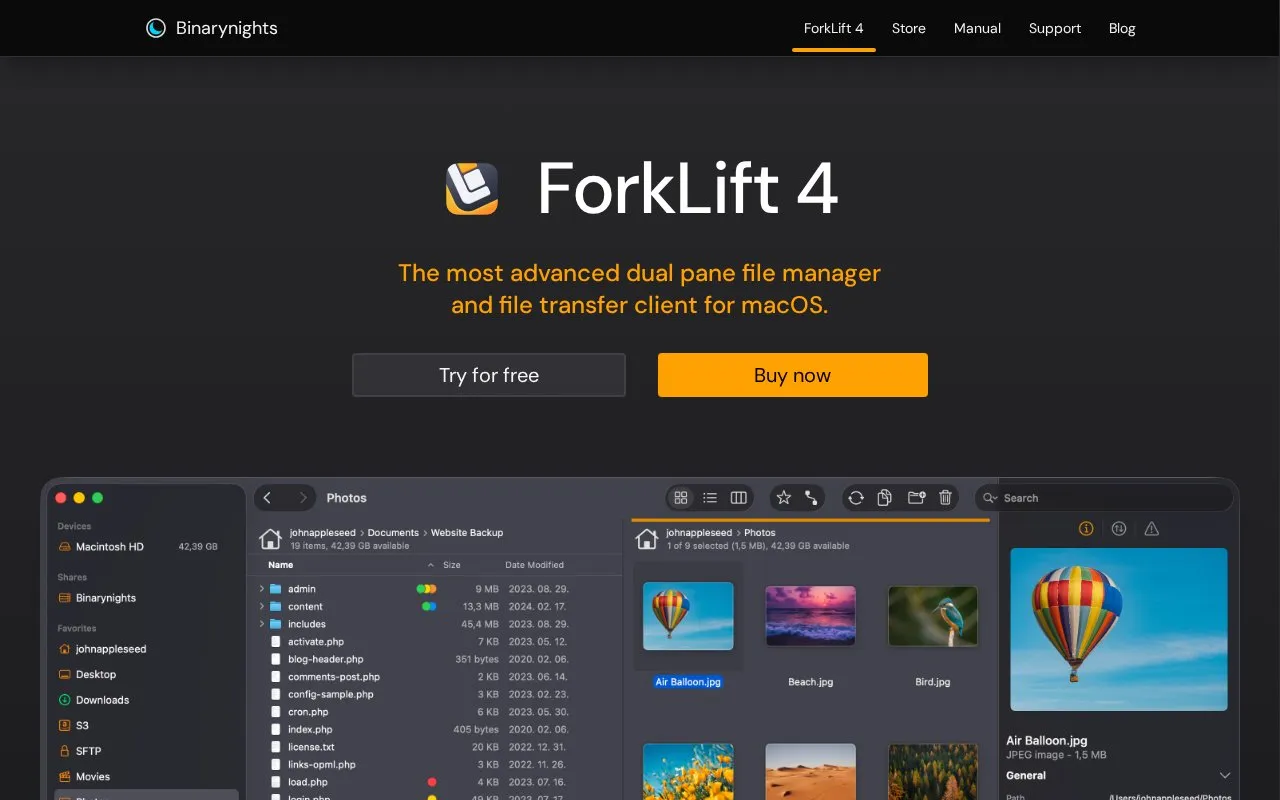
About ForkLift
ForkLift is a file manager and file transfer client for macOS. It uses a dual-pane layout to manage files on local drives and on remote servers and cloud storage. It can connect to SFTP, FTP, WebDAV, Amazon S3, Backblaze B2, Google Drive, OneDrive, Dropbox, Rackspace Cloud Files, SMB, AFP, and NFS volumes, and it can copy files between two remote servers by drag and drop.
The product includes folder comparison and one- or two-way synchronization, a transfer activity view, and a log of file operations. Favorite paths and favorites can be kept in sync across multiple computers through iCloud. Remote text files can be edited in a chosen editor, with changes uploaded on save. The homepage lists requirements of macOS 14.6 and describes the product as paid, with a free trial offered.
Key features
- Dual-pane file manager with tabs for opening multiple folders in one pane
- Connects to SFTP, FTP, WebDAV, Amazon S3, Google Drive, and other remote services
- Compares local or remote folders and synchronizes them one- or two-way
- Edits remote text files and uploads changes when saved
- Activity view shows file tasks in real time, with a log of results
- Git support shows file status and can add, commit, push, and pull
Best for: Mac users who regularly transfer, compare, or manage files on remote servers or cloud storage accounts.
Good for
- Supports many remote protocols and cloud storage services in one application
- Shows progress for copying, deleting, and other file tasks, plus a log of results
- Can compare and synchronize local or remote folders from one interface
Watch out for
- Requires macOS 14.6 according to the homepage
- Is a paid product, with a free trial offered
- Favorite sync across computers uses iCloud
ForkLift at a glance
- Website
- binarynights.com
- Category
- Software & Utilities › File Utilities
- Type
- Online tool
- Pricing
- Paid
- Open source
- Not stated
- Last checked
- Oct 9, 2026 · Online when checked
- Listed
- Oct 9, 2026
Guides for File Utilities
ForkLift alternatives
Tools and sites you could use instead, ranked by how closely they match.

Panic’s paid Mac file-transfer application for remote servers and supported storage services.
Paid
9 alternatives
OneCommander is a Windows file manager with dual-pane browsing, Miller columns, tabs, and built-in previews.

FTP file transfers are supported by FileZilla, a free open-source client and server application.
Free

SmartFTP provides Windows file transfers over FTP, FTPS, SFTP, WebDAV, cloud storage services, and terminal connections.

FTP, SFTP, S3, and WebDAV transfers are supported by WinSCP, a Windows file manager.
Featured in
 8 sites
Best of
8 Best SFTP Clients for Uploads and Remote File Management
I'd start with WinSCP on Windows and FileZilla when the same transfer tool needs to run across Windows, macOS and…
Popular in File Utilities
Well-known listings from the same topic.
SDeletelearn.microsoft.com/en-us/sysinternals/downloa…PowerRenamelearn.microsoft.com/en-us/windows/powertoys/po…robocopylearn.microsoft.com/windows-server/administrat…VERTvert.shNanaZipnanazip.orgPhotonphotondev.netlify.app


ForkLift FAQ
Which remote services can ForkLift connect to?
The homepage lists SFTP, FTP, WebDAV, Amazon S3, Backblaze B2, Google Drive, OneDrive, Dropbox, Rackspace Cloud Files, SMB, AFP, and NFS remote volumes.
How are favorites kept in sync across computers?
ForkLift keeps favorites synchronized across multiple computers through iCloud.
Which languages is the interface available in?
The homepage lists English, German, Hungarian, French, Spanish, Portuguese, Polish, Ukrainian, Italian, Czech, Japanese, and Chinese.
Is something wrong or out of date?
Tell us and an editor will check it.
Own this website?
Claim this listing
Claim the listing and suggest updates yourself. An editor checks every claim first.