

Auto Refresh Plus lets users set page refresh intervals and monitor changing web pages in Chrome, Firefox, Edge, and Opera.
FX Cast
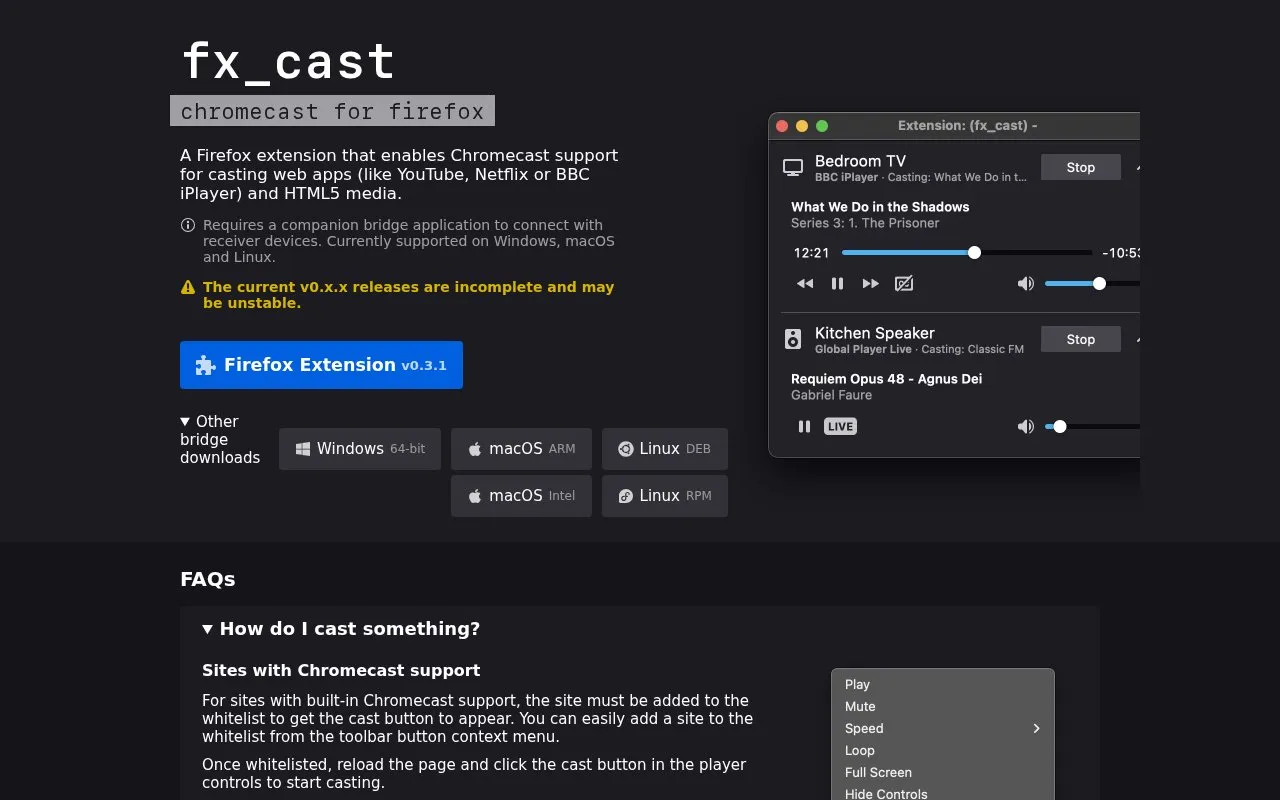
fx_cast is a Firefox extension that enables Chromecast support for casting web apps and HTML5 media, according to its project page.
About FX Cast
FX Cast is a Firefox extension that adds Chromecast support for casting web apps such as YouTube, Netflix or BBC iPlayer, and HTML5 media. It requires a separate companion bridge application to connect with receiver devices.
It is supported on Windows, macOS and Linux. The current v0.x.x releases are described as incomplete and may be unstable, and not all sites are well-supported.
Key features
- Casts web apps with built-in Chromecast support after whitelisting
- Casts HTML5 media through browser context menu Cast option
- Uses companion bridge application to discover and connect devices
- Adds sites to whitelist from toolbar button context menu
- Supports daemon mode for sandboxed Firefox snap and Flatpak
- Bridge available via Homebrew and Arch Linux AUR packages
Best for: Firefox users on Windows, macOS, or Linux who want to cast web apps and HTML5 media to Chromecast devices.
Good for
- Casts both web apps and HTML5 media to Chromecast devices
- Works on Windows, macOS, and Linux
- Bridge can be installed via Homebrew on macOS and AUR on Arch Linux
Watch out for
- Current v0.x.x releases are described as incomplete and may be unstable
- Not all sites are well-supported and users may encounter issues
- No sound when casting a screen or tab due to API limitations
FX Cast at a glance
- Website
- hensm.github.io/fx_cast
- Category
- Software & Utilities › Firefox Extensions
- Type
- Website
- Pricing
- Not confirmed. Check the site
- Platforms
- Browser extension, Linux, macOS, Web, Windows
- Open source
- Not stated
- Language
- English
- Last checked
- Oct 5, 2026 · Online when checked
- Listed
- Oct 5, 2026
FX Cast alternatives
Tools and sites you could use instead, ranked by how closely they match.

The CatalyzeX Firefox extension helps find code implementations for research papers across search and research sites.

Cookie-Editor lets users create, edit, and delete cookies for the current browser tab.

This browser extension downloads books from Internet Archive and HathiTrust Digital Library, with a notice naming its official source.
Open source
24 alternatives
CRX Installer installs Chrome extensions in Zen, Firefox Nightly, and LibreWolf, with additional setup steps noted for some browsers.
PWAsForFirefox helps users install, manage, and use Progressive Web Apps in Mozilla Firefox.
Free
18 alternativesPopular in Firefox Extensions
Well-known listings from the same topic.
Browserlingbrowserling.comSocialFocussocialfocus.appKarakeepkarakeep.appFirefoxCSS Storefirefoxcss-store.github.ioPagetualpagetual.hoothin.comShortkeysshortkeys.app


FX Cast FAQ
How do I cast something?
For sites with built-in Chromecast support, add the site to the whitelist from the toolbar button context menu, reload the page, then click the cast button in the player controls. For certain HTML5 media, use the "Cast..." item in the browser context menu, which requires a network-accessible URL and does not work with DRM-encumbered media.
Why do I need the bridge?
WebExtension APIs do not provide mDNS/DNS-SD for device discovery or TCP connections for communicating with Chromecast devices, so the separate bridge application handles that connection.
Why aren't my devices being found?
The bridge relies on Bonjour on Windows/macOS and Avahi on Linux, so system service or network configuration issues can prevent discovery. Devices using the older DIAL protocol are not currently supported, and some network setups such as virtual machine adapters can interfere with mDNS.
Is something wrong or out of date?
Tell us and an editor will check it.
Own this website?
Claim this listing
Claim the listing and suggest updates yourself. An editor checks every claim first.