
This Game Bar guide explains how to locate the performance widget and adjust its display settings.
Steam Deck Tools
Adjust fan, overlay, power, and Steam Controller settings on Windows with Steam Deck Tools.
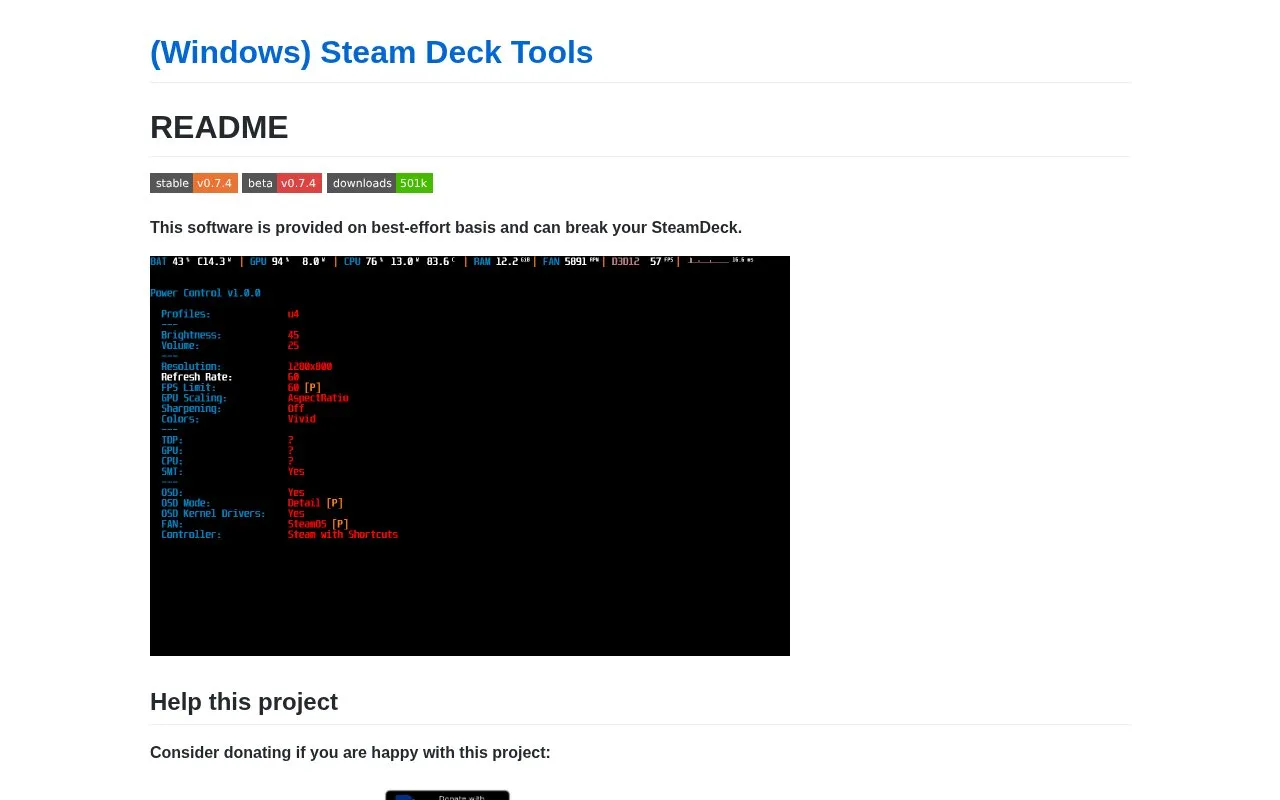
About Steam Deck Tools
Steam Deck Tools provides four applications for Steam Deck running Windows: Fan Control, Performance Overlay, Power Control, and Steam Controller. They cover fan control, viewing FPS and other stats, changing TDP or refresh rate, and using Deck controls with Game Pass.
The software is provided on a best-effort basis and can break the device. It uses kernel memory manipulation that can cause system instability and may trigger antivirus or anti-cheat software, including possible suspension or ban in online games. It validates the BIOS version against a list of supported Steam Deck LCD and OLED versions, and it can connect to a remote server to check for updates or track errors.
Key features
- Control Steam Deck fan on Windows
- Display FPS and hardware stats overlay
- Adjust TDP and screen refresh rate
- Map Steam Deck controls for Game Pass use
- Check BIOS version against supported list
Best for: Steam Deck owners running Windows who need fan, overlay, power, and controller adjustments.
Good for
- Includes fan, overlay, power, and controller tools in one project
- Does not use kernel-level features by default
- Documents settings considered safe for online games
Watch out for
- Provided on best-effort basis and can break the device
- Kernel memory use can cause instability and trigger antivirus or anti-cheat detection
- Supports only listed Steam Deck LCD and OLED BIOS versions
Steam Deck Tools at a glance
- Website
- steam-deck-tools.ayufan.dev
- Category
- Gaming › Game Utilities & Launchers
- Type
- Website
- Pricing
- Not confirmed. Check the site
- Platforms
- Web, Windows
- Open source
- Not stated
- Language
- English
- Last checked
- Oct 5, 2026 · Online when checked
- Listed
- Oct 5, 2026
Steam Deck Tools alternatives
Tools and sites you could use instead, ranked by how closely they match.

This guide explains how to overclock and adjust NVIDIA GPU settings for improved system performance.

Adjust ZeroTier network interface settings on Windows to help multiplayer games work over local networks.
Open source
24 alternatives
Follow instructions for customizing the Steam overlay browser through this guide.

EmuDeck helps configure emulators on SteamOS, Steam Deck, ROG Ally, and Windows.

Adjust PC game behavior and settings with Special K, a toolkit for various game-related functions.
Open source
24 alternativesPopular in Game Utilities & Launchers
Well-known listings from the same topic.
Archivearchive.org/details/MemcardRex1.8cancerogenoslabsites.google.com/view/cancerogenoslabGameSave Managergamesave-manager.comGameGuidesgamerguides.comBalatro Wikibalatrowiki.orgBetter xCloudbetter-xcloud.github.io


Steam Deck Tools FAQ
Can I use it with online games that use anti-cheat?
It uses kernel memory manipulation via inpoutx64.dll and may trigger anti-cheat detection, which could cause interference or suspension or ban. For online play, use Default FAN, disable OSD Kernel Drivers, and change TDP, CPU and GPU frequency before starting the game.
What is needed to install it?
Download and install the latest SteamDeckTools setup.exe from GitHub Releases. Portable use requires manual installation of Microsoft Visual C++ Redistributable, Rivatuner Statistics Server, and ViGEmBus. SWICD, GlosSI, and HidHide should be uninstalled or disabled.
Which devices are supported?
The application validates the BIOS version. Supported versions are F7A0107, F7A0110, F7A0113, F7A0115, F7A0116, and F7A0119 for Steam Deck LCD, and F7G0107 for Steam Deck OLED.
Is something wrong or out of date?
Tell us and an editor will check it.
Own this website?
Claim this listing
Claim the listing and suggest updates yourself. An editor checks every claim first.