

Subtitle Generator
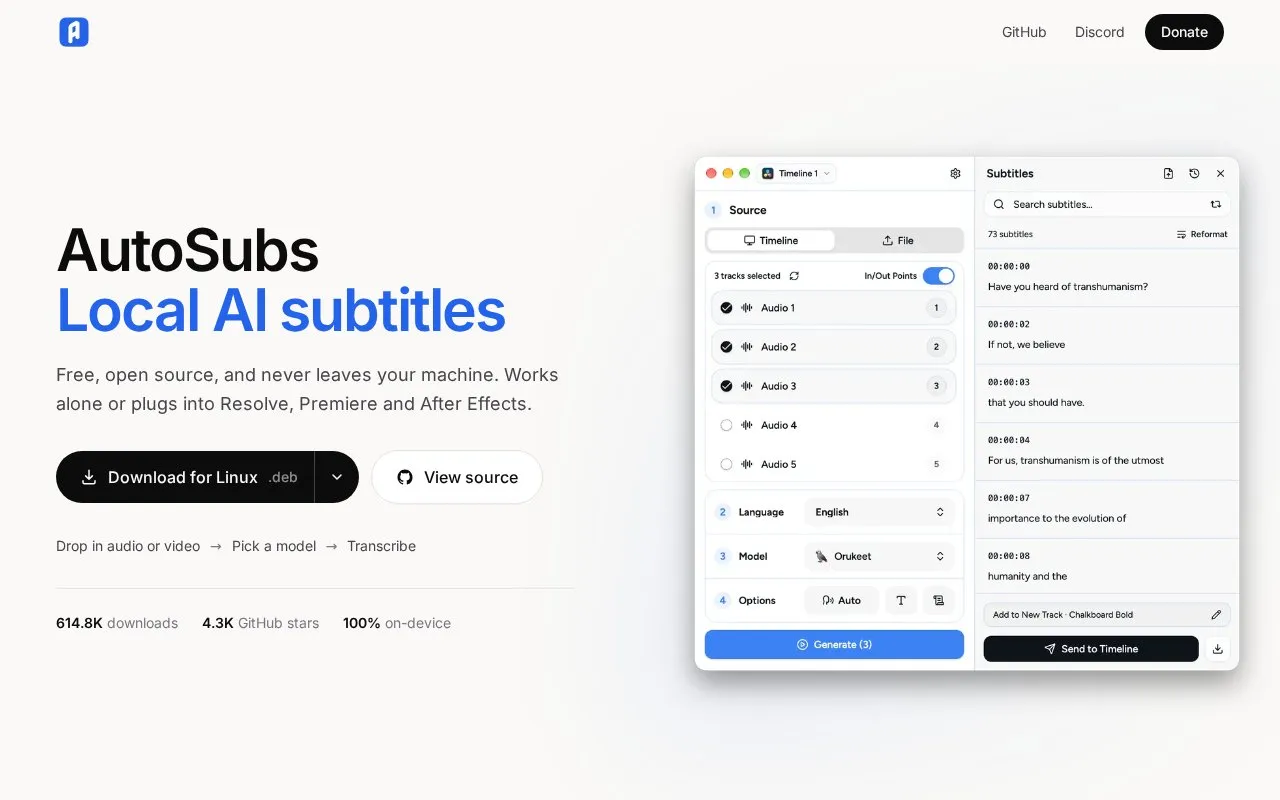
AutoSubs generates subtitles locally and can run on its own or integrate with DaVinci Resolve, Premiere Pro, and After Effects.
About Subtitle Generator
AutoSubs transcribes audio or video and produces subtitles on the user's own computer. It can run on its own, or it can be connected to DaVinci Resolve, Premiere Pro, and After Effects, where the generated text is placed on a timeline, caption track, or text layer. The homepage says transcription runs on the device, with no upload, account, or telemetry. It also says footage under NDA stays on the drive it came from. The homepage describes the software as free, but the directory has no verified pricing. Licensing is described inconsistently: the homepage calls it open source under the MIT license, while the directory record lists it as not open source.
The software offers several speech recognition model families, including Whisper, Parakeet, and Canary. Models are downloaded on demand, and their sizes range from about 40 MB to 3.7 GB. Language coverage depends on the model. The homepage's speed figure of 30 times faster than real time, with no GPU required, applies to specific models tested on an Apple M3 MacBook Pro. Installers are listed for macOS, Windows, and Linux.
Key features
- On-device transcription using downloadable model families, including Whisper, Parakeet, and Canary
- Word-level timing through forced alignment for karaoke-style and word-by-word captions
- Speaker labels through diarization for multi-person interviews and recordings
- Subtitle formatting with characters-per-line and per-second limits
- Captions placed directly into DaVinci Resolve, Premiere Pro, and After Effects
- Transcription and translation between languages, with SRT export
Best for: Video editors who want offline subtitles inside DaVinci Resolve, Premiere Pro, or After Effects, particularly for interviews and multi-speaker recordings.
Good for
- Homepage states that processing runs on the user's machine, with no upload, account, or telemetry
- Works standalone or connects to three video editing applications
- Provides speaker labels and word-level timing for interview and documentary work
Watch out for
- Speech models are downloaded on demand and range from about 40 MB to 3.7 GB
- The stated speed applies only to specific models on one Apple M3 MacBook Pro
- Directory record lists no verified pricing, and the license status is described inconsistently
Subtitle Generator at a glance
- Website
- tom-moroney.com/auto-subs
- Category
- Design & Creative › Video Editing & Animation
- Type
- Website
- Pricing
- Not confirmed. Check the site
- Platforms
- Linux, macOS, Web, Windows
- Open source
- Not stated
- Language
- English
- Last checked
- Oct 6, 2026 · Online when checked
- Listed
- Oct 5, 2026
Guides for Video Editing & Animation

Subtitle Generator alternatives
Tools and sites you could use instead, ranked by how closely they match.

FireCut automates silence cuts, captions, zooms, and chapters inside Premiere Pro and DaVinci Resolve.
Free trial
5 alternatives
DaVinci Resolve is a video editing and post-production app for Windows, macOS and Linux, combining editing, color correction, visual effects and audio tools. A free version is available alongside paid Resolve Studio.
Freemium
10 alternatives
INTRO HD lists After Effects and Premiere Pro templates, video templates, and related downloadable media assets.

AEDownloadPro lists After Effects and Premiere Pro templates, motion graphics, titles, and video assets, with downloadable examples on its site.

Apply an open-source VHS and NTSC video effect in a standalone app or plugins for After Effects, Premiere and OpenFX.

Blackmagic Design provides training materials for DaVinci Resolve, including a path to professional certification.
Popular in Video Editing & Animation
Well-known listings from the same topic.
Animakeranimaker.com8mb.video8mb.videoASM Lessonsgithub.com/FFmpeg/asm-lessonsCuttrcuttr.inVideo Cuttervideo-cutter-js.comMotionPlacesmotionplaces.com


Subtitle Generator FAQ
Does the software upload footage or audio?
The homepage says nothing is uploaded, with no account and no telemetry. Model downloads are fetched on demand, and the homepage does not describe any other external services.
Which video editors does it connect to?
The homepage lists DaVinci Resolve, Premiere Pro, and After Effects. It can also run on its own.
Is something wrong or out of date?
Tell us and an editor will check it.
Own this website?
Claim this listing
Claim the listing and suggest updates yourself. An editor checks every claim first.