

Flameshot
Capture and save screenshots with Flameshot, a cross-platform tool that includes built-in screenshot features.
About Flameshot
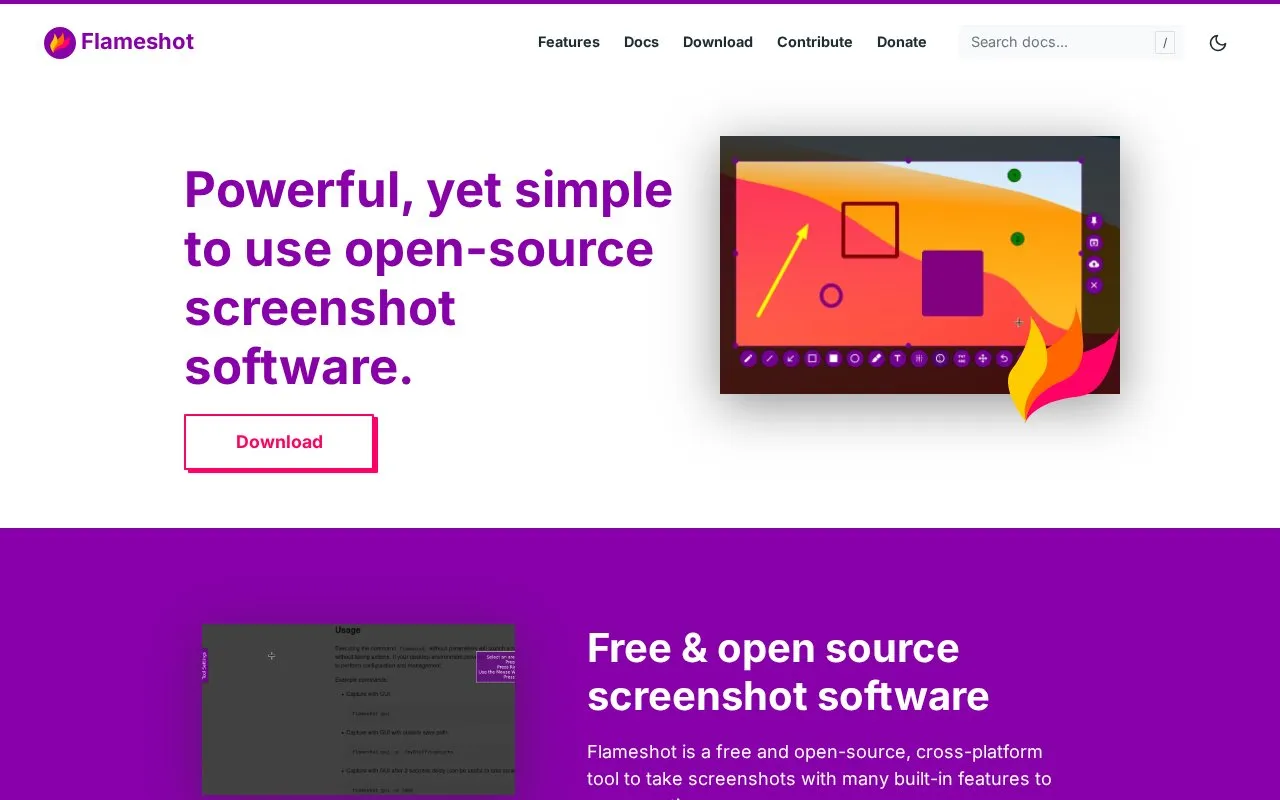
Flameshot is a free and open-source tool for taking screenshots on Windows, macOS, and Linux. Users drag a selection box to capture an area, add annotations in the app, and save the image to the computer.
It includes arrows, text, highlights, drawings, rectangular or circular borders, solid color boxes, incrementing counters, and blur or pixelate options. The interface color, buttons, keyboard shortcuts, and save behavior can be changed in a configuration dialog, and a command-line interface supports scripting without opening the graphical interface. Downloads are 64-bit only.
Key features
- Capture screen area by dragging selection box
- Add arrows, text, highlights, and freehand drawings
- Blur or pixelate areas within screenshots
- Add borders, solid boxes, and incrementing counters
- Customize interface color, buttons, shortcuts, and saving
- Use terminal commands without launching graphical interface
Best for: People on Windows, macOS, or Linux who need annotated screenshots saved locally with terminal control.
Good for
- Free and open-source with Windows, macOS, and Linux downloads
- Built-in annotation tools including blur and pixelate options
- Command-line interface for scripting and key binds
Watch out for
- Downloads are 64-bit only for Windows, macOS, and Linux
Flameshot at a glance
- Website
- flameshot.org
- Category
- Online Tools › Image Tools
- Type
- Online tool
- Pricing
- Not confirmed. Check the site
- Platforms
- Linux, macOS, Web, Windows
- Open source
- Yes · Source code
- Language
- English
- Last checked
- Oct 5, 2026 · Online when checked
- Listed
- Oct 5, 2026
Guides for Image Tools

Flameshot alternatives
Tools and sites you could use instead, ranked by how closely they match.

Built with Rust and Vue, Urocissa is a self-hosted gallery for large collections of photos and videos.
Open source
24 alternatives
Greenshot provides screenshot capture tools for Windows, according to its project page.
Open source
24 alternatives
Capture and annotate screenshots across platforms with ksnip, a dedicated screenshot utility.
Open source
24 alternatives
Capture a screen region, add quick annotations, and save or share the image. Images uploaded through its sharing service are publicly accessible.
Free
7 alternatives
Lap runs as an offline-first desktop photo manager on macOS, Windows, and Linux, for albums and large local libraries.
Open source
24 alternatives
FlipFlip displays local images in a randomized slideshow and runs on Mac, Windows, and Linux.
Open source
24 alternativesFeatured in
 8 sites


Best of
Best Free Screenshot Tools for Clear Captures and Markup
The best free screenshot tools save more than a picture: they help the recipient see the exact button, error, or…
Popular in Image Tools
Well-known listings from the same topic.
CamScannerapps.apple.com/us/app/camscanner-pdf-scanner-a…BeeRefbeeref.orgGreenshotgetgreenshot.orgnomacsnomacs.orgConverseenconverseen.fasterland.netStorage Serverpixelunion.eu


Flameshot FAQ
Is Flameshot free?
Yes, it is described as free and open-source.
How can Flameshot be installed on Linux?
64-bit only, via AppImage, package manager, Snapcraft, or Flathub.
How can Flameshot be installed on macOS?
64-bit only, via Homebrew or by downloading the .dmg file.
Is something wrong or out of date?
Tell us and an editor will check it.
Own this website?
Claim this listing
Claim the listing and suggest updates yourself. An editor checks every claim first.