

HandBrake
HandBrake is a free, open-source video converter for Windows, macOS and Linux. It converts video files into commonly supported formats and codecs.
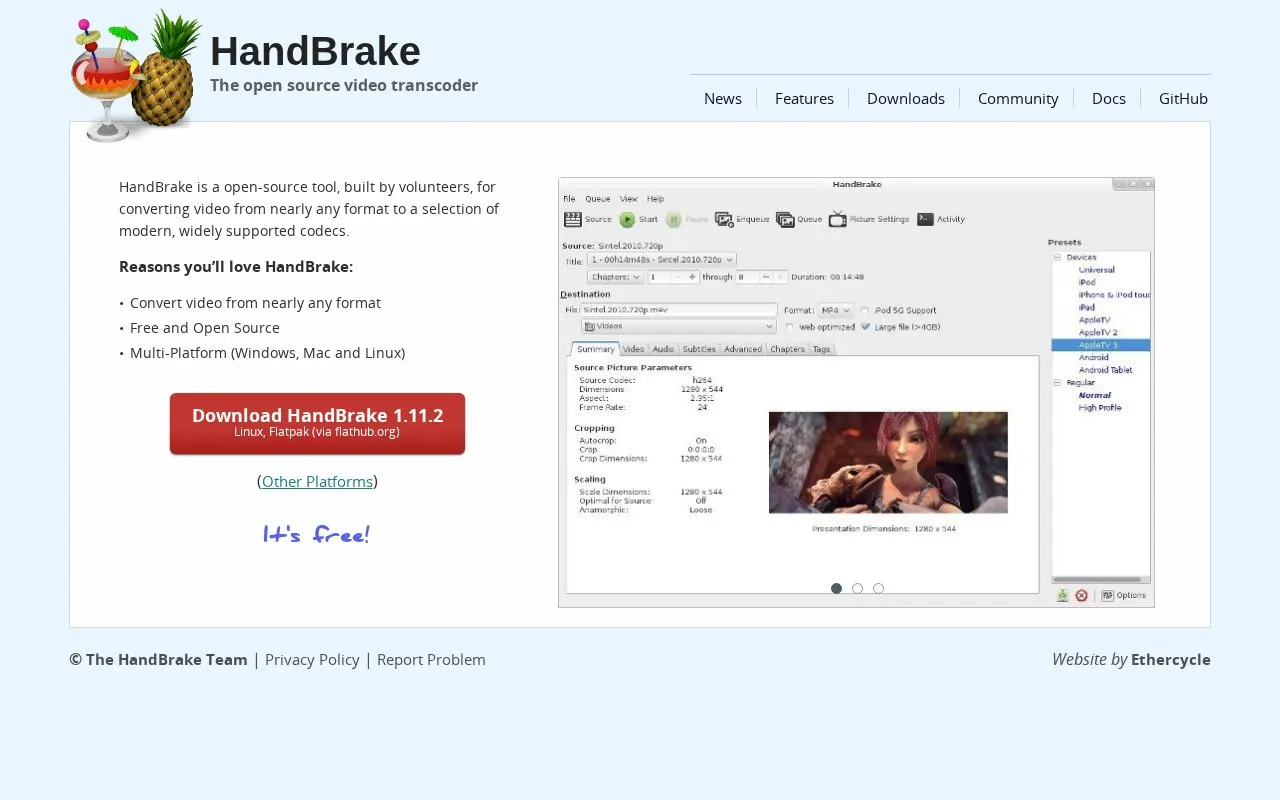
About HandBrake
HandBrake converts existing video into MP4, MKV or WebM files on Windows, macOS and Linux. It is free and open source. You can start with a device or general preset, then adjust the output quality, dimensions, audio and subtitles. The queue lets you prepare several conversions before running them. This is useful when a recording needs a more widely supported format or when you want a smaller copy for storage or playback.
HandBrake focuses on conversion after recording or editing. It can crop and resize a picture, select a chapter or time range, and keep supported audio tracks without re-encoding them. Video itself is always converted, so it does not provide a simple video passthrough operation. It also cannot join several clips into one film. Use a timeline editor for that work, then convert the finished result if needed. HandBrake can read unprotected disc sources, but it does not remove copy protection or process DRM-protected video.
Key features
- Convert video to MP4, MKV or WebM
- Choose device presets or adjust encoding settings
- Queue multiple conversion jobs
- Crop, resize and apply video filters
- Select audio tracks, subtitles, chapters or a time range
- Use supported hardware encoders when available
Best for: People preparing existing videos for compatible playback or smaller storage copies, especially when they have several files to convert.
Good for
- Free, open-source software for Windows, macOS and Linux
- Presets give a starting point while retaining encoding controls
- Queues and track selection support repeat conversion work
Watch out for
- Always re-encodes video and cannot pass it through unchanged
- Cannot combine clips into a single edited video
- Does not remove copy protection or handle DRM-protected input
HandBrake at a glance
- Website
- handbrake.fr
- Category
- Design & Creative › Video Editing & Animation
- Type
- App
- Pricing
- Free
- Platforms
- Linux, macOS, Windows
- Details verified
- Oct 20, 2026 · Official source
- Open source
- Yes · Source code
- Language
- English
- Last checked
- Oct 5, 2026 · Online when checked
- Listed
- Oct 5, 2026
Guides for Video Editing & Animation

HandBrake alternatives
Tools and sites you could use instead, ranked by how closely they match.

Convert videos with XviD4PSP, a program for video processing and format conversion.

Windows video and audio converter with a large format list, device presets, batch jobs and basic editing. Free.
Free
5 alternatives
Use Restream's free online video and audio tools, including a webcam test and format converter.
Free

Convert video files online to formats including MP4, MOV and AVI with this free browser tool.

Reduce video file sizes online with a free converter that supports MP4, AVI, MOV and MPEG formats.

Convert video, audio and image files online with this web-based media converter built around FFmpeg.
HandBrake comparisons

Featured in
 8 sites

Best of
8 Best Free Video Converters for MP4 and Smaller Files
I'd start with HandBrake for a smaller, shareable video and Shutter Encoder for a job involving editing formats or a…
Popular in Video Editing & Animation
Well-known listings from the same topic.
Animakeranimaker.com8mb.video8mb.videoASM Lessonsgithub.com/FFmpeg/asm-lessonsCuttrcuttr.inVideo Cuttervideo-cutter-js.comMotionPlacesmotionplaces.com


HandBrake FAQ
Can HandBrake join several clips together?
No. HandBrake converts video sources but does not combine clips. Assemble the clips in a video editor first.
Can HandBrake change a container without re-encoding the video?
No. Its video output is always converted, although supported audio tracks can use passthrough.
Is something wrong or out of date?
Tell us and an editor will check it.
Own this website?
Claim this listing
Claim the listing and suggest updates yourself. An editor checks every claim first.