
Dnote is a terminal-based notebook for capturing commands and snippets, with full-text search and a self-hosted server API.
NetBoot
netboot.xyz provides a menu for PXE booting operating-system installers and utilities.
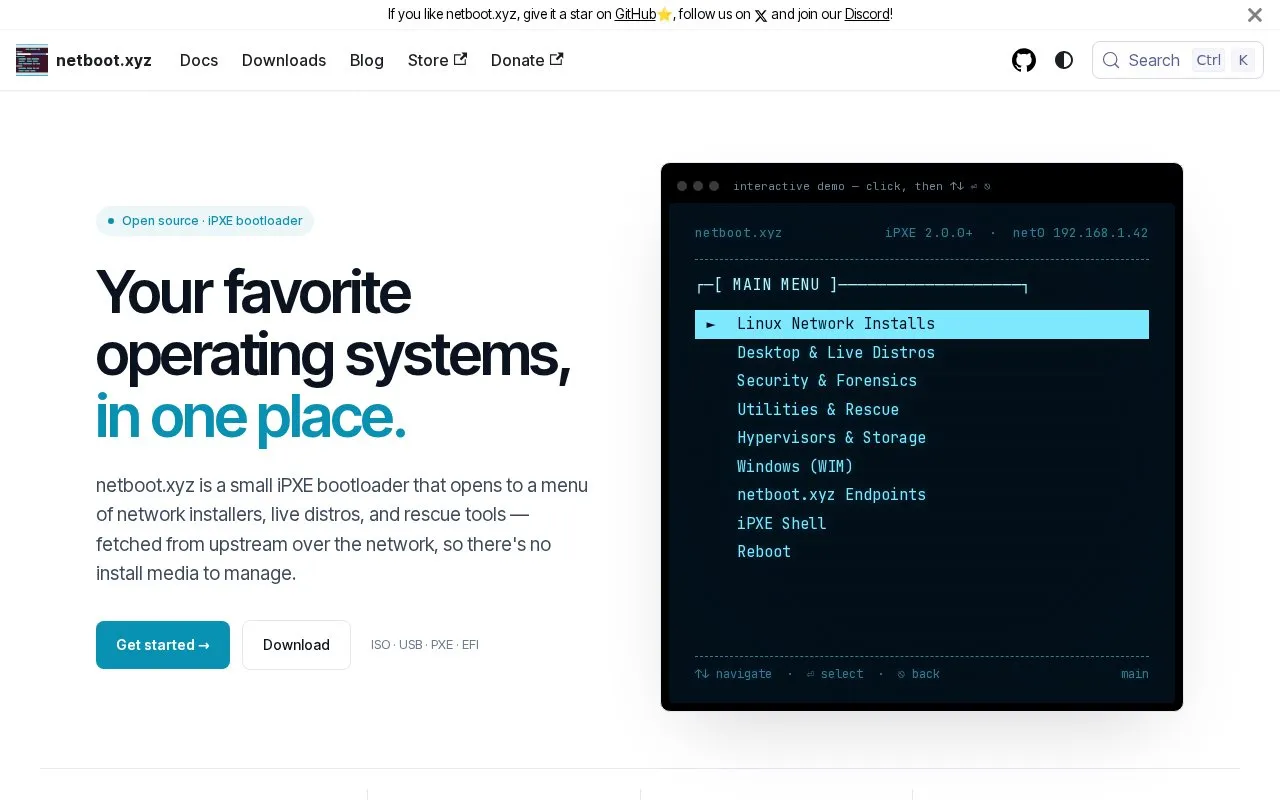
About NetBoot
netboot.xyz is an iPXE bootloader that shows a menu of Linux network installers, live distributions, security and forensics tools, rescue utilities, hypervisors, and Windows WIM images. Images are pulled from upstream mirrors over HTTP at boot time, so separate install media is not maintained.
It is provided as ISO, USB image, and PXE/TFTP and EFI builds for x86_64 and arm64. It can be started from a USB stick, ISO, or DHCP server, or chainloaded from GRUB, syslinux, or UEFI shell, and can be self-hosted via Docker.
Key features
- Menu of Linux installers, live distros and rescue tools
- Boots from USB image, ISO, PXE/TFTP and EFI builds
- Supports x86_64 and arm64 on BIOS and UEFI
- Fetches installer images from upstream over HTTP at boot
- Includes iPXE shell and chainloading from GRUB or UEFI shell
- Self-hostable instance via Docker
Best for: People who install, try, or repair operating systems over the network without managing install media.
Good for
- No install media to manage; images fetched at boot time
- Multiple formats for USB, VMs, IPMI, and network boot
- Releases published with checksums
Watch out for
- Requires network access to pull images during boot
NetBoot at a glance
- Website
- netboot.xyz
- Category
- Software & Utilities › System Utilities
- Type
- Website
- Pricing
- Not confirmed. Check the site
- Platforms
- Linux, Web, Windows
- Open source
- Not stated
- Language
- English
- Last checked
- Oct 5, 2026 · Online when checked
- Listed
- Oct 5, 2026
NetBoot alternatives
Tools and sites you could use instead, ranked by how closely they match.

PowerShell provides a shell and scripting environment for multiple systems, according to the project summary.
Open source
24 alternatives
RepoHub provides a unified interface for discovering and installing software from official repositories across Linux, Windows, and macOS.

A shell that treats each input as structured data instead of raw text streams.
Open source
24 alternatives
psmux brings tmux-style terminal multiplexing to PowerShell, Windows Terminal, and cmd.exe through a native Windows implementation.
Open source
24 alternatives
Chocolatey is a package manager for Windows, according to its project description.
Popular in System Utilities
Well-known listings from the same topic.
Phone Linkmicrosoft.com/windows/sync-across-your-devicesMicrosoft SDmicrosoft.com/en-us/software-downloadPowerToyslearn.microsoft.com/en-us/windows/powertoysWinWorldPCwinworldpc.comGeekUninstallergeekuninstaller.com0Install0install.net


NetBoot FAQ
How do I start using netboot.xyz?
Grab the image format for your boot method, boot from USB, ISO, or DHCP server, then select an entry from the menu.
What boot formats are available?
ISO for VMs and IPMI, .img for USB, .kpxe for TFTP, plus EFI builds for x86_64 and arm64.
Can I run my own copy?
Yes, you can run your own instance via Docker.
Is something wrong or out of date?
Tell us and an editor will check it.
Own this website?
Claim this listing
Claim the listing and suggest updates yourself. An editor checks every claim first.