XConvert offers online audio tools for converting, compressing, cutting, and joining files.
Free
Shutter Encoder converts, compresses, and edits media files and provides downloads.
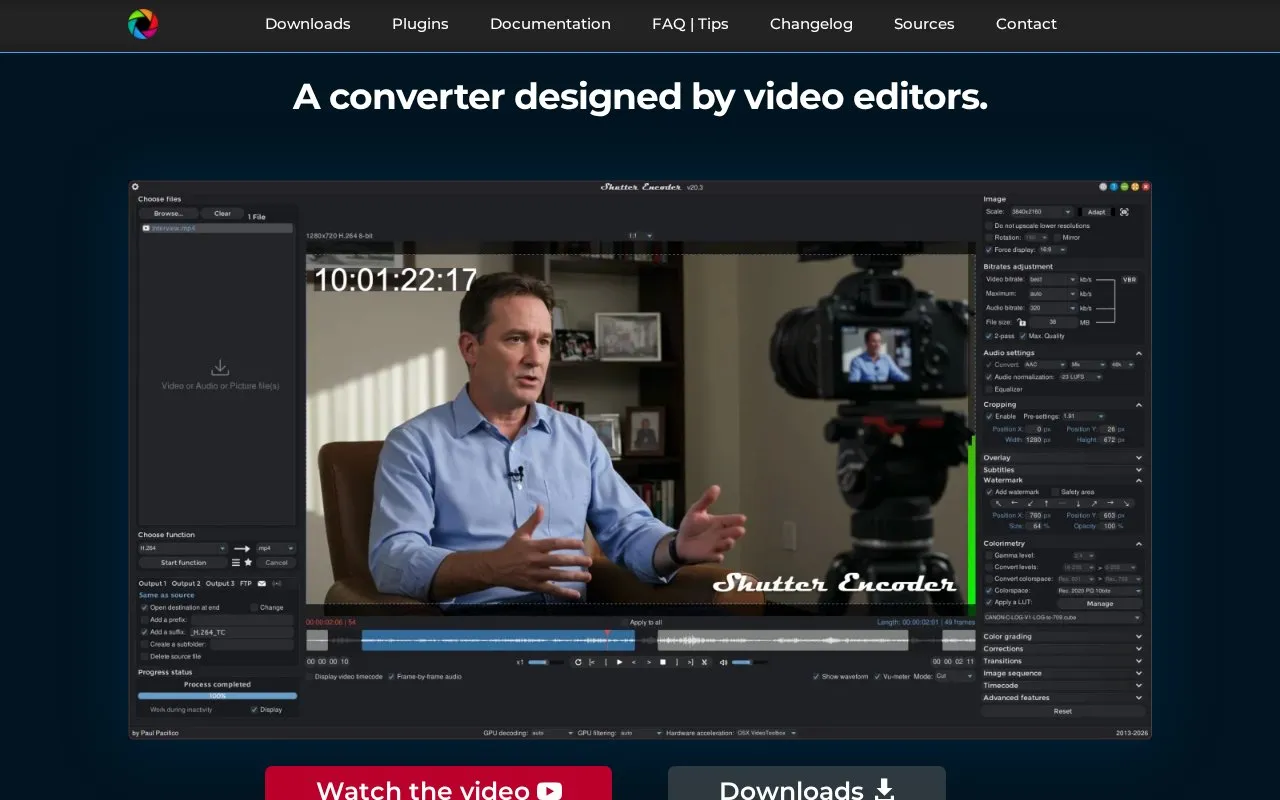
Shutter Encoder converts, compresses, and edits video, audio, and image files using FFmpeg for encoding. It includes trimming with preview, cropping, color adjustment with LUTs and color-space conversion, subtitle embedding and editing, timecode and text burn-in, image and video overlays, cut detection with EDL export, web URL downloads, a render queue, saveable presets, FTP upload, and file information and renaming tools.
Cutting without re-encoding works only with some codecs.
Tools and sites you could use instead, ranked by how closely they match.
XConvert offers online audio tools for converting, compressing, cutting, and joining files.
FlicFlac converts WAV, FLAC, MP3, OGG, and APE files using a small portable Windows application.
Phiola plays, records, and converts audio on Linux, macOS, and other supported platforms.
AudioAuditor analyzes audio files, including spectrograms and checks for fake lossless or AI-generated tracks.
kunst downloads album art or displays artwork embedded in audio files.
SpotifyArt downloads full-quality cover images for Spotify songs and albums.
 8 sites
I'd start with HandBrake for a smaller, shareable video and Shutter Encoder for a job involving editing formats or a…
Well-known listings from the same topic.
Tell us and an editor will check it.
Claim the listing and suggest updates yourself. An editor checks every claim first.