

SMPlayer
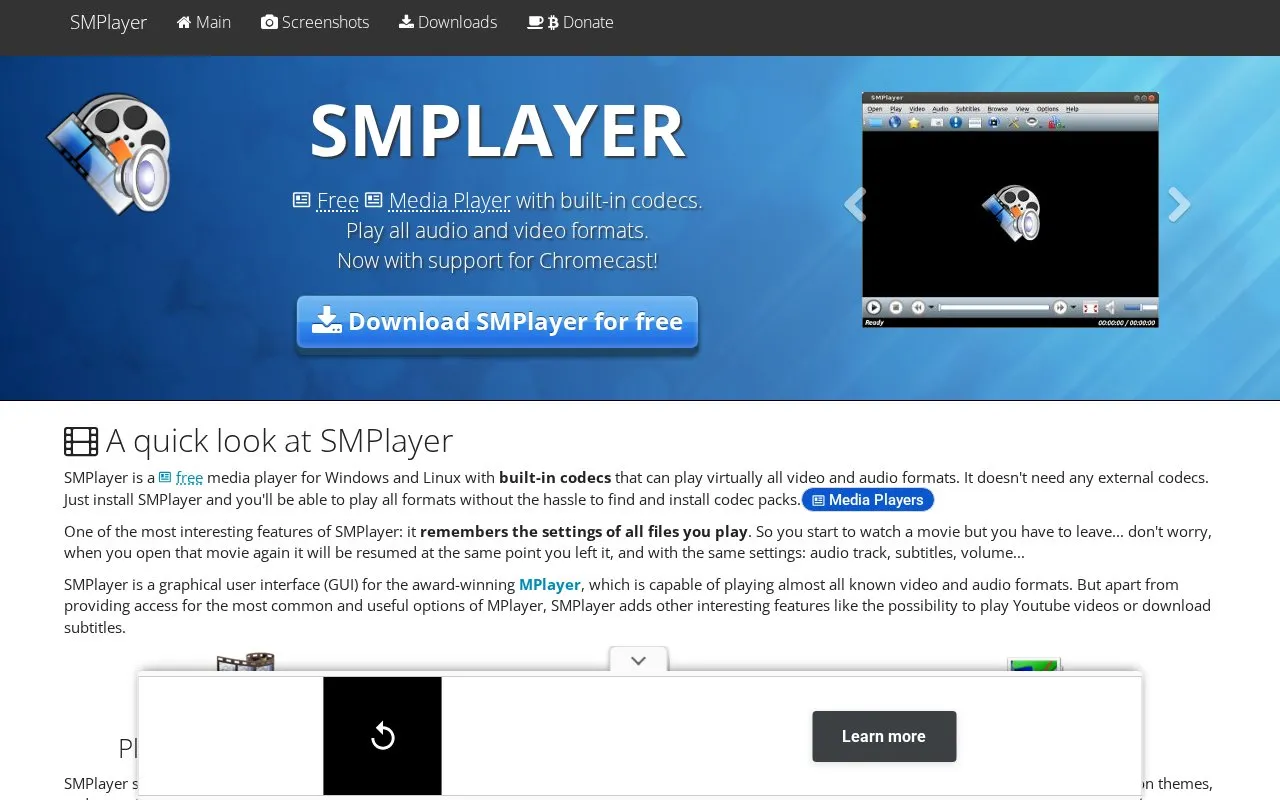
Play audio and video formats with SMPlayer, a media player for Windows and Linux that includes built-in codecs.
About SMPlayer
SMPlayer is a free media player for Windows, Linux and Mac OS, as described on its official site, with built-in codecs so most audio and video formats play without installing external codec packs. It acts as a graphical interface for the MPlayer playback engine, with support for mpv as well, and adds features such as YouTube playback, subtitle downloads, skins and Chromecast support.
The player remembers the settings of each file it plays, so an interrupted movie resumes at the same point with the same audio track, subtitles and volume. Advanced controls include video and audio filters, playback speed changes, audio and subtitle delay adjustment and a video equalizer. The site states the software is free and open source under the GPL license and is available in more than 30 languages. Subtitle search relies on opensubtitles.org, an external service.
Key features
- Built-in codecs play most audio and video formats without external codec packs
- Remembers per-file playback position, audio track, subtitles and volume
- Plays YouTube videos; optional plugin to search YouTube
- Searches and downloads subtitles from opensubtitles.org
- Video and audio filters, speed control, delay adjustment, video equalizer
- Skins and icon themes; support for mpv alongside MPlayer; Chromecast support
Best for: Windows, Linux and Mac OS users who want one free player that opens most media files without hunting for codec packs.
Good for
- Built-in codecs remove the need to find and install third-party codec packs
- Per-file memory restores position, audio track, subtitles and volume on resume
- Site states it is free and open source under the GPL license and available in over 30 languages
Watch out for
- Subtitle search and download depends on the external opensubtitles.org service
- Stated Windows compatibility covers XP through 10; later versions are not mentioned
SMPlayer at a glance
- Website
- smplayer.info
- Category
- Software & Utilities › Media Players & Servers
- Type
- Website
- Pricing
- Not confirmed. Check the site
- Platforms
- Linux, Web, Windows
- Open source
- Not stated
- Language
- English
- Last checked
- Oct 5, 2026 · Online when checked
- Listed
- Oct 5, 2026
Guides for Media Players & Servers
SMPlayer alternatives
Tools and sites you could use instead, ranked by how closely they match.

Play media from the command line with mpv, a free, open-source player supporting many formats, codecs, and subtitle types.

SMTube browses, searches, and plays YouTube videos through a media player such as SMPlayer.
Free
18 alternativesThe free K-Lite Codec Pack supports playback of music and video files, including MKV, MP4, AVI, and FLV formats.
DeaDBeeF plays and converts audio formats across Linux, macOS, Windows, and other Unix-like systems.
ALF FreeWare VideoCODECs lists codec collections and formats, including AVI, MPEG, MP4, and audio codec options.

Play media from the command line with mpv, which supports a wide range of formats, codecs, and subtitles.
Featured in
 8 sites


Best of
Best Free Media Players: 8 Choices for Files, Subtitles and TV
The best free media players open your local files, handle the right audio and subtitle tracks, and stay out of the way…
Popular in Media Players & Servers
Well-known listings from the same topic.
Ampacheampache.orgAIMPaimp.ruXbox Kodiapps.microsoft.com/detail/9nblggh4t892Pasta Toolpastatool.comMuseeksmuseeks.ioCaracal Clubcaracal.club


SMPlayer FAQ
Do I need to install codec packs to use SMPlayer?
No. SMPlayer includes built-in codecs and the site says it can play virtually all video and audio formats without external codecs.
Does SMPlayer remember where I stopped a video?
Yes. It remembers settings for every file played, so reopening a movie resumes at the same point with the same audio track, subtitles and volume.
Can SMPlayer play YouTube videos?
Yes. It can play YouTube videos, and an optional plugin is available to search for YouTube videos from within the player.
Is something wrong or out of date?
Tell us and an editor will check it.
Own this website?
Claim this listing
Claim the listing and suggest updates yourself. An editor checks every claim first.