

NeoHtop monitors processes, CPU, and memory usage in real time through a desktop system monitor.
TaskSlinger
TaskSlinger monitors and controls processes, services, startup apps, and resource usage in a native Windows task manager.
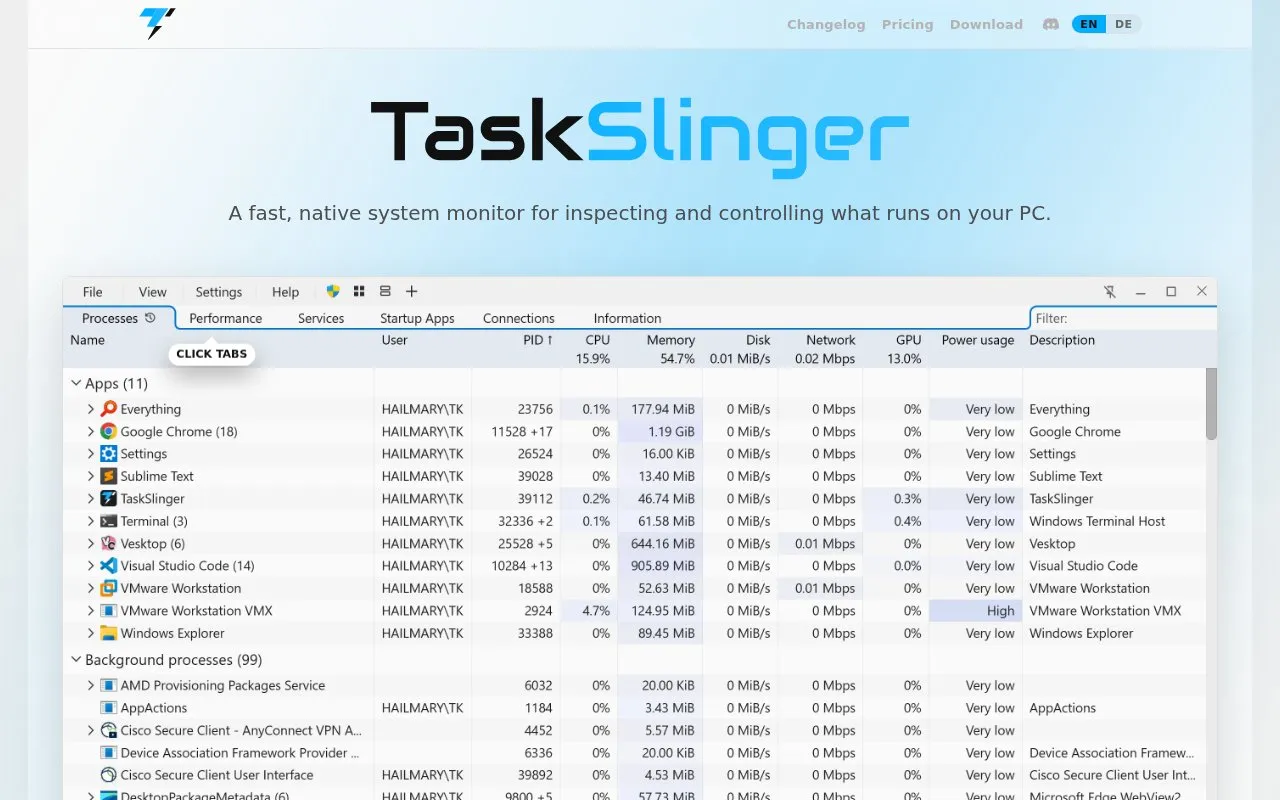
About TaskSlinger
TaskSlinger is a native Windows task manager replacement for viewing and managing processes, services, startup apps, network connections, and resource use. It includes process, performance, services, startup, connections, and system information views, with type-to-search filtering, customizable columns, layout and theme, and tools to view process modules and tokens and dump processes.
Version 0.9.4 is offered as a 2.1 MB download for Windows 10/11 x64. It is described as beta software that may contain bugs or behave unexpectedly, with a free beta available until 1.0 and a perpetual license offered.
Key features
- Process table with grouped apps, live totals, and resource meters
- Performance view with logical processor graphs and resource summaries
- Services view with startup type, status, PID, user, and path
- Startup apps view with status, type, location, publisher, and command
- Connections view with local and foreign endpoints, state, and owning process
- System information view with OS, processor, memory, and BIOS fields
Best for: Developers, system tuners, and support engineers who keep Task Manager open to monitor Windows activity.
Good for
- Sends no telemetry, analytics, or usage data according to homepage
- Stated 150-millisecond launch with full rendering from first frame
- Interface drawn by custom Direct3D renderer, not an embedded web view
Watch out for
- Beta software that may contain bugs or behave unexpectedly
- Windows 10/11 x64 only, per download details
TaskSlinger at a glance
- Website
- taskslinger.net
- Category
- Software & Utilities › Hardware & Diagnostics
- Type
- Website
- Pricing
- Not confirmed. Check the site
- Platforms
- Web, Windows
- Open source
- Not stated
- Language
- English
- Last checked
- Oct 5, 2026 · Online when checked
- Listed
- Oct 5, 2026
TaskSlinger alternatives
Tools and sites you could use instead, ranked by how closely they match.

AppControl tracks CPU, memory, disk, temperature, and GPU usage over time, with controls for managing applications.

Microsoft PC Manager offers Windows tools for boosting PC performance, cleaning storage, and managing large files.
Pick
22 alternatives
Quick CPU monitors processor temperatures, voltages, frequencies, and usage, and includes tuning and stability testing tools.

WizTree analyzes disk space on Windows by reading the Master File Table to locate files and folders.

REW measures and analyzes room acoustics, speakers, subwoofers, and audio devices.
Popular in Hardware & Diagnostics
Well-known listings from the same topic.
Dolby Accessapps.microsoft.com/detail/9n0866fs04w8RAMMaplearn.microsoft.com/en-us/sysinternals/downloa…UNIGINE Benchmarksbenchmark.unigine.comVIAcaniusevia.comTrueNAStruenas.comProcess Lassobitsum.com


TaskSlinger FAQ
Does TaskSlinger send telemetry?
According to the homepage, it sends no telemetry, analytics, or usage data anywhere.
What is needed to install it?
Version 0.9.4 is a 2.1 MB download for Windows 10/11 x64.
Is the current version final?
No. It is described as beta software that may contain bugs, with the free beta available until 1.0.
Is something wrong or out of date?
Tell us and an editor will check it.
Own this website?
Claim this listing
Claim the listing and suggest updates yourself. An editor checks every claim first.