Tofu
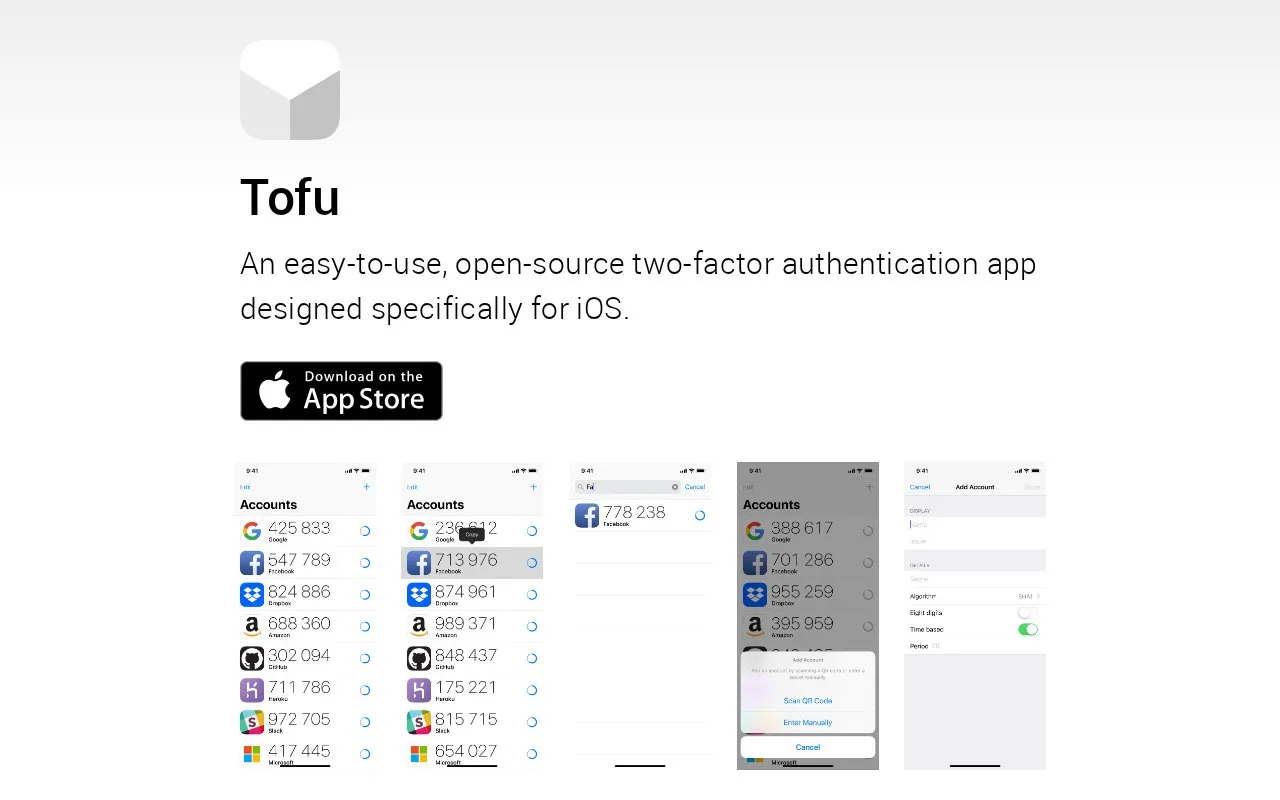
Tofu, an iOS authenticator, that adds accounts by scanning issuer QR codes and generates time-based or counter-based one-time passwords offline.
About Tofu
Tofu is a free authenticator app for iOS that generates one-time passwords for accounts protected by two-factor authentication. Accounts are added by scanning the QR code an issuer provides, and the app produces both counter-based (HOTP) and time-based (TOTP) codes using the SHA1, SHA256 and SHA512 algorithms, with 6 or 8 digits. It works with any service that supports HOTP or TOTP, and needs no network or cellular connection, so it can be used in airplane mode.
Account details are stored in the iOS keychain rather than on a Tofu server. The site states the app is free and open source under the ISC license, with source code on GitHub. Accounts are included in iOS backups, but restoring them to a new iPhone requires a password-protected backup made with iTunes or Finder on a Mac; accounts do not migrate when restoring from an iCloud backup.
Key features
- Adds accounts by scanning issuer-provided QR codes
- Searches stored accounts by name
- Generates counter-based (HOTP) and time-based (TOTP) one-time passwords
- Supports 6- or 8-digit codes using SHA1, SHA256 and SHA512
- Works offline, including in airplane mode
- Stores account details in the iOS keychain
Best for: iPhone users who want an offline authenticator for services that support HOTP or TOTP two-factor authentication.
Good for
- Generates one-time passwords with no network or cellular connection required
- Covers both HOTP and TOTP with SHA1, SHA256 and SHA512 variants
- Account details are held in the iOS keychain rather than an external service
Watch out for
- Accounts do not transfer to a new iPhone from an iCloud backup
- Moving accounts requires a password-protected iTunes or Finder backup, or manual re-enrollment of each account
- Available for iOS only
Tofu at a glance
- Website
- tofuauth.com
- Category
- Privacy & Security › Password Managers
- Type
- Website
- Pricing
- Not confirmed. Check the site
- Platforms
- iOS, Web
- Open source
- Not stated
- Last checked
- Oct 5, 2026 · Online when checked
- Listed
- Oct 5, 2026
Guides for Password Managers
Tofu alternatives
Tools and sites you could use instead, ranked by how closely they match.

Use Stratum, an open-source Android app for generating two-factor authentication codes, with encrypted backups, account categories, and a Wear OS companion app.

Yubico Authenticator is a desktop and Android companion app for managing YubiKeys and accessing one-time passwords.

OTP Helper copies one-time passwords from SMS messages and notifications on Android, working offline without internet permission.
Open source
24 alternatives
Keyguard manages passwords in Bitwarden-compatible accounts and KeePass KDBX files, with login autofill, passkeys, offline use, and password issue checks.

Bitwarden stores and syncs passwords and passkeys through browser extensions, desktop and mobile apps, and a web vault. It offers free accounts and paid personal and business plans.
FreemiumOpen sourcePick
24 alternatives
Store, sync, and autofill passwords, passkeys, and email aliases with Proton Pass, an end-to-end encrypted password manager.
FreePick
24 alternativesPopular in Password Managers
Well-known listings from the same topic.


Tofu FAQ
What is two-factor authentication?
It requires two separate means of identification at sign-in, commonly something you know, such as a password, and something you possess, such as your iPhone. Tofu stores the shared secret in the iPhone keychain and generates the one-time password that is entered alongside the normal username and password.
How do I avoid being locked out if I lose access to my iPhone?
Services that support two-factor authentication generally issue backup or recovery codes during setup, and one of these can be used instead of a Tofu-generated password. The site recommends printing them and storing them safely, or saving them in a password manager such as 1Password.
How do I move my accounts to a new iPhone?
The only automated method is restoring a password-protected backup of the old iPhone made with iTunes or Finder on a Mac. Otherwise, two-factor authentication must be deactivated and reactivated for each account, scanning the new QR codes with Tofu on the new iPhone.
Is something wrong or out of date?
Tell us and an editor will check it.
Own this website?
Claim this listing
Claim the listing and suggest updates yourself. An editor checks every claim first.