
KeeWeb
Manage KeePass-compatible passwords with KeeWeb, available as a desktop app and online web app.
About KeeWeb
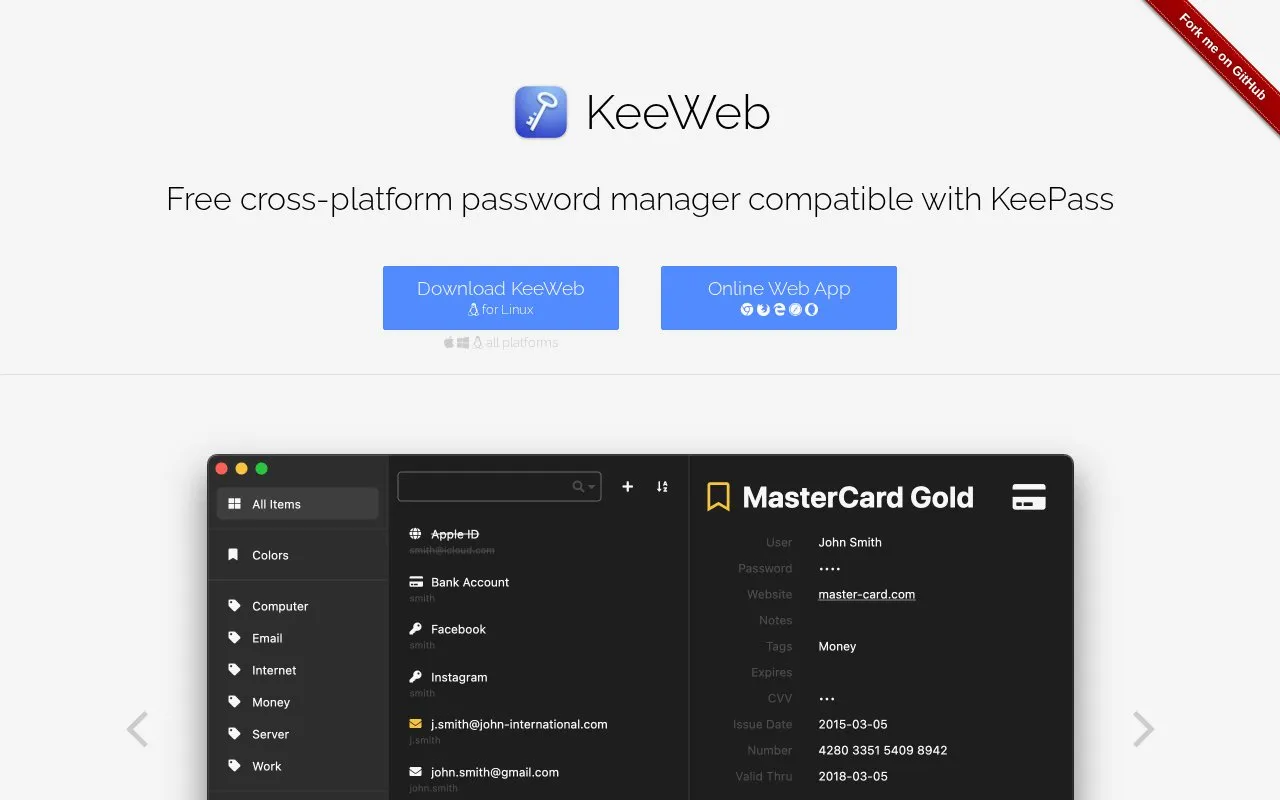
KeeWeb is a password manager compatible with KeePass that runs as a desktop app on macOS, Windows and Linux, and as an online web app. According to its homepage, the app is free, with no trials, demo versions or limits.
It can open local database files and files stored in Dropbox, Google Drive, OneDrive or a user's own server, and it can sync changes across devices automatically. Files are saved for offline use, and changes sync again when the device is back online. The web app has almost all of the desktop features but not all of them. On mobile browsers, users can view details and copy passwords. Cloud sync depends on the external services the user connects, so those services are part of the setup.
Key features
- Opens local files and files stored in Dropbox, Google Drive, OneDrive or own server
- Syncs changes across devices automatically when cloud storage is connected
- Saves files for offline use and syncs changes when back online
- Searches several open files from one search box, with advanced field and regex options
- Keeps a history of changes that can be rolled back or deleted
- Generates passwords of a chosen length using only selected symbols
Best for: People who already use KeePass-format password databases and want a free client across desktop and web.
Good for
- Described as free, with no trials, demo versions or limits
- Available as desktop apps for macOS, Windows and Linux and as a web app
- The web app requires no installation and works in modern browsers
Watch out for
- The web app has almost all, but not all, of the desktop app's features
- On mobile browsers, users can only view details and copy passwords
- Cloud sync relies on external services such as Dropbox, Google Drive or OneDrive
KeeWeb at a glance
- Website
- keeweb.info
- Category
- Privacy & Security › Password Managers
- Type
- Online tool
- Pricing
- Free
- Platforms
- Linux, macOS, Web, Windows
- Open source
- Not stated
- Language
- English
- Last checked
- Oct 6, 2026 · Online when checked
- Listed
- Oct 5, 2026
Guides for Password Managers
KeeWeb alternatives
Tools and sites you could use instead, ranked by how closely they match.

Manage KeePass-compatible password databases with AuthPass, a free app for mobile and desktop systems.
Manage KeePass-compatible password vaults on iPhone and Mac with Strongbox, including autofill features.

Manage passwords, secrets, and credentials from the command line with gopass and Git or GPG storage.
FreeOpen source
24 alternatives
Awesome KeePass curates KeePass-compatible clients, libraries, plugins, tools, security research, and documentation in one project list.
Open source
24 alternatives
Keyguard manages passwords in Bitwarden-compatible accounts and KeePass KDBX files, with login autofill, passkeys, offline use, and password issue checks.

Bitwarden stores and syncs passwords and passkeys through browser extensions, desktop and mobile apps, and a web vault. It offers free accounts and paid personal and business plans.
FreemiumOpen sourcePick
24 alternativesPopular in Password Managers
Well-known listings from the same topic.
Proton Passproton.me/passStratumstratumauth.comKeePassiumkeepassium.comKeePassXCkeepassxc.org2FAS2fas.com


KeeWeb FAQ
Can I open a database stored in Dropbox or Google Drive?
Yes. The homepage says you can open files from Dropbox, Google Drive, OneDrive or your own server and sync changes across devices automatically.
Can I use my passwords without an internet connection?
Files are saved for offline use, including those opened from Dropbox. The offline version can always be accessed, and changes sync automatically when you are online again.
Can I restore an earlier version of an entry?
All changes are recorded in history. You can roll back to any earlier state or delete a state completely.
Is something wrong or out of date?
Tell us and an editor will check it.
Own this website?
Claim this listing
Claim the listing and suggest updates yourself. An editor checks every claim first.