

AnyTXT
Anytxt Searcher searches file contents on desktop systems, including text, PDF, Office, code, ebook, and image files.
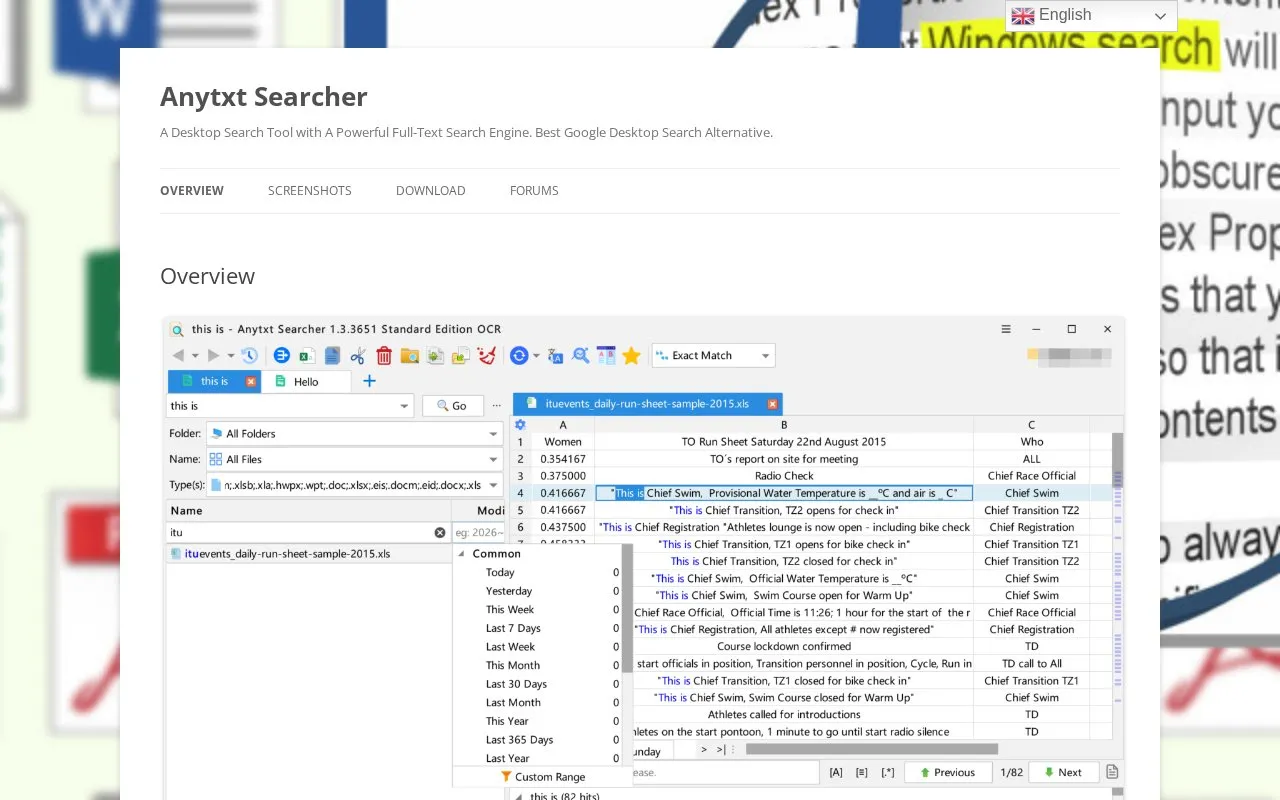
About AnyTXT
AnyTXT Searcher is a desktop full-text search application for Windows, macOS, and Linux. It extracts text from many document and file types—including text, PDF, Microsoft Office, OneNote, eBook, code, image, email, and binary files—without requiring additional software, and stores the extracted metadata in a built-in high-speed index. The homepage also lists offline OCR for images and scanned PDFs, multilingual OCR, a multilingual user interface, real-time index sync, SSD optimization, keyword view, HTTP search service, and AES256 encryption. Microsoft Outlook (eml) support is labeled beta, and the vendor says more document types are coming.
Key features
- Full-text content search on Windows, macOS, and Linux desktops.
- Parses text, PDF, Office, eBook, code, image, email, and other document formats.
- Built-in offline OCR for text in images and scanned PDFs, including multilingual OCR.
- Built-in high-speed indexing with real-time sync and SSD optimization.
- Multilingual user interface and full-text indexing for Chinese, Japanese, and Korean.
- Keyword view, HTTP search service, and AES256 encryption.
Best for: People who need to search file contents across many formats on a local Windows, macOS, or Linux computer.
Good for
- Supports a wide range of formats including Office, PDF, eBook, image, email, and binary files.
- Advertises fast full-text search, stated as almost 1 second.
- Works across Windows, MacOS, and Linux with a multilingual interface and document indexing.
Watch out for
- Microsoft Outlook (eml) support is labeled beta.
- The vendor says more document types are coming, so format coverage may be incomplete.
- The software is not open source.
AnyTXT at a glance
- Website
- anytxt.net
- Category
- Software & Utilities › File Utilities
- Type
- Website
- Pricing
- Not confirmed. Check the site
- Platforms
- Linux, macOS, Web, Windows
- Open source
- Not stated
- Language
- English
- Last checked
- Oct 6, 2026 · Online when checked
- Listed
- Oct 5, 2026
Guides for File Utilities
AnyTXT alternatives
Tools and sites you could use instead, ranked by how closely they match.

GeekLink OCR extracts burned-in video subtitles into time-synced SRT files, with local processing for Mac and Windows.
Free trial
7 alternatives
NormCap captures text from the screen using OCR, with downloads for Linux, macOS, and Windows.

TextShot takes a screenshot and copies its text to the clipboard using Python, on Windows, macOS, and Linux.
Open source
24 alternatives
Text Grab extracts text with OCR on Windows, with an optional background process and notifications.
Open source
24 alternatives
Umi-OCR processes screenshots, image batches, and PDF documents offline, with OCR support for multiple languages.
Open source
24 alternativesRemove EXIF, GPS, PDF, Office, ebook, and audio metadata in a browser using Metadata Remover, which lists supported file types.
Popular in File Utilities
Well-known listings from the same topic.
SDeletelearn.microsoft.com/en-us/sysinternals/downloa…PowerRenamelearn.microsoft.com/en-us/windows/powertoys/po…robocopylearn.microsoft.com/windows-server/administrat…VERTvert.shNanaZipnanazip.orgPhotonphotondev.netlify.app


AnyTXT FAQ
What file formats can AnyTXT search?
It supports plain text, PDF (including scanned PDFs), Microsoft Word, Excel, PowerPoint, OneNote, eBook formats, WPS, Kindle, mind maps, OFD, WizNote, Edraw Max, images, binary files, and more. Microsoft Outlook (eml) support is beta.
Does AnyTXT include OCR?
Yes. It includes offline OCR for text in images such as png, jpg, and bmp, as well as scanned PDFs, and lists multilingual OCR support.
Which platforms are supported?
AnyTXT works on Windows, MacOS, and Linux. The homepage also mentions an Anytxt full-text search web engine.
Is something wrong or out of date?
Tell us and an editor will check it.
Own this website?
Claim this listing
Claim the listing and suggest updates yourself. An editor checks every claim first.