

Dillinger
Dillinger offers online Markdown editing with live preview, HTML or PDF export, and sync options for GitHub, Dropbox, and Google Drive.
About Dillinger
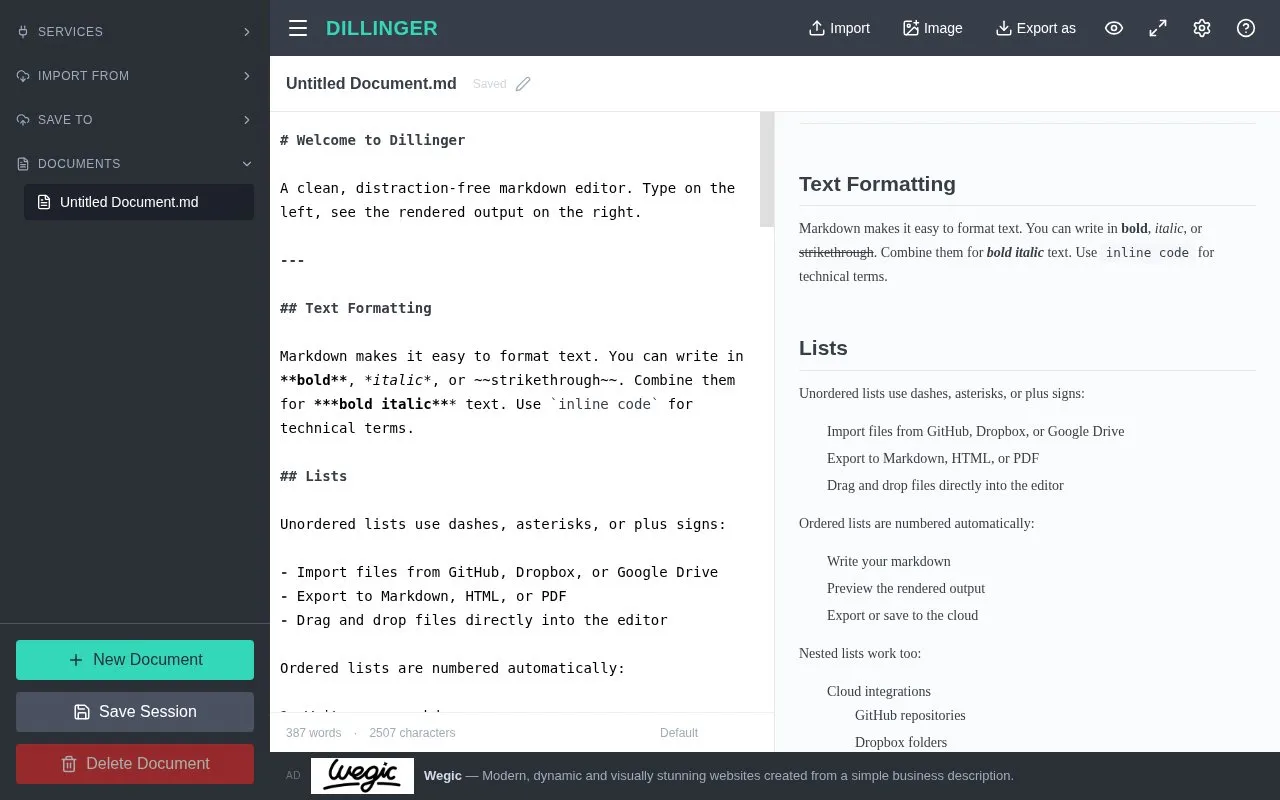
Dillinger is a browser-based Markdown editor with a side-by-side live preview and synced scrolling. It can import and save files through GitHub, Dropbox, Google Drive, OneDrive, and Bitbucket, and export the current document to Markdown, styled HTML, or PDF.
Drafts are auto-saved to browser local storage and remain available offline after the initial load. Core editing and preview do not require signup, while cloud sync requires an internet connection and linking a third-party account.
Key features
- Side-by-side live preview with synced scrolling as you type
- Export current document to Markdown, styled HTML, or PDF
- Import and save files via GitHub, Dropbox, Google Drive, OneDrive, Bitbucket
- Auto-save drafts to browser local storage
- Vim and Emacs keybindings with Monaco-based editing
- Full-screen zen mode and dark mode options
Best for: Developers, technical writers, and others writing READMEs, documentation, blog posts, or LLM prompts.
Good for
- Core editing works without signup, with drafts kept in browser local storage.
- Editing and preview continue offline after initial load.
- Supports file sync with GitHub, Dropbox, Google Drive, OneDrive, and Bitbucket.
Watch out for
- Cloud sync features require an internet connection.
- File sync requires linking a third-party account.
Dillinger at a glance
- Website
- dillinger.io
- Category
- Software & Utilities › Text Editors
- Type
- Website
- Pricing
- Not confirmed. Check the site
- Platforms
- Web
- Open source
- Not stated
- Language
- English
- Last checked
- Oct 5, 2026 · Online when checked
- Listed
- Oct 5, 2026
Guides for Text Editors

Dillinger alternatives
Tools and sites you could use instead, ranked by how closely they match.

Browser-based Markdown editor with live preview, offline storage and sync or export to Google Drive, Dropbox and GitHub. Free and open source.
FreeOpen source
16 alternatives
Memo Notepad offers note editing with optional Google Drive or Dropbox sync, plus dark and other style modes.

Write Markdown with a live rendered preview and export documents to PDF, Word, or HTML using this browser editor.

Edit Markdown in the browser with a live GFM preview, diagrams, export, and sharing options, without logging in.

This Markdown editor provides live preview, diagrams, LaTeX, syntax highlighting, PDF export, and multi-tab support.
Open source
24 alternatives
NotesOnline provides a browser notepad with rich text, tabs, autosave, and TXT, Markdown, or HTML exports.
Featured in
 8 sites


Best of
8 Best Free Markdown Editors for Articles and Notes
The best free Markdown editors let you write a document and hand someone an ordinary file afterward. I'd start with…
Popular in Text Editors
Well-known listings from the same topic.
Google Docsgoogle.com/docs/aboutProton Docsproton.me/drive/docsVertex42vertex42.comNotepad++notepad-plus-plus.orgLibreOfficelibreoffice.orgSublime Textsublimetext.com


Dillinger FAQ
Does Dillinger require a signup?
No for core editing. An account connection is only needed to sync files with a third-party service such as GitHub or Dropbox.
Can I export markdown to PDF or HTML?
Yes. The export menu supports download as Markdown, styled HTML, or PDF.
Does Dillinger work offline?
Yes, after the initial load for editing and preview, with documents auto-saved to browser local storage. Cloud sync requires connectivity.
Is something wrong or out of date?
Tell us and an editor will check it.
Own this website?
Claim this listing
Claim the listing and suggest updates yourself. An editor checks every claim first.