

Tunnelblick is free, open-source macOS software for controlling OpenVPN connections, with downloads and support information on its site.
LuLu
Monitor and control outgoing network connections on macOS with LuLu, a free, open-source firewall.
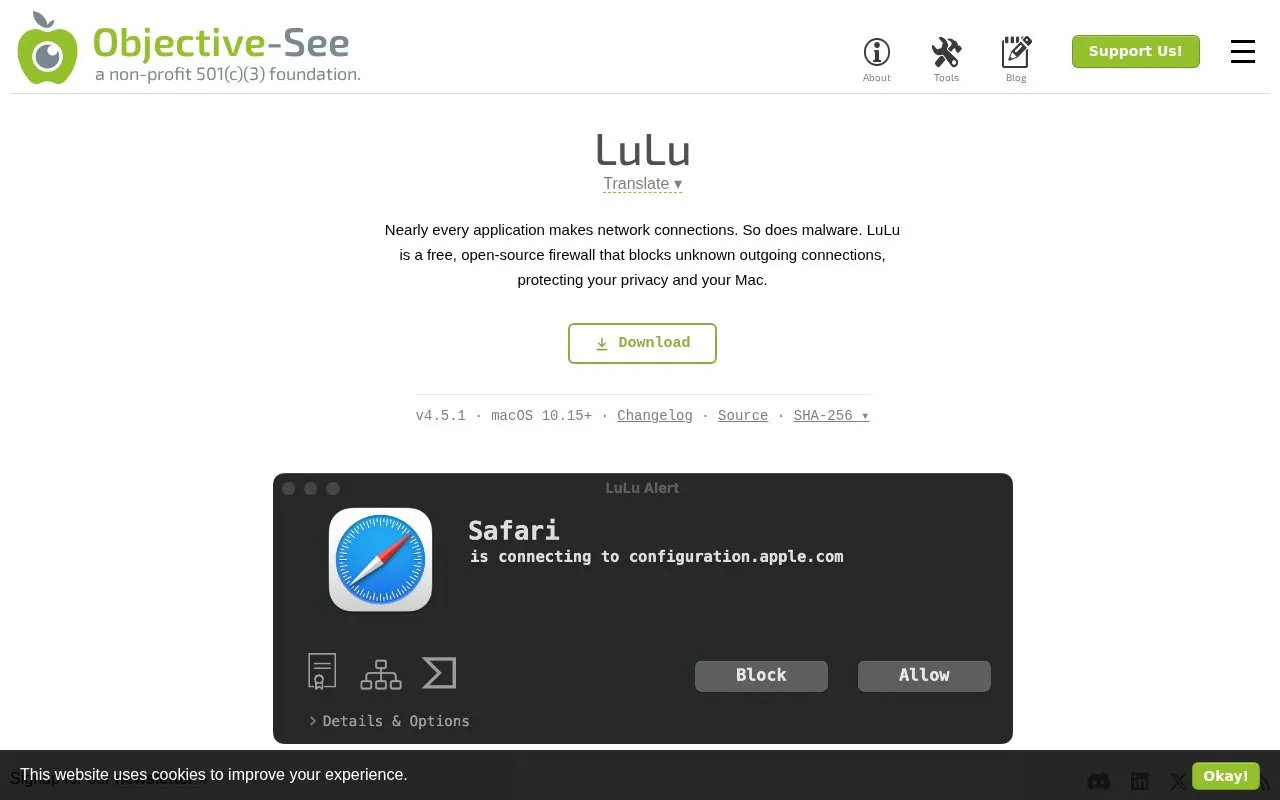
About LuLu
LuLu is a firewall for macOS that watches outgoing network connections and alerts when a new, unauthorized process tries to connect. Alerts show the process name and destination; clicking a name or connection reveals the full path or URL, and the dialog includes code signing information, the process hierarchy, and a VirusTotal lookup whose results open in the default browser. Users can block or allow a connection, and that choice becomes a general rule for the process by default, with finer-grained rules available through the detailed options.
It requires macOS 10.15 or later and a multi-step approval of its System Extension and Network Filter in System Settings; an already installed copy must be quit before reinstalling. Default settings allow Apple software and already installed programs to access the network without alerts, and these can be changed later in Settings. LuLu runs in the status bar and is set to start each time you log in.
Key features
- Alerts on new or unauthorized outgoing connections
- Allow or block connections, creating per-process rules by default
- Shows code signing info and process hierarchy for alerts
- VirusTotal results open in the default browser via item hash
- Runs in the status bar and starts at login
- Version 4.5.1 for macOS 10.15 and later
Best for: macOS users who want to see and decide on the outgoing connections their applications attempt.
Good for
- Described on its page as a free, open-source firewall
- Alerts name the connecting process and its destination, with extra context on demand
- Default settings let Apple software and existing programs connect without alerting
Watch out for
- Requires manual, multi-step approval of its System Extension and Network Filter
- Limited to macOS 10.15 and later
- The VirusTotal check builds a URL with the item's hash and opened in the default browser, an external service
LuLu at a glance
- Category
- Privacy & Security › Desktop & OS Privacy
- Type
- Website
- Pricing
- Not confirmed. Check the site
- Platforms
- macOS, Web
- Open source
- Not stated
- Language
- English
- Last checked
- Oct 5, 2026 · Online when checked
- Listed
- Oct 5, 2026
LuLu alternatives
Tools and sites you could use instead, ranked by how closely they match.

Freenet offers peer-to-peer apps that operate without company control or dedicated servers, according to the project site.

Detect possible macOS ransomware by monitoring file encryption activity with RansomWhere?.

BlockBlock monitors for malware that installs itself persistently to run automatically after a restart or login.

Lockdown Privacy offers an open-source firewall for blocking trackers, ads, and badware in apps on iPhone and iPad.

Tracee monitors runtime security events and supports forensic analysis with eBPF instrumentation.
Popular in Desktop & OS Privacy
Well-known listings from the same topic.
wBlockapps.apple.com/app/wblock/id6746388723uBO Lite Safariapps.apple.com/app/ublock-origin-lite/id674534…Stayapps.apple.com/app/stay-for-safari/id1591620171Tor Browsertorproject.orgFirejailfirejail.wordpress.comHyphanethyphanet.org


LuLu FAQ
Does LuLu alert on every outgoing connection?
No. The recommended defaults allow Apple software and already installed programs to access the network without alerting you; those settings can be changed later in LuLu's Settings.
What happens when I block or allow a connection in an alert?
By default the decision applies to the entire program as a general rule that always blocks or always allows it, unless you use the detailed options to create more fine-grained rules.
What should I do before reinstalling LuLu?
Quit the installed copy using the "Quit LuLu" option in its status bar menu, otherwise installation fails with a "LuLu.app is in use" error.
Is something wrong or out of date?
Tell us and an editor will check it.
Own this website?
Claim this listing
Claim the listing and suggest updates yourself. An editor checks every claim first.