

Monitor and control outgoing network connections on macOS with LuLu, a free, open-source firewall.
RansomWhere?
Detect possible macOS ransomware by monitoring file encryption activity with RansomWhere?.
About RansomWhere?
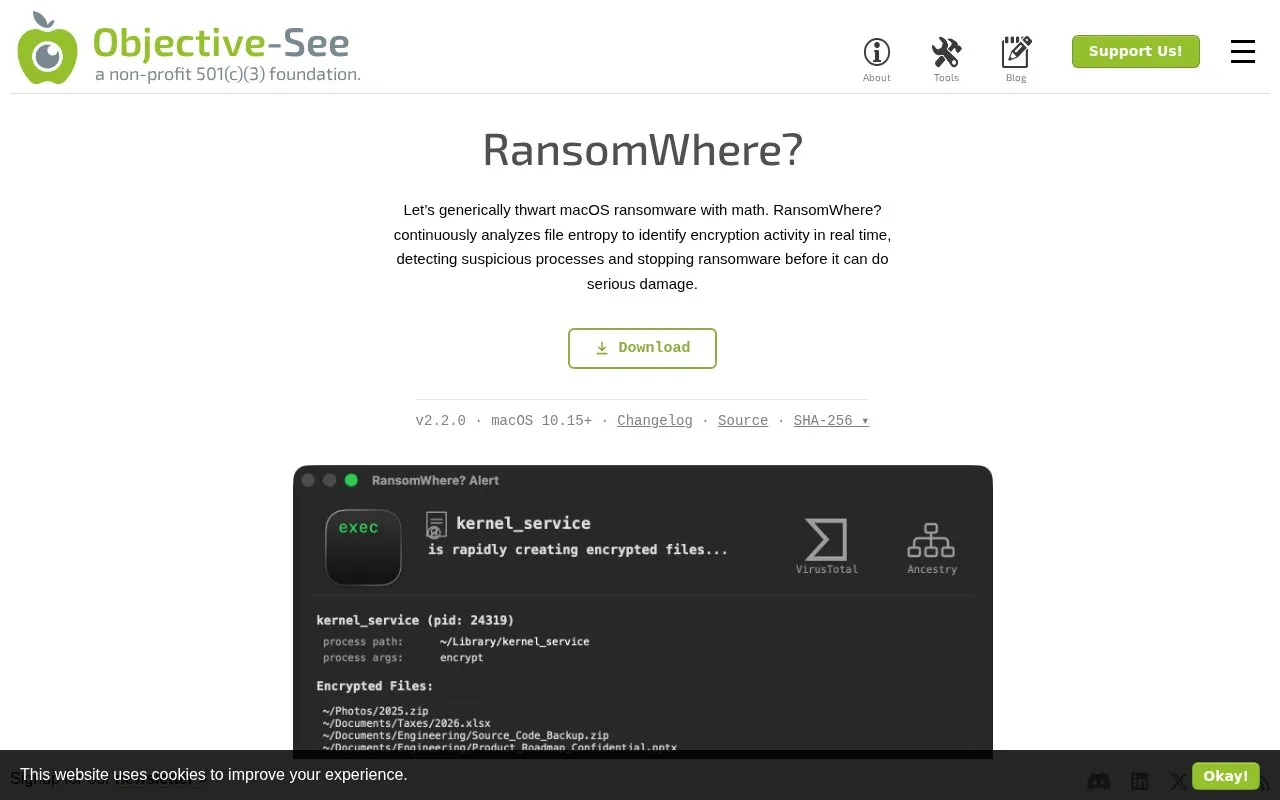
RansomWhere? is a macOS utility that monitors file encryption activity to detect possible ransomware. It looks for a behavior common to most ransomware, the rapid creation of encrypted files, rather than matching known ransomware samples. When an untrusted third-party process begins encrypting files, the utility suspends it and alerts the user. The user can then block the process, which terminates it, or allow it to continue, with an optional rule to allow it in the future.
The utility uses Apple's Endpoint Security framework, so it requires elevated system privileges and Full Disk Access, which the user must grant manually after installation. The source states that legitimate software can also trigger alerts, including encrypted messaging apps, browsers, and security tools. A Notarization Mode setting can be enabled to trust notarized and Mac App Store applications. The download is listed for macOS 10.15 and later.
Key features
- Monitors file entropy to identify encryption activity in real time
- Suspends suspicious third-party processes that rapidly create encrypted files
- Alerts show process details, code signing information, and process ancestry
- Alerts list the files a process was observed encrypting
- Rules window to view, add, and delete allow or block decisions
- Notarization Mode to trust notarized and Mac App Store applications
Best for: Mac users who want generic, behavior-based detection of possible ransomware activity and are willing to review alerts and grant system permissions.
Good for
- Detects a behavior common to most ransomware rather than relying only on known samples
- Gives the user a choice to block a process or allow it, with rules to remember the decision
- Alerts include code signing details and VirusTotal detections to help verify a process
Watch out for
- Legitimate software such as encrypted messaging apps, browsers, and antivirus tools can trigger alerts
- Requires elevated system privileges and manually granted Full Disk Access
- Download is listed for macOS 10.15 and later only
RansomWhere? at a glance
- Category
- Privacy & Security › Desktop & OS Privacy
- Type
- Website
- Pricing
- Not confirmed. Check the site
- Platforms
- macOS, Web
- Open source
- Not stated
- Last checked
- Oct 6, 2026 · Online when checked
- Listed
- Oct 5, 2026
RansomWhere? alternatives
Tools and sites you could use instead, ranked by how closely they match.

BlockBlock monitors for malware that installs itself persistently to run automatically after a restart or login.

gocryptfs provides file-based encryption through a mountable FUSE filesystem.

Tomb makes strong encryption easier for everyday use by creating locked folders that can be transported and hidden in a filesystem.
Free
24 alternatives
Tracee monitors runtime security events and supports forensic analysis with eBPF instrumentation.

Cryptsetup and LUKS provide open-source disk encryption, including full-disk encryption.
Popular in Desktop & OS Privacy
Well-known listings from the same topic.
wBlockapps.apple.com/app/wblock/id6746388723uBO Lite Safariapps.apple.com/app/ublock-origin-lite/id674534…Stayapps.apple.com/app/stay-for-safari/id1591620171Lockdown Privacylockdownprivacy.comTor Browsertorproject.orgFirejailfirejail.wordpress.com


RansomWhere? FAQ
What does it mean when RansomWhere? displays an alert?
The alert means a third-party process was observed rapidly creating encrypted files. The source notes that legitimate software may do this too, so the user should check the process's code signing information before choosing Allow or Block.
What happens if I block a process?
The current suspended instance of the process is terminated, and later launches of the process will fail. If Remember my decision is selected, a rule is created to keep the choice.
Why does RansomWhere? need Full Disk Access?
The source states that Apple requires Full Disk Access for applications that use the Endpoint Security framework, which RansomWhere? uses to monitor for the creation of encrypted files. The first time you install it, the app explains how to grant this permission manually.
Is something wrong or out of date?
Tell us and an editor will check it.
Own this website?
Claim this listing
Claim the listing and suggest updates yourself. An editor checks every claim first.